
If you’ve recently switched to eSIM or are thinking about it, this question has probably crossed your mind — can the same eSIM work on both your iPhone and Apple Watch? It sounds like it should be simple. One plan, two devices. But the reality is a little more nuanced than that, and this guide will walk you through everything you need to know.
Many Apple users wonder whether they can use the same eSIM on both their iPhone and Apple Watch. The answer depends on your mobile carrier and the type of Apple Watch you own. If you have a GPS + Cellular Apple Watch, most carriers allow the watch to share the same phone number as your iPhone through a service known as Number Sharing or MultiSIM.
Can i Use same eSIM on iPhone and Apple Watch? With this setup, your Apple Watch can make calls, send messages, and use mobile data even when your iPhone is not nearby. Although the watch uses its own eSIM profile, it is linked to the same mobile number and account as your iPhone. This provides a seamless experience across both devices.
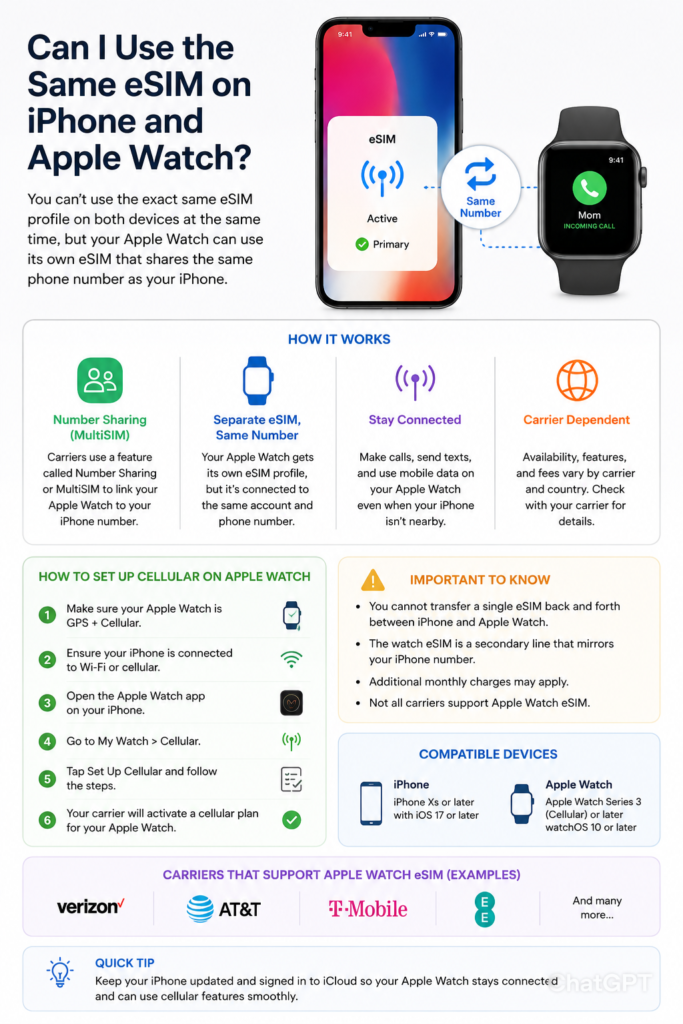
To use cellular service on your Apple Watch, you must have a compatible iPhone, an eligible cellular plan, and carrier support for Apple Watch eSIM activation. Setup is usually completed through the Apple Watch app on your iPhone, where you can add and activate your cellular plan.
Keep in mind that you cannot typically transfer a single eSIM profile directly between an iPhone and an Apple Watch at the same time. Instead, carriers provision a separate eSIM for the watch that is connected to the same account and phone number. Availability and features may vary depending on your carrier and country.
Before activating cellular service, check with your carrier to confirm support for Apple Watch eSIM plans and any additional monthly charges that may apply. This ensures that your iPhone and Apple Watch work together seamlessly while sharing the same mobile number.
Can i Use same eSIM on iPhone and Apple Watch? The Short Answer
No, you cannot use the exact same eSIM profile simultaneously on both your iPhone and Apple Watch. Each eSIM profile is tied to a specific device. However — and this is the important part — your Apple Watch can share your iPhone’s cellular plan through a feature called Apple Watch Cellular with Family Sharing or Number Sharing, depending on your carrier. So while the eSIM profiles are technically separate, they’re connected under the same phone number and plan.
Let’s unpack what that actually means in practice.
What Is an eSIM, and How Does It Work?
An eSIM (embedded SIM) is a digital version of a traditional SIM card. Instead of a physical chip you slot into your phone, an eSIM is built into the device and programmed remotely. Your carrier pushes your plan details directly to the device over the air.
Both modern iPhones (iPhone XS and later) and Apple Watch models (Series 3 and later with GPS + Cellular) support eSIM. But here’s the thing: each device has its own eSIM chip, and each chip holds its own activation profile. They’re not shared between devices.
Think of it like this: your iPhone and Apple Watch are like two separate lockers in the same building. They’re in the same complex (your carrier account), but each has its own key (eSIM profile). You can’t use one key for both lockers at the same time.
How Apple Watch Cellular Actually Works

When you set up cellular on your Apple Watch, your carrier assigns it a secondary line or a paired number that mirrors your iPhone’s number. This is sometimes called “NumberSync” or “One Number,” depending on the carrier.
Here’s what happens step by step:
- You pair your Apple Watch with your iPhone in the Watch app.
- You go to Watch app > Cellular > Set Up Cellular.
- Your carrier provisions a separate eSIM profile on the Watch.
- The Watch gets its own data connection but uses the same phone number as your iPhone.
- When someone calls your number, both devices ring. You can answer from either one.
So the connection is shared at the number level, not at the eSIM level. It’s a clever workaround that gives you the seamless experience of one number across two devices, even though under the hood, two separate eSIM profiles are active.
Carriers That Support Apple Watch Cellular

Not all carriers support Apple Watch cellular pairing, and even among those that do, the setup process can vary. In the US, major carriers like AT&T, T-Mobile, and Verizon all support it. In India, Airtel and Jio support Apple Watch cellular. Globally, you’ll want to check Apple’s carrier support page before assuming it’ll work.
A real-world example: Let’s say you’re on T-Mobile with an iPhone 15. You buy an Apple Watch Series 9 with GPS + Cellular. In the Watch app, you tap “Set Up Cellular,” and T-Mobile provisions a new eSIM on the Watch that shares your existing number. You now get charged a small monthly fee (usually $10–$15 in the US) for the Watch line, even though it’s the same number.
This is the standard way it works — not one eSIM split across two devices, but two eSIMs sharing one identity on the network.
Pros and Cons of Using Apple Watch Cellular with eSIM
Pros
You can leave your iPhone at home. This is the whole point. Once your Apple Watch has its own cellular connection, you can go for a run, head to the gym, or do a grocery run without carrying your phone. Calls, texts, and streaming music all work directly from the Watch.
Same phone number, zero confusion. Your contacts don’t need to know a different number for your Watch. When they call, both devices ring. When you reply from your Watch, it shows your regular number.
Works seamlessly with Apple ecosystem. Handoff works between iPhone and Watch. If you start a call on your Watch and walk back to your iPhone, you can continue it there.
No physical SIM needed. Because it’s eSIM-based, you’re not fussing with tiny SIM cards when setting up your Watch.
Useful for kids and elderly family members. If you add an Apple Watch to a Family Sharing plan, a family member can have their own cellular Watch line even without an iPhone. This is great for kids who need to stay reachable without carrying a phone.
Cons
Extra monthly cost. Carriers charge a separate fee for the Watch line. It’s typically $10–$15/month in the US. Over a year, that adds up.
Requires an active iPhone pairing. The Apple Watch cellular feature doesn’t work as a standalone device in most cases — you still need an iPhone to set it up and manage it. (Family Setup is an exception, but it has its own limitations.)
Not all carriers are supported. If you’re on a smaller carrier or a regional network, Apple Watch cellular might not be available at all.
eSIM profile isn’t transferable. If you get a new Apple Watch, you’ll need to go through the carrier setup process again. The eSIM from the old Watch doesn’t transfer to the new one — even if it’s the same carrier and plan.
Separate activation required each time. Every time you reset or replace your Apple Watch, you have to re-provision the eSIM. This can sometimes involve calling your carrier, which is an annoying extra step.
What About Using a Different eSIM Plan on Apple Watch?
Some people ask whether they can put a completely separate eSIM plan on their Apple Watch — different number, different carrier, different plan. This is technically possible on some Apple Watch models, depending on the carrier and region.
For example, if you travel internationally, you might want to put a local eSIM on your Watch for data. However, carrier lock restrictions can limit this. The Apple Watch’s eSIM is often locked to the carrier it was activated with, similar to how some iPhones are carrier-locked.
If you want full flexibility with carrier choice, make sure you buy an unlocked Apple Watch — this gives you more freedom to switch carriers or use travel eSIMs.
Can You Transfer an eSIM from iPhone to Apple Watch?
No, you cannot take an eSIM profile from your iPhone and move it onto your Apple Watch. The two are separate processes:
- Your iPhone’s eSIM is provisioned directly from your carrier onto the iPhone.
- Your Apple Watch’s eSIM is provisioned separately, usually through the Watch app, under a paired/shared number.
They’re both managed by your carrier under your account, but they’re independent activations. There’s no “export eSIM” or “share eSIM” function in iOS that would let you copy the profile across.
Setting Up eSIM on Apple Watch: Step-by-Step
If you’re ready to get your Apple Watch set up with its own cellular connection, here’s how to do it:
- Make sure your Watch supports cellular. Look for “GPS + Cellular” on the box or in Settings > General > About on the Watch itself.
- Open the Apple Watch app on your paired iPhone.
- Tap “Cellular” in the Watch app.
- Tap “Set Up Cellular.” Your iPhone will connect to your carrier’s system.
- Follow the on-screen prompts. You may need to agree to a new monthly charge for the Watch line.
- Wait for activation. This usually takes a few minutes. Sometimes it takes up to an hour if the carrier’s system is slow.
- Test it. Put your iPhone in another room, then try making a call or opening a streaming app on your Watch. If it works, you’re good to go.
If activation fails, the most common fix is to restart both devices and try again. If that doesn’t work, calling your carrier’s support line is often faster than trying to troubleshoot through the app.
When Things Go Wrong: Common Issues
“Set Up Cellular” option is missing. This usually means your carrier doesn’t support Apple Watch cellular, or your Watch doesn’t have cellular capability (GPS-only model).
eSIM activation stuck or failing. Carrier server issues are the most common cause. Try again after an hour, or restart the Watch and iPhone.
Watch shows “No Service” even after activation. Check that the Watch’s cellular toggle is on (swipe up on Watch face > tap the cellular icon until it turns green). Also make sure you’re not in a low-coverage area.
Calls aren’t ringing on Watch. Go to iPhone Settings > Phone > Calls on Other Devices and make sure your Watch is listed and enabled.
Frequently Asked Questions
Can I use my Apple Watch cellular without my iPhone nearby?
Yes. Once the eSIM is set up and active, your Watch can make calls, send messages, and stream data entirely on its own. Your iPhone doesn’t need to be nearby or even turned on.
Does using cellular on Apple Watch drain the battery faster?
Yes, noticeably. Using LTE on the Watch can reduce battery life to around 6–8 hours depending on usage, compared to 18+ hours on a typical day with Bluetooth and no cellular.
Can two Apple Watches share the same eSIM plan as one iPhone?
No. Each Apple Watch needs its own eSIM activation, and each one typically carries a separate monthly charge on your carrier account.
What happens to my Apple Watch eSIM if I switch to a new iPhone?
When you pair a new iPhone with your Apple Watch, the Watch’s cellular plan stays intact. The eSIM on the Watch doesn’t change — it remains active on the same carrier plan.
Can I use Apple Watch cellular on Wi-Fi calling instead of eSIM?
Yes and no. Wi-Fi calling is separate and requires your iPhone to be present. The eSIM cellular on Watch is for when you’re completely independent of your iPhone.
Is there a way to use one eSIM across both devices to save money?
Not in a way that bypasses the extra carrier charge. The shared-number setup always results in two separate eSIM activations, and most carriers charge for the Watch line separately.
Can I use a travel eSIM on my Apple Watch abroad?
Potentially yes, if your Watch is unlocked and the travel eSIM provider supports Apple Watch. This is less common, but options like Airalo or local carrier eSIMs sometimes work. Check compatibility before purchasing.
What if my carrier doesn’t support Apple Watch cellular?
You’ll only be able to use your Watch with Bluetooth when your iPhone is nearby. Cellular features simply won’t be available. Consider switching carriers or checking if a carrier upgrade is available in your area.
Will Apple Watch eSIM work with prepaid plans?
It depends on the carrier. Most major postpaid plans support it, but prepaid plans often don’t include Apple Watch pairing as an option. Check with your specific carrier.
Does Apple Watch use eSIM or nano-SIM?
Apple Watch uses eSIM exclusively — there’s no slot for a physical SIM card. The eSIM is embedded in the device at the factory.
Conclusion
To wrap it up: you can’t use the same eSIM profile on both your iPhone and Apple Watch at the same time. Each device needs its own eSIM activation. But through your carrier’s number sharing setup, both devices can operate under the same phone number — so from your contacts’ perspective, nothing changes. Calls, texts, and even iMessage work across both devices seamlessly.
The setup process is straightforward if your carrier supports it, and once it’s running, it really does feel like magic — especially when you realize you can head out on a run, leave your phone behind, and still be fully reachable.
The main downsides are the extra monthly cost and some activation friction, but for anyone who wants their Apple Watch to be genuinely independent, it’s absolutely worth it.

