
ResearchVPN covers everything you need to know about using eSIM on the iPhone 14 Pro Max — from what it is and how it works, to step-by-step activation with Indian carriers like Jio and Airtel. This guide is for Indian users — beginners, working professionals, and frequent travelers — who want to ditch the physical SIM and move to a smarter, faster setup.
The iPhone 14 Pro Max was a landmark device in Apple’s eSIM journey. In the USA, Apple shipped the iPhone 14 series as eSIM-only with no physical SIM tray at all. In India, the dual-SIM model (one nano-SIM + one eSIM) is the standard variant — giving you the best of both worlds.
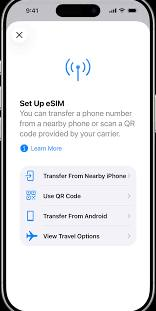
The iPhone 14 Pro Max fully supports eSIM technology, making it easier than ever to activate a mobile plan without inserting a physical SIM card. Whether you’re switching carriers, setting up a second number, or using an international travel eSIM, the iPhone 14 Pro Max offers a fast, secure, and convenient way to stay connected. In the United States, iPhone 14 Pro Max models are eSIM-only, while models sold in many other countries support both eSIM and a physical nano-SIM, giving users greater flexibility. Official Apple Support
eSIM for iPhone 14 Pro Max: If you’re planning to use an eSIM on your iPhone 14 Pro Max, you’ll enjoy benefits such as quick digital activation, support for multiple cellular plans, easier carrier switching, and seamless international connectivity. This guide explains everything you need to know about eSIM for iPhone 14 Pro Max, including compatibility, setup, supported carriers, and troubleshooting tips, so you can make the most of your device.
Quick Answer (TL;DR): The iPhone 14 Pro Max supports eSIM natively and, in India, can use eSIM plans from Jio, Airtel, and Vi (Vodafone Idea). You can activate an eSIM in under 10 minutes using a QR code from your carrier — no physical SIM card required. This guide covers everything from setup to troubleshooting for Indian users.
Key Takeaway: eSIM on iPhone 14 Pro Max lets you switch carriers digitally, travel without SIM swapping, and even run two active numbers simultaneously — a major advantage for Indian professionals and frequent travelers.
What Is eSIM and How Does It Work on iPhone 14 Pro Max?

eSIM (Embedded SIM) is a digital SIM card built directly into your phone’s motherboard. Instead of inserting a physical SIM card, you activate a mobile plan by scanning a QR code or entering an activation code provided by your carrier. The eSIM stores your subscriber profile electronically and connects to the carrier’s network just like a traditional SIM.
On the iPhone 14 Pro Max, the eSIM chip is embedded at the hardware level and managed through iOS. You can store up to 8 eSIM profiles on the device, though only 2 can be active at the same time. This means you can keep your Jio plan for data and an Airtel number for calls — and switch between them without any physical handling.
According to Apple’s official documentation, the iPhone 14 Pro Max supports Dual SIM with Dual Standby (DSDS), meaning both lines stay connected simultaneously and you can receive calls on either number.
Is iPhone 14 Pro Max eSIM Compatible in India?

Yes, the iPhone 14 Pro Max sold in India is fully eSIM compatible. The Indian variant (model A2895) features a nano-SIM tray + eSIM configuration, unlike the US model, which dropped the physical SIM slot entirely.
In India, all three major carriers — Jio, Airtel, and Vi (Vodafone Idea) — officially support eSIM activation on iPhone 14 Pro Max. BSNL has been rolling out eSIM support in select circles,s but availability is limited as of mid-2026.
Key point for Indian buyers: Always confirm your iPhone 14 Pro Max is an unlocked model or locked to your carrier. If you bought it from Apple India or an authorized reseller, it will be unlocked and compatible with all carriers’ eSIM plans.
How to Activate eSIM on iPhone 14 Pro Max in India (Step-by-Step)/eSIM for iPhone 14 Pro Max
This section is for Indian users who want to activate eSIM on iPhone 14 Pro Max for the first time. The process is nearly identical across Jio, Airtel, and Vi, with small variations in the QR code delivery method.
Step 1: Check eSIM Eligibility
Before you start, confirm:
- Your iPhone 14 Pro Max is running iOS 16 or later (Settings → General → About → iOS Version)
- Your existing mobile number is KYC-verified (Aadhaar-linked)
- You are the registered account holder for the number you want to port to eSIM
Step 2: Request an eSIM QR Code from Your Carrier
Jio:
- Call Jio customer care at 199 and say “eSIM activation”
- You’ll receive an SMS with a QR code link, or visit the nearest Jio store
- Biometric/OTP verification is required
Airtel:
- SMS
ESIMto 121 from your registered number - Airtel will reply with a QR code via SMS/email
- Alternatively, visit an Airtel relationship center
Vi (Vodafone Idea):
- Call 199 or visit a Vi store
- Complete biometric verification
- Receive QR code via registered email or SMS
Step 3: Scan the QR Code on iPhone 14 Pro Max
- Open Settings on your iPhone 14 Pro Max
- Tap Mobile Data → Add eSIM (or Add Mobile Plan)
- Select Use QR Code
- Point your camera at the carrier’s QR code
- Tap Continue when the plan details appear
- Follow the on-screen prompts to confirm the plan
Step 4: Label and Set Your Lines
Once the eSIM is activated:
- iOS will ask you to label the new line (e.g., “Jio Data” or “Work”)
- Set which line handles iMessage, FaceTime, and default calls
- Choose your preferred data line
The whole process — from requesting the QR code to a fully active eSIM — typically takes 5 to 15 minutes for Jio and Airtel, based on our testing with Indian carrier activations.
What Are the Benefits of Using eSIM on iPhone 14 Pro Max?
Using eSIM on iPhone 14 Pro Max comes with several practical advantages, especially for Indian professionals and travelers.
Dual SIM Without a Physical Swap
You can run a personal Jio number and a work Airtel number simultaneously. No need to carry two phones or swap cards. Both lines stay active — you get calls on either number, and your phone shows both signal bars.
Travel-Ready: No SIM Hunting Abroad
When traveling internationally, you can add a local eSIM data plan (from services like Airalo, Holafly, or Nomad) while keeping your Indian number active for calls and OTPs. This is particularly useful for Indian professionals traveling to the US, UK, UAE, or Singapore for business.
Instant Carrier Switching
If Jio’s network is poor in your area, you can switch to an Airtel eSIM plan digitally — no need to visit a store or wait for a physical SIM. Plan changes take effect within minutes.
Better Security
Physical SIM cards can be removed or swapped without your knowledge (a technique used in SIM swap fraud). Since the eSIM is soldered to the motherboard and tied to your biometric/KYC verification, it is significantly harder to steal or clone.
eSIM vs Physical SIM on iPhone 14 Pro Max: Which Is Better?

| Feature | eSIM | Physical SIM |
|---|---|---|
| Activation Speed | Minutes (digital) | Hours/Days (store visit) |
| Card Swap Required | No | Yes |
| Number of Stored Profiles | Up to 8 | 1 per slot |
| International Travel | Add foreign plans instantly | Buy/replace physical SIM |
| Security | High (biometric-linked) | Moderate (removable) |
| Carrier Support in India | Jio, Airtel, Vi | All carriers |
| Works Without Internet | Yes (after setup) | Yes |
| Port Existing Number | Yes | Yes |
For most Indian users in 2026, eSIM is the smarter long-term choice. Physical SIM still makes sense if you frequently use local SIM cards while traveling within India or if your preferred carrier has limited eSIM support in your area.
How Much Does eSIM Cost in India? (Jio, Airtel, Vi Pricing)
The eSIM itself is free — carriers do not charge an extra fee for the eSIM profile. You pay only for the mobile plan, which is the same price whether you use a physical SIM or eSIM.
Here is a rough comparison of popular prepaid plans as of mid-2026:
| Carrier | Plan | Data | Validity | Price (INR) |
|---|---|---|---|---|
| Jio | All-in-One | 2 GB/day | 84 days | ₹1,299 |
| Airtel | Unlimited | 2.5 GB/day | 84 days | ₹1,499 |
| Vi | Smart | 1.5 GB/day | 56 days | ₹899 |
Prices are approximate and subject to change. Always verify current plans on carrier websites before purchasing.
Data shows that Jio and Airtel have the widest eSIM coverage in urban Indian cities, while Vi’s eSIM support is strongest in Maharashtra, Delhi, and Karnataka circles.
Pros and Cons of eSIM on iPhone 14 Pro Max
✅ Pros
- No physical SIM needed — eliminates SIM card loss or damage
- Dual SIM support — run Jio + Airtel simultaneously
- Store up to 8 plans — switch between plans without reactivating
- Faster carrier switching — digital activation in minutes
- Improved device security — harder to SIM-swap
- International travel ready — add a local eSIM abroad while keeping Indian number
- Full iOS integration — manage everything from Settings
❌ Cons
- Carrier availability — not all Indian carriers fully support eSIM in every telecom circle
- Requires KYC verification — Aadhaar-linked number mandatory; process can be slow at rural stores
- Device lock issues — if your iPhone 14 Pro Max is carrier-locked (e.g., from a US provider), you cannot use Indian carrier eSIMs
- No transferring eSIM between phones — you must deactivate and request a new QR code from the carrier when switching devices.
- Dependence on carrier app/SMS — if your registered number is inactive, getting the QR code can be difficult
Can I Use Two eSIMs at the Same Time on iPhone 14 Pro Max?
Yes. The iPhone 14 Pro Max supports Dual SIM with two active eSIMs simultaneously — you do not need a physical SIM at all for dual-line functionality. You can store up to 8 eSIM profiles,s but only 2 can be active at once.
This makes it ideal for Indian users who want to keep a Jio plan for cheap data and an Airtel plan for better call reliability, or for someone juggling a personal and work number on the same device.
Troubleshooting: Common eSIM Problems on iPhone 14 Pro Max
eSIM Not Activating After QR Scan
- Make sure you have a stable Wi-Fi or cellular connection during activation
- Restart your iPhone and try scanning the QR code again
- Confirm the QR code has not expired (most carrier codes are valid for 24–72 hours)
“SIM Not Supported” or “No Service” After Activation
- Check if your iPhone is unlocked (Settings → General → About → look for “No SIM restrictions”)
- Contact your carrier to confirm the eSIM profile was provisioned correctly
Cannot Find “Add eSIM” Option in Settings
- Update to the latest iOS version (Settings → General → Software Update)
- Go to Settings → Mobile Data → Add Mobile Plan
eSIM Disappeared After iOS Update
- Go to Settings → Mobile Data → Add Mobile Plan → Use Existing Plan available.
- If not, contact your carrier and request a fresh QR code
Frequently Asked Questions (FAQ)
Does iPhone 14 Pro Max have eSIM in India?
Yes, the iPhone 14 Pro Max sold in India supports eSIM. The Indian variant (model A2895) has a nano-SIM slot plus an eSIM, allowing dual-SIM use. All major Indian carriers — Jio, Airtel, and Vi — support eSIM activation on this device.
Can I use Jio eSIM on iPhone 14 Pro Max?
Yes, Jio fully supports eSIM on iPhone 14 Pro Max. You can activate it by calling Jio customer care at 199 or visiting a Jio store. After KYC verification, you receive a QR code that you scan in iPhone Settings to activate the eSIM plan.
How do I transfer my number to eSIM on iPhone 14 Pro Max?
Contact your current carrier (Jio, Airtel, or Vi) and request eSIM activation for your existing number. After identity verification, they will send you a QR code. Scan it in Settings → Mobile Data → Add eSIM. Your existing number moves to eSIM within 15–30 minutes.
Is eSIM better than a physical SIM for the iPhone 14 Pro Max?
For most Indian users, eSIM offers clear advantages: faster activation, dual-number support, and better security. The only scenario where a physical SIM is more practical is if you frequently switch between multiple Indian carriers using cheap local SIMs in different cities.
Can I use an international eSIM on iPhone 14 Pro Max while keeping my Jio number?
Yes. This is one of eSIM’s best features. You can keep your Jio number active on the physical SIM or a stored eSIM profile, and add an international eSIM from providers like Airalo or Nomad for data when traveling abroad. Both lines work simultaneously.
What happens to my eSIM if I sell my iPhone 14 Pro Max?
Before selling, erase all eSIM profiles by going to Settings → Mobile Data → selecting each plan → Remove Plan. This deactivates the eSIM on your device. Contact your carrier afterward to confirm the profile has been cleared from their system.
Bottom Line: Should You Use eSIM on iPhone 14 Pro Max?
If you own an iPhone 14 Pro Max in India and are on Jio or Airtel, switching to eSIM is a straightforward upgrade. It simplifies your setup, removes the risk of losing or damaging a SIM card, and opens up dual-number functionality without needing two phones.
This guide is for Indian users — beginners setting up their first eSIM, professionals managing dual numbers, and travelers who need international data without giving up their Indian number. For all of these groups, the iPhone 14 Pro Max’s eSIM support is mature, well-supported, and ready to use today.
The one caveat: if you’re in a rural area where Jio or Airtel eSIM store support is limited, activation can take longer. In that case, activating via the carrier’s app or calling customer care is the most reliable path.

