
So your old phone is gone, dead, or maybe sitting in a drawer with a cracked screen that won’t turn on anymore, and now you’re staring at a shiny new phone wondering how on earth you’re supposed to get your eSIM working on it. Good news first: it’s very doable. The not-so-good news is that it’s a little more fiddly than transferring an eSIM the “normal” way, where you have both phones next to each other.
This guide walks you through exactly what to do, why it works the way it does, and what to watch out for, whether you’re on Jio, Airtel, Vodafone Idea, giffgaff, or pretty much any other carrier that supports eSIM.
Transfer eSIM: Getting a new phone is exciting, but transferring an eSIM can be challenging if your old device is lost, broken, stolen, or no longer works. The good news is that you can still move your eSIM to your new phone without having access to the old one. Most mobile carriers allow you to reactivate your eSIM by verifying your identity and issuing a new activation QR code or activation details.
In this guide, you’ll learn how to transfer an eSIM to a new phone without the old phone, what you need before starting, and the exact steps for both iPhone and Android devices. We’ll also cover common problems, carrier requirements, and practical tips to make the process quick and hassle-free.
- Check now: Does my iPhone Support eSIM?
- Does the iPhone 12 Pro Support eSIM
- How to Delete/remove eSIM Profile on iPhone 16
Who this guide is for
This article is written for anyone who:
- Lost their old phone, had it stolen, or it’s broken beyond use
- Sold or gave away their old phone before remembering to move the eSIM
- Wants to set up a new phone but can’t unlock the old one for the transfer
- Is confused about the difference between “eSIM transfer” and “eSIM reissue”
If any of that sounds like your situation, you’re in the right place.
First, understand what actually happens when you transfer an eSIM

An eSIM isn’t a physical chip you can pop out and slot into another phone. It’s a digital profile, basically a small piece of data tied to your phone number, that your carrier issues and can also cancel or reissue at will. This matters a lot here, because it means the transfer doesn’t strictly need your old device at all. Your carrier is the one who actually controls the eSIM, not your phone.
That’s the whole reason this process is possible without the old phone. If eSIMs worked like physical SIM cards, you’d genuinely be stuck. Since they don’t, your carrier can simply deactivate the eSIM on record and issue a brand new one to your new device.
The two ways to move an eSIM
Before jumping into the without-old-phone method, it helps to know there are two very different routes:
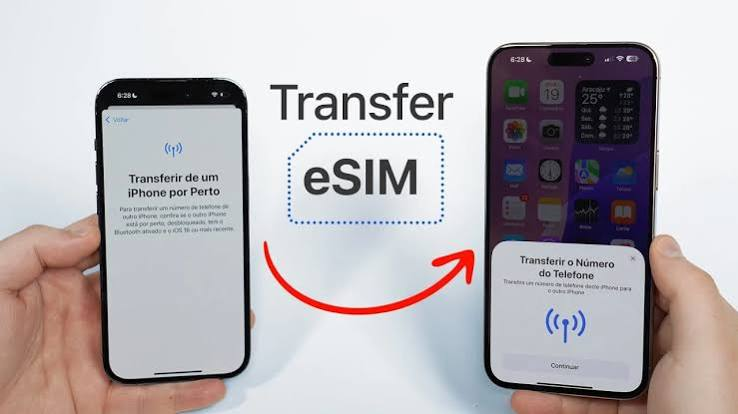
- Device-to-device transfer – This is what Apple’s “Transfer from Nearby iPhone” feature or a QR scan between two phones does. Both devices need to be on and near each other. This is not your situation, so we’ll skip past it quickly.
- Carrier-assisted reissue – This is the one you want. You contact your carrier (through SMS, app, or website), confirm you’re the account holder, and they generate a fresh eSIM QR code or profile for your new phone. The old eSIM gets killed off in the process.
Almost every major carrier, including Jio, Airtel, Vi, and giffgaff, uses some version of the second method for exactly this situation.
Step-by-step: Transfer eSIM-Transferring an eSIM without the old phone

The exact screens will differ depending on your carrier, but the overall flow is remarkably similar everywhere. Here’s the general path.
Step 1: Check that your new phone actually supports eSIM
This sounds obvious, but it trips people up constantly. Not every phone, even recent ones, supports eSIM, and some regional variants of the same phone model (especially certain Android phones sold in India) don’t have an eSIM slot at all. Check your phone’s settings under Mobile Network or Cellular, or just search “[your phone model] eSIM support” before doing anything else.
Step 2: Get in touch with your carrier using an alternate route
Since you don’t have your old phone, you’ll need another way to prove it’s really you. Most carriers offer one of these:
- An SMS-based request sent from a different phone using your registered mobile number as reference
- Their mobile app, logged in with your account credentials
- A request placed through their website using OTP verification sent to your number (which can often still be received via the eSIM if it’s not fully deactivated, or via a temporary physical SIM if the network offers a fallback)
- Calling customer care directly and verifying your identity manually
For example, with Jio, you (or someone helping you) can send an SMS in the format GETESIM followed by your EID and IMEI number to the designated shortcode, then confirm consent with a follow-up reply. Airtel uses a similar SMS-based flow where you text your registered email ID to a specific number, then approve the transfer request over SMS and a callback confirmation. If you’re on a carrier like giffgaff, the community forums show plenty of people in exactly this spot, phone lost or broken, using the app or website login to trigger the eSIM swap, followed by a quick identity check sent by text.
Step 3: Verify your identity
Because you’re not sitting there with the old phone in hand, carriers will lean harder on identity verification. Expect to confirm things like your registered email address, date of birth, last recharge amount, or an OTP sent to an alternate number. Keep your ID proof and account details handy since some carriers ask for a copy of your ID if the automated process fails.
Step 4: Get your new eSIM QR code or activation link

Once your identity checks out, the carrier deactivates the old eSIM (this part is irreversible, so make sure your new phone is genuinely ready) and sends a fresh QR code, usually to your registered email address, sometimes as a downloadable link inside the carrier’s app.
Step 5: Scan or install the new eSIM on your new phone
Go to your new phone’s Settings, then Mobile Network or Cellular, then “Add eSIM” or “Add Mobile Plan.” Scan the QR code with your phone’s camera, or tap the activation link if you received one. Follow the on-screen prompts, and within a few minutes to a couple of hours (this varies quite a bit by carrier), your number should be live on the new phone.
Step 6: Test everything before you relax
Make a call, send a text, and check mobile data. Don’t assume it worked just because the app says “activated.” A quick real-world test saves you a frustrating call to customer care later.
A practical example
Say Priya’s phone was stolen while she was traveling. She has a new phone in hand but obviously can’t access the old one. Here’s roughly what her path looked like:
- She borrowed a friend’s phone to call her carrier’s customer care number.
- After confirming her identity with her registered email and date of birth, the agent flagged her old eSIM for deactivation.
- She received a new QR code by email within about 20 minutes.
- She opened that email on her new phone, scanned the QR code straight off the screen using her phone’s camera, and her number was active again in under an hour.
The whole thing took less than a day, and she didn’t need to visit a store. Not every case is this smooth; some carriers still expect a store visit if automated verification fails, but this is the outcome you’re aiming for.
Pros and cons of this method
Pros
- You don’t need the old phone at all, which is the entire point
- Most carriers now offer app, SMS, or web-based flows instead of forcing a store visit
- It’s usually free; carriers rarely charge for a straightforward eSIM reissue
- Your number and existing plan generally carry over automatically
- It works even if the old phone is lost, stolen, sold, or simply broken
Cons
- You’ll likely lose SMS and calls temporarily on your old number while the transfer processes, sometimes for a few hours, occasionally up to 24 hours.
- Identity verification can be stricter and slower, especially if you can’t receive an OTP anywhere.e
- If your registered email is outdated or you no longer have access to it, this gets a lot more complicated and may require an in-person visit.
- Some regional carriers still don’t support this fully online and require a store visit for identity proof.
- If you accidentally confirm deletion before your new eSIM is ready, there’s no way to undo it.
Common mistakes people make
A few things worth flagging because they come up again and again in carrier forums and support threads:
- Confirming the eSIM deletion too early. Once you approve the transfer, the old eSIM is gone for good. Don’t do this until your new phone is fully ready to receive the new profile.
- Using an outdated registered email. If your email on file is one you no longer check, update it with your carrier before starting the process, if at all possible.
- Assuming the process is instant. Some carriers process this within minutes; others take a couple of hours. Don’t panic if it’s not live the second you scan the QR code.
- Not checking eSIM compatibility on the new phone first. This causes unnecessary back-and-forth with customer care.
- Skipping the identity verification step and expecting the carrier to “just trust you.” They won’t, and honestly, that’s a good thing for security.
What if the automated process doesn’t work?
Sometimes carriers can’t verify your identity remotely, especially if your registered details are outdated or your account has recent unusual activity flagged for fraud protection. In that case, your options are:
- Visiting a physical store or franchise outlet with valid ID proof
- Asking a family member on the same account or plan to assist with verification
- Requesting a callback from customer care and completing extra verification steps over the phone
This is more common than you’d think, and it’s not a sign you’ve done something wrong. Carriers are simply being cautious since eSIM reissue is a common target for SIM-swap fraud.
A quick word on security
Since eSIM transfers hinge on identity verification rather than physical possession of a SIM card, this process is also a favorite target for scammers attempting SIM-swap fraud. Never share OTPs, QR codes, or account PINs with anyone claiming to be from your carrier over an unsolicited call or message. Legitimate carrier verification will never ask you to read out an OTP to “confirm” your identity over a call you didn’t initiate.
FAQs
Can I transfer my eSIM to a new phone if my old phone is completely dead?
Yes. Since the eSIM profile lives with your carrier rather than on the physical device, a dead, lost, or stolen phone doesn’t block the transfer. You’ll just need to verify your identity through an alternate method.
Will I lose my phone number during this process?
No, your number stays with your account, not your device. Once the new eSIM is activated, your existing number, balance, and plan should carry over as usual.
How long does the transfer usually take?
It ranges from around 20 minutes to a couple of hours for most carriers, though some processes note up to 24 hours for full service restoration, particularly for SMS.
Do I need my old phone’s IMEI number?
Sometimes, yes, particularly for carriers like Jio, which ask for your device’s IMEI as part of the SMS-based request. If you don’t have it, check your purchase invoice or original packaging, since the IMEI is usually printed there too.
Is there a fee for transferring an eSIM without the old phone?
Generally no. Most carriers treat this as a standard part of customer support and don’t charge for eSIM reissue, though it’s worth double-checking with your specific provider.
What if I don’t have access to my registered email either?
This is where things get trickier. You’ll likely need to visit a store in person with valid ID to get things sorted, since most digital verification methods rely on either your registered number or email.
Can I do this transfer between different phone brands, like Android to iPhone?
Yes. Since the transfer is carrier-driven rather than tied to Apple’s or Google’s ecosystems, it works across brands. Jio, for instance, explicitly supports moving an eSIM between Android and iPhone in either direction.
What happens to my old eSIM once the new one is activated?
It gets deactivated and can no longer be used. This is permanent, so make sure your new phone is genuinely ready before confirming the transfer.
Conclsion
Losing access to your old phone feels like it should complicate an eSIM transfer, but it really doesn’t have to. The entire system is built around your carrier account, not your device, which means as long as you can verify who you are, you can get your number running on a new phone without ever touching the old one again. Keep your registered email and phone number up to date, be patient with the verification step, and you’ll likely have everything back up and running the same day.

