
The best AI tools for data cleaning in 2026 are Ataccama ONE for enterprise governance, Alteryx One for no-code self-service prep, Energent.ai for unstructured PDFs and scans, Querri for messy spreadsheets, and OpenRefine as the top free option — each built for a different data-quality workload rather than one tool fitting every team.

Data scientists still spend roughly 60–80% of their working hours cleaning data instead of analyzing it, and that bottleneck has only grown as unstructured formats like PDFs, scanned forms, and web-scraped pages now make up the majority of enterprise data. AI data cleaning software closes that gap by recognizing patterns, suggesting fixes, and executing transformations from plain-language commands instead of hand-written rules. This guide ranks the nine AI tools for data cleaning worth using in 2026, based on automation depth, accuracy, governance features, and real-world fit.
Check now – Best AI Tools for Data Analysis in 2026 and Best AI Tools for Research Data Analysis 2026
What Are the Best AI Tools for Data Cleaning in 2026?
The best AI data cleaning tools in 2026 span enterprise governance platforms, no-code preparation tools, and free options. Ataccama ONE leads for governed enterprise quality, Alteryx One leads for self-service prep, Energent.ai leads for unstructured documents, and OpenRefine remains the strongest free, open-source choice.
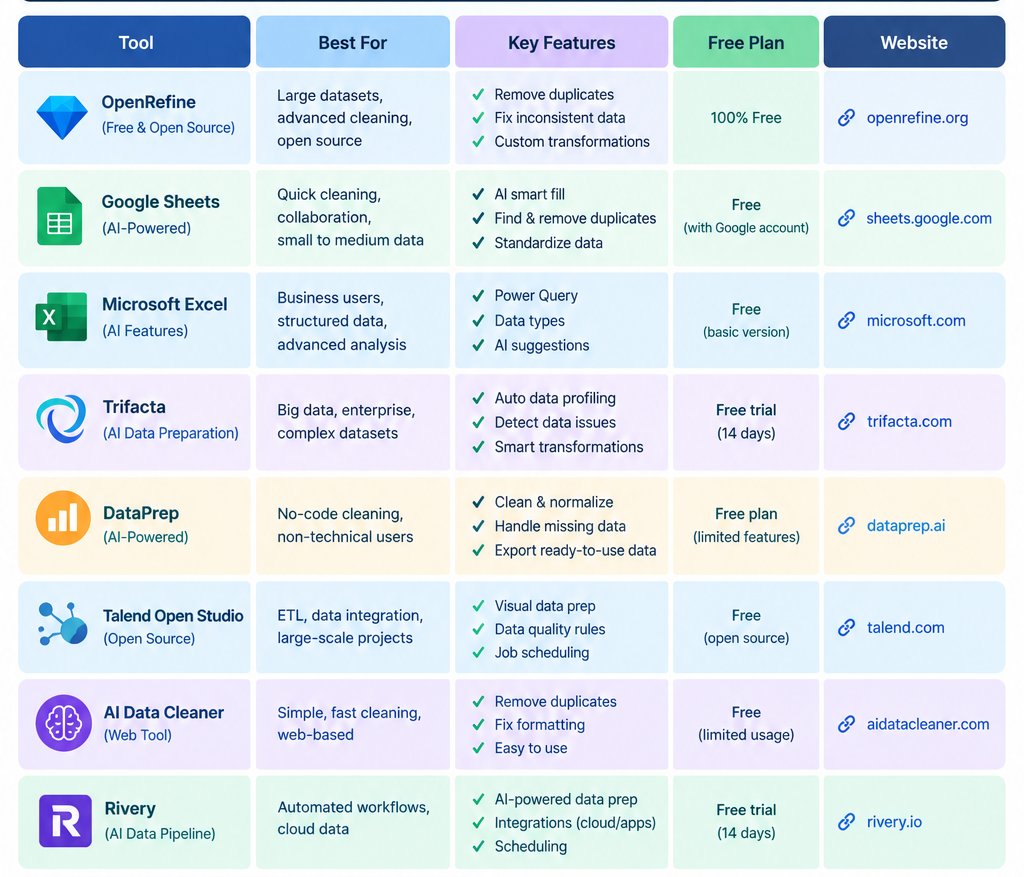
- Ataccama ONE — best for enterprise data governance and master data management
- Alteryx One (Designer Cloud, formerly Trifacta) — best for no-code, self-service data prep at scale
- Energent.ai — best for cleaning unstructured PDFs, scans, and web pages
- Querri — best for business users cleaning messy Excel and CRM exports
- OpenRefine — best free, open-source data cleaning tool
- Talend Data Fabric (Qlik) — best for hybrid engineering and business self-service
- Excel Copilot + Power Query (Microsoft) — best for cleaning data inside Excel and Power BI
- WinPure / Melissa Clean Suite — best for contact, address, and duplicate-record cleaning
- MonkeyLearn — best for developers needing an API to clean and classify text data
Quick-Reference Comparison Table
| Tool | Best For | Deployment | Coding Required | Pricing Model |
|---|---|---|---|---|
| Ataccama ONE | Enterprise governance & MDM | Cloud/hybrid | No (low-code) | Custom enterprise quote |
| Alteryx One | No-code prep at scale | Cloud | No | Per-seat, tiered |
| Energent.ai | Unstructured docs (PDF/scans) | Cloud | No | Usage-based |
| Querri | Messy Excel/CRM cleanup | Cloud | No | Subscription |
| OpenRefine | Free, local data cleaning | Local desktop | No | Free/open source |
| Talend Data Fabric | Hybrid engineering + business prep | Cloud / on-prem | Optional | Custom enterprise quote |
| Excel Copilot + Power Query | In-app Excel/Power BI cleaning | Cloud/desktop | No | Microsoft 365 + Copilot add-on |
| WinPure / Melissa | Contact & address matching | Cloud / on-prem | No | Per-record / subscription |
| MonkeyLearn | API text classification & cleaning | Cloud (API) | Yes (developer integration) | Usage-based API pricing |
How Do AI Data Cleaning Tools Differ From Traditional Data Cleaning Software?
AI data cleaning tools differ from traditional software by learning patterns instead of following fixed rules. They use machine learning and NLP to detect anomalies, suggest fixes, and execute transformations from natural-language prompts, while traditional tools require analysts to manually write and maintain every validation rule.
- Pattern recognition over hard-coded rules — AI tools flag anomalies (a ZIP code that doesn’t match a state, a duplicate customer under two spellings) without a human writing that rule first.
- Natural-language commands — typing “standardize date formats” or “remove duplicate rows” replaces custom scripts or SQL.
- Continuous monitoring — modern platforms re-check data quality on a schedule and alert teams before bad data reaches a dashboard or model, instead of relying on one-time batch cleanups.
- Unstructured-data support — AI tools increasingly extract and normalize PDFs, scanned documents, and free-text fields, a category traditional spreadsheet tools can’t process at all.
Which AI Tool Is Best for Enterprise Data Governance and Data Quality at Scale?
Ataccama ONE is the best AI tool for enterprise data governance. It unifies profiling, cleansing, cataloging, and master data management in one platform, and its ONE AI Agent recommends cleansing rules and monitors quality continuously across hybrid and multi-cloud environments — making it a repeat Leader in Gartner’s Magic Quadrant for Augmented Data Quality Solutions.
Key features:
- ONE AI Agent auto-recommends cleansing rules and explains data reliability across large data estates
- Native connectors to AWS, Azure, Google Cloud, Databricks, and Snowflake
- Multidomain master data management (MDM) with AI-based matching for customer, product, and supplier records
- Built-in data lineage, cataloging, and trust scoring
Pros
- Named a Leader in Gartner’s Magic Quadrant for Augmented Data Quality Solutions for five consecutive years
- End-to-end governance rather than point-in-time cleaning
- Strong fit for regulated industries like finance, insurance, and healthcare
Cons
- Steeper learning curve for smaller teams
- Sales-led, custom pricing with no self-serve tier
- More platform than needed for a single one-off file cleanup
Best for: mid-size to large enterprises needing governed, auditable data quality across many connected systems.
[Check out Actical – Gartner Magic Quadrant for Augmented Data Quality Solutions in 2026]
Which AI Tool Is Best for No-Code, Self-Service Data Preparation?

Alteryx One is the best no-code AI tool for self-service data preparation. Its Alteryx Copilot builds cleaning workflows directly from natural-language prompts, while the data-wrangling engine it inherited from Trifacta — now branded Designer Cloud — profiles and normalizes messy fields for technical and non-technical users alike.
Key features:
- Alteryx Copilot generates workflows from prompts like “remove duplicate customer rows and standardize phone formats”
- Drag-and-drop visual builder alongside a natural-language mode
- Runs preparation logic directly inside Snowflake, Databricks, BigQuery, and Redshift without copying data out
- Designer Cloud (formerly Trifacta, acquired 2022) handles cloud-native data wrangling
Pros
- Serves citizen analysts and data engineers in one governed tool
- Reusable preparation recipes with full lineage tracking
- Wide connector library for enterprise apps, ERPs, and CRMs
Cons
- Teams migrating from the legacy Trifacta Wrangler interface report a retraining curve after the Designer Cloud rebrand.
- Licensing cost scales quickly for larger teams
- Some users find the jump from desktop Designer to the cloud interface nontrivial.l
Best for: analytics teams that want both drag-and-drop workflows and natural-language prep inside one governed platform.
Which AI Tool Is Best for Cleaning Unstructured Data Like PDFs and Scanned Documents?
Energent.ai is the top pick for unstructured data cleaning. Its AI agent reads raw PDFs, scans, and web pages, then outputs presentation-ready spreadsheets and charts with no coding required — and it scores strongly on independent extraction benchmarks like DABstep.
Key features:
- Processes up to 1,000 files in a single prompt
- Converts scans, PDFs, and web pages directly into structured, analysis-ready spreadsheets
- Fully conversational, zero-code interface
- Generates presentation-ready charts alongside the cleaned data
Pros
- Handles document types spreadsheet-first tools can’t touch
- No integration or setup work needed to start
- Strong accuracy on messy, real-world unstructured sources
Cons
- Less suited to organization-wide, governed data-quality programs
- Newer platform without decades-long enterprise track record
- Best fit for project-based cleanup rather than continuous pipeline monitoring
Best for: analysts buried in PDFs, scanned forms, and web-scraped data who need clean, usable spreadsheets fast.
Which AI Tool Is Best for Cleaning Messy Excel Files and CRM Exports?
Querri is the best AI tool for business users cleaning messy Excel and CRM exports. Its preprocessing engine automatically restructures merged cells, embedded sub-tables, and multi-tab workbooks, then a single conversational prompt — such as “fill missing values with the column average” — executes the fix.
Key features:
- Automatically restructures workbooks with merged cells, subtotal rows, and inconsistent tabs
- Plain-language commands for deduplication, format standardization, and missing-value handling
- Extracts themes, sentiment, and urgency from open-ended survey or support-ticket text
- Caches processed files so repeat analysis loads instantly
Pros
- Purpose-built for the messy exports business teams actually receive
- No SQL or Python required
- Combines cleaning, analysis, and visualization in one workflow
Cons
- Narrower scope than full enterprise governance suites
- Not designed for large-scale, cross-system master data management
- Smaller enterprise reference base than legacy vendors like Informatica
Best for: business teams cleaning CRM dumps, survey exports, and multi-tab spreadsheets without engineering support.
What Is the Best Free AI Data Cleaning Tool?
OpenRefine is the best free AI data cleaning tool in 2026. It’s fully open source, processes data locally so nothing leaves your machine, and its established fuzzy-matching clustering now pairs with a community-built LLM extension that adds natural-language cleaning commands.
Key features:
- Facet-based exploration to drill into inconsistent values column by column
- Key-collision and nearest-neighbor clustering to merge near-duplicate text entries
- New LLM extension (demoed in 2026 community calls) enables natural-language prompts via local or external model providers
- Full operation history that can be replayed on new versions of a dataset
Pros
- Completely free and open source
- Local processing keeps sensitive data private
- Backed by an active community and Code for Science and Society
Cons
- No built-in governance, scheduling, or enterprise support
- Steeper interface learning curve than commercial no-code tools
- Scaling to very large datasets needs more manual tuning
Best for: individual analysts, researchers, journalists, and libraries who need serious cleaning power without a license fee.
Which AI Tool Is Best for Hybrid Technical and Business Data Prep?
Talend Data Fabric, now part of Qlik, is best for organizations that need engineer-grade pipelines and business self-service in one platform. It pairs visual data-quality rules with AI-assisted profiling across structured and semi-structured sources, so data engineering and analytics teams can share one tool instead of two.
Key features:
- Visual and code-friendly transformation options in the same environment
- AI-assisted profiling that flags anomalies and suggests standardization rules
- Broad connector library across databases, SaaS apps, and files
- Data-quality scoring built into pipeline monitoring
Pros
- Bridges engineering-owned pipelines and analyst self-service
- Mature, well-established integration ecosystem
- Handles both structured and semi-structured inputs
Cons
- Full platform licensing fits mid-to-large budgets better than small teams
- More setup overhead than lightweight point tools
- Feature depth can go underused by teams with simple, one-off needs
Best for: organizations that want shared tooling across data engineering and business analytics teams.
Which AI Tool Is Best for Cleaning Data Inside Excel and Power BI?

Excel Copilot paired with Power Query is the best lightweight option for teams already living in Microsoft’s stack. Copilot’s “Clean Data” capability detects and resolves extra spaces, inconsistent formatting, duplicate entries, and missing values from a typed request, then hands off recurring jobs to Power Query for automated, refreshable workflows.
Key features:
- Natural-language cleaning commands like “remove rows where the email column is empty”
- Copilot Agent Mode plans and executes multi-step cleanup tasks, including merging sheets
- Power Query builds reusable, auto-refreshing transformation workflows for recurring reports
- Outputs stay as editable Excel objects — formulas, steps, and tables — instead of opaque results
Pros
- No new platform to learn if your team already works in Excel or Power BI
- Combines ad-hoc AI cleanup with durable, scheduled Power Query pipelines
- Keeps transformations auditable and editable
Cons
- Requires a Microsoft 365 subscription plus the Copilot add-on
- Less suited to governed, organization-wide data-quality programs
- Scales less gracefully than dedicated platforms once file volume grows large
Best for: analysts and small teams who want AI-assisted cleaning without leaving Excel or Power BI.
Which AI Tool Is Best for Cleaning Contact, Address, and Customer Data?
WinPure and Melissa Clean Suite are the strongest specialist choices for contact and address data cleaning. Both focus on entity resolution — matching, deduplicating, and validating names, addresses, and customer records — a task general-purpose AI cleaning tools handle less precisely.
Key features:
- Address validation and standardization against postal databases
- Fuzzy-matching entity resolution to merge duplicate customer or contact records
- Data-append and enrichment options for incomplete contact fields
- Purpose-built for structured contact data rather than free-text or documents
Pros
- Higher match accuracy on names and addresses than general-purpose tools
- Faster to deploy for a narrow, well-defined use case
- Useful compliance layer before CRM imports or mailing campaigns
Cons
- Narrow scope — not a fit for unstructured documents or broad data governance
- Less useful for teams without significant contact or address data
- Pricing can scale with record volume
Best for: sales, marketing, and operations teams that need clean, deduplicated contact and address records.
Which AI Tool Is Best for Developers Who Need an API for Text Data Cleaning?
MonkeyLearn is the best choice for developers who need programmatic, API-based text cleaning. Its pre-built text classification models tag, route, and clean unstructured text — like support tickets or reviews — directly inside a custom pipeline, without a visual interface in the loop.
Key features:
- Pre-built and custom text classification models
- Developer-friendly API for tagging, routing, and sentiment analysis
- Strips boilerplate and irrelevant text from large text datasets automatically
- Integrates into existing software pipelines rather than requiring a standalone app
Pros
- Strong fit for automating text triage at scale
- Easy-to-use API designed specifically for developers
- Effective at routing and sentiment-based categorization
Cons
- Requires development resources to implement
- Not suited to cleaning quantitative spreadsheets or PDFs
- Less useful for non-technical business users
Best for: engineering teams building automated pipelines to clean and categorize thousands of text records.
How Do You Choose the Right AI Data Cleaning Tool for Your Team?
Choosing the right AI data cleaning tool depends on your data type, team’s technical skill, and whether you need one-time cleanup or continuous governance. Match the tool to the job first, and consider scale and budget second.
- Mostly unstructured PDFs, scans, or web data? → Energent.ai
- Need governed, auditable quality across many systems? → Ataccama ONE or Talend Data Fabric
- Business users cleaning Excel/CRM exports with no code? → Querri or Excel Copilot + Power Query
- Zero budget, comfortable with a slightly technical UI? → OpenRefine
- Deduplicating contacts, names, or addresses? → WinPure or Melissa Clean Suite
- Developers need to clean text programmatically at scale? → MonkeyLearn
- Want drag-and-drop plus natural language in one enterprise platform? → Alteryx One
FAQ
What’s the difference between AI data cleaning tools and traditional data cleaning software?
AI tools use machine learning and NLP to detect anomalies and execute fixes from plain-language prompts, while traditional software requires analysts to write and maintain every validation rule manually. AI tools also scale better to unstructured data like PDFs and free text.
Can AI clean unstructured data like PDFs, scanned documents, and images?
Yes. Tools like Energent.ai use visual processing combined with natural-language understanding to digitize and normalize scans, PDFs, and web pages into structured, analysis-ready spreadsheets — a task most traditional spreadsheet-first tools can’t perform.
Is a free tool like OpenRefine good enough for business use?
OpenRefine handles serious cleaning work — clustering, fuzzy matching, and now LLM-assisted prompts — for free, and keeps data local for privacy. It lacks the governance, scheduling, and support layers that regulated or large enterprises typically require.
How much do AI data cleaning tools cost in 2026?
Costs range from free (OpenRefine) to usage-based API pricing (MonkeyLearn) to custom enterprise quotes (Ataccama ONE, Talend). Most mid-market tools like Alteryx One and Querri use per-seat or subscription pricing that scales with team size and data volume.
Do AI data cleaning tools replace data engineers?
No. AI tools remove repetitive manual work like formatting and deduplication, but engineers and analysts still define business rules, validate edge cases, and own governance and lineage — especially in regulated industries.
Conclusion
Choosing the right AI data cleaning tool in 2026 depends on your dataset, workflow, and technical requirements. Modern tools can help identify duplicates, standardize inconsistent values, fix formatting issues, handle missing data, and prepare messy datasets for analysis much faster than manual cleaning.
For Excel and Google Sheets users, AI-powered spreadsheet assistants are convenient for quick, everyday cleanup tasks. For larger or recurring workflows, dedicated data-preparation platforms can provide more automation and scalability. Meanwhile, free options such as OpenRefine and traditional tools such as Power Query remain valuable when you need reliable, repeatable data transformations without paying for an AI platform.
Ultimately, the best approach is to test your preferred tool with a copy of your real dataset before making a final decision. AI can significantly reduce repetitive cleaning work, but important corrections should still be reviewed to ensure your final data is accurate, consistent, and ready for analysis.

