
Technology is moving fast. Every week, new tools are launched that help people write faster, design better, automate tasks, analyze data, and even build businesses online.
If you’re searching for the TOP 10 AI Tools Today, you probably want practical tools that actually save time and help you earn, grow, or improve productivity.
Artificial Intelligence is no longer a futuristic concept—it is a practical tool used daily by businesses, creators, students, and entrepreneurs. In 2026, AI tools will help people work faster, think smarter, and scale their results without increasing effort. From writing and coding to design and marketing, AI-powered platforms are now essential for productivity and growth.
One of the most widely used AI tools today is ChatGPT, developed by OpenAI. It helps users generate content, brainstorm ideas, solve problems, write code, and even create business strategies. Professionals use it for drafting emails, creating marketing plans, and automating customer support conversations. Its ability to understand context and provide detailed responses makes it a powerful assistant for individuals and companies alike.
Another leading AI platform is Gemini by Google. Gemini integrates deeply with Google’s ecosystem, making it useful for research, document drafting, and productivity tasks. It works smoothly with Google Docs, Gmail, and Sheets, allowing users to automate workflows and analyze information more efficiently.
In the creative space, Midjourney has become one of the most popular AI image-generation tools. Designers and content creators use it to produce high-quality digital artwork, concept designs, and marketing visuals within minutes. It allows users to turn simple text prompts into detailed and visually stunning images, saving both time and creative energy.
For businesses focusing on video content, Synthesia offers AI-generated video creation without the need for cameras or studios. Users can create professional-looking videos with AI avatars presenting scripts in multiple languages. This tool is widely used for training materials, marketing videos, and online courses.
Developers rely heavily on GitHub Copilot, created by GitHub in collaboration with OpenAI. It acts as an intelligent coding assistant that suggests code snippets, detects errors, and speeds up development. This tool reduces coding time significantly and helps both beginners and experienced programmers write cleaner code.
In marketing and sales, AI tools like Jasper are widely used for content generation and campaign optimization. Jasper helps businesses create blog posts, ad copy, email campaigns, and product descriptions quickly while maintaining a consistent brand voice. It is especially valuable for digital entrepreneurs and agencies managing multiple clients.
For data analysis and business intelligence, platforms like Tableau AI enhance traditional analytics with predictive insights. Companies use it to analyze large datasets, forecast trends, and make smarter decisions. Instead of manually studying spreadsheets, AI-driven insights provide quick and actionable recommendations.
Voice technology has also advanced significantly with tools like ElevenLabs, which specializes in realistic AI voice generation. Content creators use it for audiobooks, YouTube videos, and voiceovers without hiring voice actors. The natural tone and clarity make it almost indistinguishable from human speech.
Automation tools such as Zapier AI help connect different apps and automate workflows. Businesses can automate repetitive tasks like email responses, data transfers, and lead tracking, saving hours of manual effort every week.
Overall, the top AI tools today are transforming how people work and create. They increase productivity, reduce operational costs, and open new opportunities for innovation. Whether someone is running a startup, building a personal brand, or managing a large organization, AI tools provide a strong competitive advantage in today’s fast-moving digital world.
Table of Contents
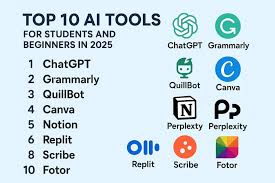
1. ChatGPT – Smart Writing & Idea Assistant
By OpenAI
One of the most popular tools today is ChatGPT by OpenAI. It helps with writing, brainstorming, coding, planning, research, and more.
ChatGPT, developed by OpenAI, is a powerful writing and idea assistant designed to help users create content quickly and efficiently. It can generate blog posts, social media captions, emails, scripts, business plans, and even code. Users simply enter a prompt, and ChatGPT provides structured, human-like responses within seconds. It also helps brainstorm ideas, improve grammar, summarize long text, and explain complex topics in simple language. Students, marketers, entrepreneurs, and professionals use it daily to boost productivity, save time, and enhance creativity without needing advanced technical skills.
What It Does
- Writes blog posts
- Generates business ideas
- Helps with coding
- Creates scripts
- Answers questions clearly
Practical Example
If you run a YouTube channel, you can:
- Generate video titles
- Create script outlines
- Write descriptions
- Get thumbnail ideas
If you’re a student:
- Summarize chapters
- Explain difficult topics
- Create study notes
Pros
✔ Easy to use
✔ Saves hours of work
✔ Good for beginners and professionals
✔ Useful in almost every industry
Cons
✘ Sometimes needs editing
✘ Advanced features require a paid plan
2. Canva – Design Made Simple
Canva has become one of the most powerful design platforms for beginners and businesses.
Canva is an easy-to-use online design platform that helps anyone create professional graphics without advanced skills. It offers ready-made templates for social media posts, YouTube thumbnails, presentations, resumes, posters, and more. You can simply drag and drop elements, change text, add images, and customize colors in minutes. It also includes stock photos, icons, videos, and fonts. Businesses use Canva for marketing materials, while students use it for projects and presentations. Even beginners can design like professionals using its simple interface. Canva works on both mobile and desktop, making design fast, affordable, and accessible for everyone.
What It Does
- Social media posts
- YouTube thumbnails
- Presentations
- Posters
- Logos
- Short videos
Practical Example
If you run an Instagram page:
- Create daily content in minutes
- Use ready-made templates
- Design ads without hiring a designer
Pros
✔ Beginner-friendly
✔ Huge template library
✔ Great for content creators
✔ Affordable pricing
Cons
✘ Some premium elements require Pro
✘ Advanced designers may want more control
3. Jasper – Marketing Content Tool
Jasper is built mainly for marketers and businesses.
Jasper is a marketing content platform designed to help businesses create high-quality written content quickly. It supports blog posts, website copy, product descriptions, email campaigns, and social media captions. Users can choose templates based on their goal, such as SEO articles or ad copy, and generate structured drafts in minutes. Jasper also allows tone customization, brand voice settings, and team collaboration. Many marketers use it to save time, improve productivity, and maintain consistent messaging across platforms. It integrates with popular tools and helps streamline content creation for startups, agencies, and growing online businesses.
What It Does
- Sales copy
- Email campaigns
- Landing pages
- Ad scripts
- Product descriptions
Practical Example
If you run an eCommerce store:
- Write product descriptions in bulk
- Create Facebook ad copy
- Generate promotional emails
Pros
✔ Great for marketing
✔ Helps increase conversions
✔ Saves copywriting cost
Cons
✘ Paid tool
✘ Best for business use, not casual users
4. Notion – Smart Productivity System
Notion is more than just a note-taking app. It’s a full productivity system.
What It Does
- Task management
- Goal tracking
- Project planning
- Content calendar
- Business dashboards
Practical Example
If you’re building an online business:
- Plan weekly tasks
- Track content ideas
- Manage affiliate links
- Organize research
Pros
✔ Clean interface
✔ All-in-one workspace
✔ Great for teams
Cons
✘ Can feel complex at first
✘ Takes time to fully customize
5. Grammarly – Writing Improvement Tool
Grammarly helps improve grammar, clarity, and tone.
What It Does
- Fix grammar mistakes
- Improve sentence clarity
- Suggest better words
- Adjust tone (formal, friendly, professional)
Practical Example
If you send business emails:
- Avoid embarrassing grammar mistakes
- Sounds more professional
- Improve communication
Pros
✔ Works in browser and apps
✔ Simple to use
✔ Great for non-native English speakers
Cons
✘ Advanced suggestions requirea premium
✘ Sometimes over-corrects style
6. Midjourney – Image Creation Tool
Midjourney helps create high-quality images from text descriptions.
What It Does
- Create digital art
- Generate thumbnails
- Design creative concepts
- Produce social media visuals
Practical Example
If you run a faceless YouTube channel:
- Generate unique thumbnail backgrounds
- Create motivational quote images
- Design custom artwork
Pros
✔ High-quality visuals
✔ Unique creative outputs
✔ Useful for content creators
Cons
✘ Paid subscription
✘ Requires learning prompts
7. Pictory – Video Creation Tool
Pictory helps turn text into videos automatically.
What It Does
- Convert blog posts to videos
- Add subtitles automatically
- Create short-form videos
- Generate social media clips
Practical Example
If you write blog posts:
- Convert each article into YouTube videos
- Create TikTok content from long videos
- Repurpose content easily
Pros
✔ Saves editing time
✔ Good for beginners
✔ Helpful for faceless channels
Cons
✘ Subscription cost
✘ Limited creative control compared to manual editing
8. Zapier – Automation Tool
Zapier connects different apps and automates workflows.
What It Does
- Connect Gmail to Google Sheets
- Send automatic email responses
- Post automatically on social media
- Sync business apps
Practical Example
If someone fills out your website form:
- Automatically send them an email
- Add their data to Google Sheets
- Notify you instantly
Pros
✔ Saves hours of manual work
✔ Great for business automation
✔ Works with thousands of apps
Cons
✘ Advanced automation requires a paid plan
✘ Takes time to set up workflows
9. Descript – Audio & Video Editing Tool
Descript makes editing audio and video easier by editing text.
What It Does
- Edit podcasts
- Remove filler words
- Add captions
- Screen recording
Practical Example
If you record YouTube videos:
- Delete “um” and “uh” automatically
- Edit video by editing text
- Create podcast clips quickly
Pros
✔ Beginner-friendly
✔ Saves editing time
✔ Great for creators
Cons
✘ Paid plans for advanced features
✘ Learning curve at first
10. Copy.ai – Quick Content Generator
Copy.ai helps generate marketing and short-form content.
What It Does
- Instagram captions
- Email subject lines
- Product descriptions
- Blog outlines
Practical Example
If you sell digital products:
- Generate daily social captions
- Create sales headlines
- Write launch emails
Pros
✔ Simple interface
✔ Fast content generation
✔ Good for small businesses
Cons
✘ Needs human editing
✘ Limited customization on the free plan
TOP 10 AI Tools Today: How to Choose the Right Tool for You
Not everyone needs all 10 tools.
Ask yourself:
- Are you a student?
- Are you building a YouTube channel?
- Do you run an online business?
- Are you a freelancer?
- Do you want passive income?
Simple Recommendations
| If You Are | Use This |
|---|---|
| Content Creator | ChatGPT, Canva, Descript |
| YouTuber | Pictory, Midjourney, Canva |
| Blogger | ChatGPT, Grammarly |
| Online Seller | Jasper, Copy.ai |
| Business Owner | Zapier, Notion |
| Student | ChatGPT, Grammarly, Notion |
Advantages of Using These Tools
✔ Save Time
Tasks that took hours now take minutes.
✔ Increase Productivity
You can do more work in less time.
✔ Reduce Costs
You don’t need to hire large teams.
✔ Boost Creativity
Helps generate ideas when you feel stuck.
Disadvantages You Should Know
✘ Over-Reliance
Don’t depend 100%. Always review and edit.
✘ Subscription Costs
Many tools charge monthly fees.
✘ Learning Curve
Some tools require practice.
✘ Privacy Concerns
Always check data policies.
Frequently Asked Questions (FAQs)
1. Which tool is best for beginners?
ChatGPT and Canva are the easiest to start with.
2. Are these tools free?
Most offer free plans, but advanced features are paid.
3. Can I earn money using these tools?
Yes. Many freelancers and creators use them for:
- Content writing
- Video editing
- Social media management
- Affiliate marketing
4. Do I need technical skills?
No. Most tools are designed for beginners.
5. Can students use these tools?
Yes. They help with studying, note-making, and presentations.
6. Are these tools safe?
Major platforms are generally safe. Always use strong passwords.
7. What are AI tools used for today?
AI tools are used for content creation, coding, graphic design, video production, marketing automation, data analysis, customer support, and productivity improvement. They help save time, reduce manual work, and increase efficiency.8. Which AI tool is best for content writing?
Tools like ChatGPT and Jasper are widely used for writing blogs, social media posts, emails, and marketing content. They help generate ideas, improve grammar, and maintain a consistent tone.9. What is the best AI tool for coding?
GitHub Copilot is one of the most popular AI coding assistants. It helps developers write code faster, fix errors, and learn new programming techniques.10. Are AI tools free to use?
Many AI tools offer free versions with limited features. However, advanced features usually require a paid subscription. Pricing varies depending on usage and functionality.11. Can AI tools replace human jobs?
AI tools are designed to assist humans, not completely replace them. They automate repetitive tasks, allowing people to focus on creativity, strategy, and decision-making.12. Which AI tool is best for image generation?
Midjourney is widely known for creating high-quality AI-generated images from text prompts. It is popular among designers and digital artists.13. Are AI tools safe to use?
Most reputable AI tools follow strong security and privacy policies. However, users should always review data policies before uploading sensitive information.14. How do businesses benefit from AI tools?
Businesses use AI to automate customer service, analyze data, create marketing campaigns, manage workflows, and improve decision-making, which increases profitability and efficiency.15. Do AI tools require technical knowledge?
Most modern AI tools are user-friendly and designed for beginners. Many platforms provide simple interfaces that require no coding knowledge.16. What is the future of AI tools?
AI tools are expected to become more advanced, personalized, and integrated into daily life. They will continue improving productivity, creativity, and automation across industries.
Conclusion – Top 10 AI Tools Today
AI tools have become powerful assets in today’s digital world, transforming how individuals and businesses operate. From content writing and coding to design, marketing, automation, and data analysis, these tools help save time, reduce costs, and improve overall productivity. They allow users to focus more on strategy, creativity, and growth rather than repetitive manual tasks.
The top AI tools today are not just trends — they are practical solutions that give a competitive advantage in a fast-moving market. Whether you are a student, entrepreneur, freelancer, or business owner, leveraging the right AI tools can significantly enhance your efficiency and results.
As technology continues to evolve, AI tools will become even smarter, more personalized, and deeply integrated into everyday workflows. Those who learn to use them effectively today will be better prepared for the opportunities of tomorrow.


Pingback: Best Crypto Exchange for Day Trading in the USA in 2026