
The world of smartphones has evolved dramatically over the years, and with the release of the iPhone 17, users are presented with new options for mobile connectivity: eSIM and Physical SIM. Understanding the difference between these two can help you make the right choice for your lifestyle, convenience, and network needs. In this article, we will explain everything you need to know about iPhone 17 eSIM vs Physical SIM, including practical examples, pros and cons, and frequently asked questions.
Difference Between iPhone 17 eSIM and Physical SIM. The iPhone 17 is the latest flagship smartphone from Apple, officially announced in September 2025 with major upgrades in performance, display, camera, and durability.
It features a 6.3‑inch Super Retina XDR OLED display with adaptive ProMotion technology (up to 120 Hz), a bright and vivid screen that makes scrolling and gaming smoother than before. The front is protected by Ceramic Shield 2, which offers improved scratch resistance and reduced glare compared with previous models.
Under the hood is the powerful A19 chip, built on a cutting‑edge process for faster performance and better energy efficiency — ideal for gaming, editing videos, and AI‑based tasks. The phone supports Apple Intelligence, bringing smarter experiences across apps and tools while keeping your data private.
The camera system includes a 48 MP Dual Fusion rear setup and an advanced Center Stage front camera, enabling sharper photos, wider group selfies, and high‑quality video recording. Videos can be recorded in 4K HDR and benefit from features like Dual Capture for creative storytelling.
Storage starts at 256 GB and goes up to 512 GB with no 128 GB base option, giving plenty of space for apps, photos, and media. The iPhone 17 also offers all‑day battery life with fast charging (up to 50 % in about 20 minutes) and supports modern wireless connectivity, including Wi‑Fi 7 and Bluetooth 6 through Apple’s new N1 networking chip.
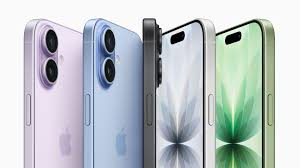
Design‑wise, it comes in several colors such as black, white, mist blue, sage, and lavender, with a refined aluminum build that is both sleek and durable. The device is IP68 water and dust resistant and built with recycled materials as part of Apple’s environmental goals.
Overall, the iPhone 17 combines premium design, powerful performance, enhanced photography, and advanced display technology in a flagship smartphone experience.
The main difference for the
Apple iPhone 17 series is that eSIM models are digital-only with no physical tray, offering slightly larger batteries and better security, while physical SIM models retain a tray for traditional nano-SIM cards.
Facebook +1
The availability of these versions depends on the specific model and your region.
Key Performance and Design Differences
According to technical reviews and experts from 9to5Mac and MacRumors, removing the physical SIM tray provides measurable hardware advantages. www.blivale.com
- Battery Capacity: The eSIM-only Apple iPhone 17 Pro Max features a 5098 mAh battery, compared to 4823 mAh in the physical SIM version. In standard testing, this results in approximately 54 minutes to 1 hour of additional battery life.
- Internal Space: Removing the tray frees up space for a more efficient internal layout, allowing for the Apple iPhone 17 Air’s ultra-thin 5.6mm profile.
- Durability: With no physical opening for a SIM tray, the device has fewer entry points for dust and liquid, potentially improving long-term resistance.
YouTube +5
Regional Availability
Apple’s strategy for SIM slots varies by country to match local carrier infrastructure.
- eSIM-Only (No Tray): The Apple iPhone 17 Air is eSIM-only globally. For the standard, Pro, and Pro Max models, the eSIM-only version is sold in the United States, Canada, Japan, the UAE, Saudi Arabia, and Mexico.
- Nano-SIM + eSIM: Models sold in Europe, India, Australia, and Singapore typically include one physical nano-SIM slot and support for multiple eSIMs.
- Dual Nano-SIM: In Mainland China, the Apple iPhone 17 Pro and Apple iPhone 17 Pro Max feature two physical SIM slots and generally do not support eSIM.
Simbye eSIM +2
Security and Convenience
Experts from Apple Support and various tech reviewers highlight different trade-offs in daily use. Apple Support +1
- Security: eSIM is more secure against theft because it cannot be physically removed from a stolen device, ensuring Find My remains active longer.
- Travel: You can store 8 or more eSIM profiles and have two active at once, making it easy to switch to local data plans without hunting for physical cards.
- Device Swapping: Physical SIMs are still preferred for users who frequently move their service between multiple phones, as eSIM transfers can be more complex and often require a Wi-Fi connection.
What is a Physical SIM?
A Physical SIM is a small, removable card that you insert into your iPhone to connect to a mobile network. It contains your phone number and carrier information. Physical SIMs have been used in phones for decades, making them a familiar option for most users.
How Physical SIM Works in iPhone 17
- You insert the SIM card into the SIM tray on your iPhone 17.
- The phone reads the SIM data to connect to your carrier.
- You can switch phones by moving the SIM card from one device to another.
Practical Example
Imagine you are traveling abroad and want to use a local mobile network. With a physical SIM, you can simply buy a local SIM card, insert it into your iPhone 17, and start using data and calls.
What is an eSIM?
An eSIM (embedded SIM) is a digital SIM embedded directly into your iPhone 17. Unlike a physical SIM, you don’t need to insert or remove anything; you can activate it with a few taps in your phone’s settings.
How eSIM Works in iPhone 17
- Go to Settings > Cellular > Add Cellular Plan.
- Scan the QR code provided by your carrier or enter the details manually.
- The eSIM is activated instantly without a physical card.
Practical Example
Suppose you travel frequently. Instead of carrying multiple physical SIM cards, you can have multiple eSIM profiles on your iPhone 17 and switch between carriers digitally without changing SIM cards physically.
Key Differences Between iPhone 17 eSIM and Physical SIM
Here’s a side-by-side comparison to make it easier to understand:
| Feature | Physical SIM | eSIM |
|---|---|---|
| Form Factor | Small removable card | Embedded in the device |
| Switching Phones | Easy, just move the SIM card | Requires carrier setup on a new phone |
| Multiple Numbers | Requires inserting a card | Can store multiple eSIM profiles |
| Activation | Need a local SIM card | Digital activation via QR or carrier app |
| Travel Convenience | Need local SIM card | Switch carriers digitally, no swapping needed |
| Durability | Can be lost or damaged | Built-in, cannot be physically damaged |
Advantages of eSIM on iPhone 17
- Convenience
You can activate and switch plans without a physical card, which is handy for international travelers. - Supports Dual SIM
iPhone 17 allows both eSIM and Physical SIM simultaneously, giving you two active numbers on one device. - No Physical Damage
Since the eSIM is embedded, there is no risk of losing it or bending it. - Environment-Friendly
Reduces the need for plastic SIM cards.
Example Scenario
A business professional can use a personal Physical SIM and a work eSIM on the same iPhone 17, keeping calls and messages separate without carrying two phones.
Advantages of Physical SIM on iPhone 17
- Easy to Swap
You can easily move your SIM card to another device without contacting your carrier. - Compatibility
Some older carriers and plans only support physical SIMs. - Backup Option
Physical SIMs provide a simple fallback if your eSIM setup has an issue.
Example Scenario
If your iPhone 17 runs into software issues, you can still insert your physical SIM into another phone to stay connected immediately.
Disadvantages of eSIM
- Carrier Dependency
Some carriers may not support eSIM, limiting your options. - Difficult to Transfer
Switching an eSIM to a new phone requires digital setup, which can be slightly tricky for less tech-savvy users. - Limited Offline Use
Activating eSIM requires an internet connection or a QR code from the carrier.
Disadvantages of Physical SIM
- Easy to Lose or Damage
Small cards can be misplaced or bent easily. - Limited to One SIM per Slot
Unless the device has a dual-SIM slot, you can only use one SIM at a time. - Travel Inconvenience
Carrying multiple SIMs while traveling is less convenient than using eSIMs.
iPhone 17 Dual SIM: Best of Both Worlds
The iPhone 17 allows you to use one physical SIM and one eSIM simultaneously. This setup offers maximum flexibility:
- Example: Use your primary number on a physical SIM for personal use and an eSIM for international travel or work.
- Switch seamlessly between carriers without physically changing cards.
- Manage plans digitally in Settings.
Difference Between iPhone 17 eSIM and Physical SIM: How to Set Up eSIM on iPhone 17
- Open Settings → Cellular → Add Cellular Plan.
- Scan the QR Code provided by your carrier or enter the details manually.
- Label Your Plans for easy management (e.g., Personal, Work).
- Switch Between Plans anytime from Cellular settings.
How to Use a Physical SIM on iPhone 17
- Locate the SIM tray on the side of your iPhone 17.
- Use the SIM ejector tool to open the tray.
- Insert your SIM card with the metal contacts facing down.
- Close the tray and wait for the phone to recognize the carrier.
Practical Tips for Choosing Between eSIM and Physical SIM
- Frequent Travelers → Prefer eSIM for easy international switching.
- Multiple Numbers → eSIM allows multiple digital profiles.
- Simple Use → Physical SIM is easier for users who rarely switch phones.
- Backup Plan → Keep a physical SIM handy for emergencies.
FAQs
1. Can I use only eSIM on iPhone 17 without a Physical SIM?
Yes, iPhone 17 supports eSIM-only setup if your carrier allows it.
2. Can I have more than one eSIM on iPhone 17?
Yes, the iPhone 17 supports multiple eSIM profiles, but only one can be active at a time alongside the physical SIM.
3. Is eSIM secure?
Yes, eSIMs are secure and encrypted, similar to physical SIM cards.
4. Can I transfer my eSIM to a new iPhone 17?
Yes, but it requires scanning a new QR code from your carrier or using their app.
5. Which is better: eSIM or Physical SIM?
It depends on your needs. eSIM is more flexible and convenient for travelers and tech-savvy users, while a physical SIM is reliable and simple for everyday use.
6. What is the main difference between eSIM and physical SIM on iPhone 17?
The main difference is that a physical SIM is a removable card, while an eSIM is embedded digitally in the iPhone. eSIM allows activation without inserting a card.
7. Can I use both an eSIM and a physical SIM at the same time?
Yes, the iPhone 17 supports dual SIM: one physical SIM and one eSIM can be active simultaneously. This is useful for having personal and work numbers on the same phone.
8. How do I switch carriers using eSIM?
You can switch carriers by adding a new eSIM plan in Settings → Cellular → Add Cellular Plan. Simply scan the carrier’s QR code or enter the plan manually.
9. Is it possible to transfer a physical SIM to another phone?
Yes, you can remove your physical SIM from iPhone 17 and insert it into another compatible phone to use your number immediately.
10. Are eSIMs supported by all carriers?
No, not all carriers support eSIM. Before relying solely on eSIM, check with your carrier to ensure compatibility.
11. Can I have multiple eSIMs on iPhone 17?
Yes, iPhone 17 can store multiple eSIM profiles, but only one can be active at a time alongside your physical SIM.
12. Which is better for international travel: eSIM or physical SIM?
eSIM is more convenient because you can switch carriers digitally without buying and inserting new physical SIMs.
13. Can I remove an eSIM from iPhone 17?
Yes, you can delete an eSIM profile in Settings → Cellular → Cellular Plans → Remove Plan.
14. Does using eSIM affect battery life?
No, eSIM does not significantly affect battery life. It functions similarly to a physical SIM in the background.
15. What happens if my iPhone 17 is lost or damaged with an eSIM?
You will need to contact your carrier to transfer the eSIM to a new device. Unlike a physical SIM, it cannot simply be moved to another phone.
Conclusion
Choosing between iPhone 17 eSIM and Physical SIM depends on your lifestyle and usage habits.
- eSIM is perfect for those who travel often, need multiple numbers, or want the convenience of digital setup.
- Physical SIM is ideal for users who prefer simplicity, easy swapping between phones, or a reliable backup.
With the iPhone 17 supporting dual SIM functionality, you don’t have to choose one over the other. You can enjoy the best of both worlds, combining convenience and reliability for a seamless mobile experience.
By understanding the difference between iPhone 17 eSIM and Physical SIM, you can make informed decisions, stay connected, and take full advantage of your iPhone 17’s advanced features.

