
In recent years, technology has transformed the way students learn, study, and manage their academic work. One of the most powerful changes comes from tools that can assist students in understanding complex topics, organizing tasks, and enhancing creativity. These tools have become indispensable for students of all ages, from high school learners to university scholars. Understanding how to use these tools effectively can make a real difference in academic performance and productivity.

AI Tools and Students. In this article, we explore the role of these tools in education, how students can benefit from them, practical examples of use, as well as advantages, limitations, and frequently asked questions.
Learning today is very different from a decade ago. Students no longer rely solely on textbooks and classrooms. Technology offers tools that help students study smarter, organize work, and develop creative projects efficiently. Understanding these tools can save time, improve grades, and make learning more enjoyable.
In this guide, we will explore how students can use these tools effectively, their advantages and limitations, practical examples, and answers to common questions.
What Are AI Tools and Students’ Needs?
Students face a variety of challenges every day. Assignments pile up, research requires time, presentations must be polished, and learning new topics can be difficult without guidance. Tools designed to assist students help in these areas by offering:
- Study assistance and summaries of difficult concepts
- Writing support for essays and reports
- Tools to enhance creativity, such as design or video editing apps
- Time management and productivity tracking
- Language translation and learning aids
By using these tools, students can streamline learning and focus on understanding rather than spending excessive time on repetitive or mechanical tasks.
- Study Tips for Students
- Best Productivity Apps for College Students
- Tools to Improve Writing Skills
- Time Management Techniques for Students
How Students Can Use These Tools Effectively
1. Writing and Research Assistance

Many students struggle with writing essays, reports, or research papers. Tools that help structure ideas, provide grammar support, and suggest improvements can save hours of work. For example:
- A student can input their draft into a writing assistant to check grammar, clarity, and flow.
- Research tools can summarize articles, highlight key points, and suggest references, making the research process faster and more organized.
Example: A university student writing a research paper on climate change can use a tool to generate a structured outline, find credible sources, and ensure the essay is readable and clear.
2. Learning and Understanding Complex Subjects
Certain subjects, like mathematics, physics, or programming, require step-by-step understanding. Students can use specialized learning tools to:
- Solve problems and provide step-by-step solutions
- Explain concepts in simpler terms
- Offer interactive examples to practice
Example: A high school student struggling with calculus can use a problem-solving tool to see how a derivative is calculated, step by step, and then practice similar problems.
3. Organizing Study Time
Time management is critical for students, especially those balancing multiple subjects or extracurricular activities. Productivity tools help students:
- Create study schedules and reminders
- Track assignment deadlines
- Prioritize tasks for exams or projects
Example: A college student juggling coursework and part-time work can use a scheduling tool to plan study sessions, set reminders for project deadlines, and stay on top of assignments.
4. Enhancing Creativity
Students are not just expected to study—they are often tasked with projects that require creativity. Design, video editing, and presentation tools can help students:
- Create visually appealing slides for presentations
- Design posters or infographics
- Edit videos for school projects
Example: A student preparing a presentation on environmental conservation can use a design tool to create clear, colorful slides and diagrams that make complex data easier to understand.
5. Language Learning and Translation

In a globalized world, language skills are crucial. Tools designed for translation and language practice help students:
- Translate text quickly for better understanding
- Learn new languages with interactive lessons
- Practice pronunciation and grammar
Example: A student learning French can use a translation tool to understand French literature and then practice writing short essays in French with feedback on grammar and sentence structure.
Pros of Using These Tools for Students
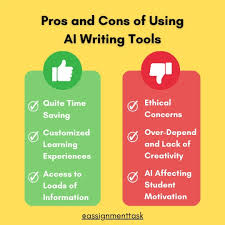
Using these tools provides many advantages that can enhance a student’s academic experience:
- Saves Time: Automates repetitive tasks like checking grammar, summarizing articles, and organizing notes.
- Improves Understanding: Breaks down complex topics into manageable explanations and practical examples.
- Boosts Productivity: Helps students plan their time, manage tasks, and stay organized.
- Enhances Creativity: Provides resources for visually engaging projects and interactive presentations.
- Supports Learning Flexibility: Students can study at their own pace, anytime, and anywhere.
Example: A student who uses study and scheduling tools can complete a week’s worth of assignments in a fraction of the time, giving them more time for revision and self-improvement.
Cons and Limitations
While these tools offer numerous benefits, they are not without drawbacks:
- Over-reliance: Students may rely too heavily on tools and neglect critical thinking skills.
- Cost: Some advanced tools may require subscriptions that are expensive for students.
- Accuracy Issues: Tools may sometimes provide incorrect suggestions or solutions.
- Limited Personalization: Not all tools adapt perfectly to an individual student’s learning style.
- Distraction Risk: If misused, these tools can become a source of distraction rather than aid.
Example: A student relying entirely on a tool for writing may not learn proper essay structuring, which can affect their overall academic development.
Practical Examples of Tools Students Can Use
Writing and Research Tools
- Tools for grammar, spelling, and clarity checks
- Research summarization and citation tools
Practical Use: Writing a term paper faster, avoiding plagiarism, and creating a polished essay.
Study and Problem-Solving Tools
- Math problem solvers
- Interactive science and coding tutorials
Practical Use: Practicing complex problems at home with clear step-by-step guidance.
Organization and Productivity Tools
- Calendar apps and reminder systems
- To-do list managers and task prioritization apps
Practical Use: Keeping track of deadlines and creating a structured weekly study plan.
Creativity and Presentation Tools
- Design apps for posters and infographics
- Video and presentation software
Practical Use: Creating professional-looking presentations that impress teachers and classmates.
Language Learning Tools
- Translation apps
- Language practice programs
Practical Use: Learning a new language while completing homework and improving comprehension skills.
Tips for Using These Tools Wisely
- Use Tools as Support, Not Replacement: They should assist, not replace, learning and critical thinking.
- Balance Time Spent: Avoid spending more time on tools than actual study.
- Verify Information: Always double-check facts provided by tools.
- Choose Tools That Fit Your Style: Some students prefer visual learning, others text-based explanations. Pick tools accordingly.
- Combine Multiple Tools: Use a mix of productivity, research, and creativity tools for comprehensive support.
FAQs About Tools and Students
1. Are these tools suitable for all education levels?
Yes, from high school to college and even professional courses, these tools can help manage workload, simplify concepts, and improve efficiency.
2. Can these tools replace teachers or tutors?
No. They are meant to support learning. Human guidance is still essential for deep understanding and personalized feedback.
3. Are these tools expensive?
Many tools are free or have basic versions that are suitable for students. Premium versions may offer advanced features at a cost.
4. Can they improve grades?
Yes, indirectly. By saving time, improving understanding, and helping create high-quality work, students are likely to see better academic performance.
5. Are there privacy concerns?
Students should check privacy policies, especially when using cloud-based tools, to ensure personal data and work are safe.
6. Do they work offline?
Some tools require internet access, while others have offline functionality. Students should choose based on their needs.
7. How can students avoid over-reliance?
Set limits, use tools for guidance, and always practice independent thinking and problem-solving.
8. Are these tools helpful for group projects?
Absolutely. Tools can help coordinate tasks, share documents, and create polished presentations collaboratively.
9. Can they assist with exam preparation?
Yes. Tools can create flashcards, quizzes, summaries, and practice tests to aid in efficient revision.
10. Are there tools specifically for language learning?
Yes. Many tools offer interactive lessons, translations, and exercises to practice reading, writing, and speaking.
11. What are AI tools for students?
AI tools for students are software or apps that help with studying, writing, research, problem-solving, and time management. They make learning easier by saving time and simplifying complex topics.
12. How do AI tools help students learn better?
AI tools help students by explaining difficult concepts in simple terms, providing step-by-step solutions, and offering personalized study support. This makes learning faster and more effective.
13. Are AI tools useful for school and college students?
Yes, AI tools are useful for both school and college students. They can help with homework, assignments, presentations, and exam preparation at all levels.
14. Can AI tools improve students’ grades?
AI tools can improve grades by helping students understand subjects better, organize their work, and submit high-quality assignments. However, students still need to study and practice regularly.
15. Are AI tools free for students?
Many AI tools offer free versions with basic features. Some advanced tools require a paid subscription, but free options are often enough for most students.
16. What are the best uses of AI tools for students?
Students can use AI tools for:
- Writing essays and assignments
- Solving math problems
- Creating presentations
- Learning new languages
- Managing study schedules
17. Can AI tools replace teachers?
No, AI tools cannot replace teachers. They are only support tools. Teachers provide guidance, experience, and deeper understanding that tools cannot fully replace.
18. Are AI tools safe for students to use?
Most AI tools are safe, but students should check privacy policies and avoid sharing personal or sensitive information online.
19. Do AI tools work without the internet?
Some AI tools require an internet connection, while others offer limited offline features. It depends on the tool being used.
20. How can students avoid overusing AI tools?
Students should use AI tools only for guidance, not for doing all their work. It is important to practice independently and think critically.
21. Are AI tools helpful for exam preparation?
Yes, AI tools can help create summaries, quizzes, flashcards, and practice tests, making revision faster and more effective.
22. Can AI tools help with homework?
Yes, AI tools can assist with homework by explaining answers, suggesting solutions, and helping students understand the topic better.
23. What are the disadvantages of AI tools for students?
Some disadvantages include over-reliance, possible incorrect answers, distractions, and the cost of premium tools.
24. Are AI tools good for language learning?
Yes, AI tools are very helpful for learning languages. They can translate text, check grammar, and improve vocabulary and pronunciation.
25. Which subjects benefit most from AI tools?
Subjects like mathematics, science, programming, and languages benefit the most, but AI tools can support almost every subject.
26. Can AI tools help with project work?
Yes, students can use AI tools to research topics, organize ideas, create presentations, and design creative projects.
27. How do AI tools save time for students?
AI tools automate tasks like summarizing notes, checking grammar, and organizing schedules, allowing students to focus more on learning.
28. Are AI tools suitable for beginners?
Yes, most AI tools are easy to use and designed for beginners, with simple interfaces and step-by-step guidance.
29. Can AI tools help students with time management?
Yes, many tools help students plan study schedules, set reminders, and track deadlines effectively.
30. Should students rely completely on AI tools?
No, students should not rely completely on AI tools. They should use them as support while developing their own skills and understanding.
Conclusion
Tools designed for students are transforming the way learning happens today. They help manage time, simplify complex concepts, enhance creativity, and improve academic performance. While they come with some limitations, when used wisely, they are an invaluable support system for students.
Practical use of these tools ensures students not only save time but also learn more efficiently, enjoy creative projects, and stay organized. By understanding their strengths and weaknesses, students can make the most of these tools and achieve better results in their academic journey.
Whether you are preparing for exams, writing essays, or working on creative projects, integrating these tools into your routine can make learning smoother, smarter, and more engaging.

