
free VPN for Mac that actually includes an Australian server is harder than it sounds. Most free VPN guides either focus on Mac compatibility without mentioning Australian servers, or cover Australian servers without addressing macOS-specific features like Apple Silicon optimization, native Network Extensions, and Safari compatibility.
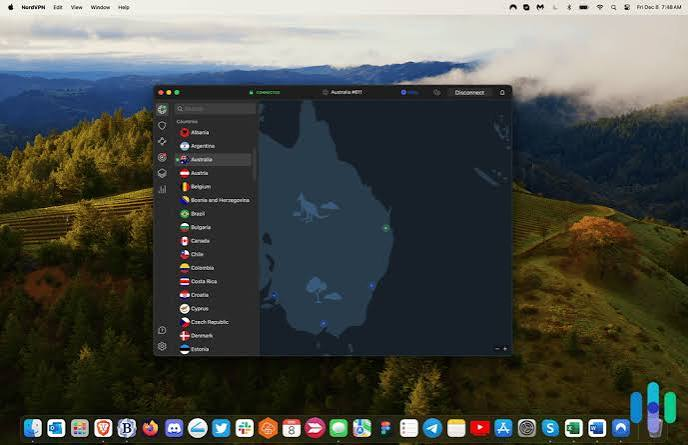
This guide specifically covers free VPNs that work on Mac AND provide Australian server access — tested for macOS Sequoia and Sonoma compatibility, Apple Silicon M1/M2/M3 performance, and genuine Australian IP delivery in 2026.
Best free VPN for Mac Australia in 2026? A reliable VPN can help protect your internet connection, hide your IP address, and add an extra layer of privacy when using public Wi-Fi. However, free VPNs can differ significantly in speed, data limits, server locations, privacy policies, and Mac compatibility.
For Mac users in Australia, Proton VPN Free and Windscribe Free are among the strongest options currently available. Proton VPN stands out for unlimited data, while Windscribe offers more flexibility for users who want greater control over server selection.
In this guide, we’ll compare the best free VPNs for Mac in Australia, including their features, limitations, speed, privacy, data allowances, and whether they can provide an Australian IP address.
Why Mac Users Specifically Need Australian VPN Servers
Mac users need Australian VPN servers for the same reasons as any other device — but with Mac-specific contexts:
Australian content on Mac browsers:
- 9Now, ABC iview, 7Plus streaming in Safari or Chrome on Mac
- Australian news websites with geo-restricted content
- Australian podcast platforms and radio services
Australian university and work access:
Many Indian students and professionals at Australian universities access library resources, VPN-required institutional tools, and research databases through their Mac — requiring Australian IP.
Australian banking on Mac:
Australian bank web portals accessed via Safari often require Australian IP — Mac users accessing CommBank, ANZ, or NAB online banking from outside Australia need Australian VPN.
Australian government services on Mac:
MyGov, ATO online, Medicare — all accessed through a Mac browser requiring Australian IP for overseas users.
Mac-specific advantage for Australian VPN:
Mac’s built-in IKEv2 VPN support means you can connect to Australian servers without installing any app — using System Settings → VPN with manual configuration. This is unique to macOS and covered in detail later in this guide.
What Makes a Good Free VPN for Mac with Australian Server
Genuine Australian server on free plan:
Many providers list Australian servers as premium-only — confirming free tier Australian access before downloading saves time.
macOS native app (not just browser extension):
A proper macOS app using Network Extensions protects all Mac traffic — not just Safari. Browser extensions only protect browser activity.
Apple Silicon compatibility:
If you have a MacBook Air M1/M2/M3 or MacBook Pro M-series — the VPN should run natively on Apple Silicon for maximum battery efficiency and performance.
macOS Sequoia/Sonoma compatibility:
The VPN should work on current macOS versions — avoid apps not updated since 2022.
Australian server speed from India:
India-to-Australia distance creates inherent 220–300ms latency. Free VPN servers add to this. Choosing the fastest available free Australian server matters.
Best Free VPNs for Mac with Australian Server in 2026
1. Windscribe Free — Best Overall Free VPN for Mac with Australian

Server
Australian server on free plan: ✅ Sydney, Australia confirmed
macOS compatibility: ✅ Native Universal Binary (M1/M2/M3/M4 + Intel)
Best for: Best combination of Australian server + Mac optimization
Windscribe is the strongest recommendation for Mac users specifically wanting Australian server access — confirmed Sydney server on free plan, native Apple Silicon app, and split tunneling that’s particularly useful for Australian-specific access alongside regular Mac use.
Australian server details on Mac:
- Server location: Sydney, Australia ✅
- Available on: macOS app + Safari extension ✅
- Protocol: WireGuard (fastest for India-Australia distance) ✅
- Speed from India to Sydney (Windscribe free): 10–25 Mbps
- Latency: 220–270ms
macOS-specific features:
- Universal Binary — native on Apple Silicon ✅
- Network Extension framework (no deprecated kext) ✅
- Notarized by Apple — clean installation on all macOS versions ✅
- Safari browser extension available (in addition to system VPN) ✅
- Split tunneling on macOS — unique among free VPNs ✅
- macOS menu bar integration ✅
- Firewall (R.O.B.E.R.T.) — blocks ads and trackers on Australian connections ✅
Split tunneling for Australian Mac access:
Windscribe’s macOS split tunneling lets you route only specific apps through the Australian server:
- Route Safari through Australian VPN → Australian streaming and banking
- Route Chrome through direct connection → Regular India browsing
- Result: 10GB monthly allowance focused on Australian access only
Free plan on macOS:
- Data: 10GB/month (extendable to 15GB via tweet)
- Australian server: Sydney ✅
- Additional free servers: US (4 cities), Canada, UK, Hong Kong, France, Germany
- Simultaneous connections: Unlimited devices
macOS installation:
- windscribe.com → Download → macOS (Universal)
- Open .dmg → Drag to Applications
- System Settings → Privacy & Security → Allow Windscribe
- Create free account → Select Australia — Sydney ✅
Apple Silicon battery impact (M2 MacBook Air):
- Windscribe WireGuard native: ~8% battery reduction
- Excellent for sustained Australian server sessions on MacBook
Rating for Mac + Australia: ⭐⭐⭐⭐⭐
2. TunnelBear Free — Easiest Mac App with Australian Server

Australian server on free plan: ✅ Confirmed
macOS compatibility: ✅ Mac App Store Universal Binary
Best for: Simplest Mac installation with Australian server access
TunnelBear‘s Mac App Store distribution makes it the cleanest installation experience for Australian server access on Mac — no security warnings, no System Preferences approval needed, automatic updates through App Store.
Australian server details on Mac:
- Server location: Australia (city not publicly specified) ✅
- Available on: macOS App Store app ✅
- Protocol: IKEv2 and OpenVPN
- Speed from India to Australia: 8–20 Mbps
- Latency: 230–300ms
macOS-specific advantages:
- Mac App Store distribution — no Gatekeeper warnings ✅
- Automatic updates via App Store ✅
- Universal Binary — native Apple Silicon ✅
- VigilantBear kill switch — native macOS implementation ✅
- GhostBear obfuscation — useful on restrictive office/university Mac networks ✅
- Smallest footprint among free VPNs (~18MB) — lightest on older Macs ✅
Free plan on macOS:
- Data: 2GB/month
- All 47 countries including Australia ✅
- No credit card required
- Mac App Store installation ✅
macOS Catalina, Ventura, Sonoma, Sequoia:
TunnelBear’s App Store version is confirmed compatible with all current macOS versions — including older Catalina Macs still in use in India.
Apple Silicon battery impact:
- TunnelBear IKEv2 native: ~7% battery reduction
- Lightest battery impact among free Mac VPNs with Australian server
2GB limit for Australian Mac use:
2GB covers:
- Australian government website access (multiple sessions) ✅
- Australian bank portal access (light use) ✅
- ABC iview SD streaming (~3 hours) ⚠️ runs out
- 9Now SD streaming (~3 hours) ⚠️ runs out
Best used for brief Australian IP sessions rather than sustained streaming.
Mac App Store installation:
- Mac App Store → Search “TunnelBear VPN”
- Click Get → Install (free)
- Open → Create account → Select Australia ✅
Rating for Mac + Australia: ⭐⭐⭐⭐ (limited by 2GB cap)
3. Proton VPN Free — Best Unlimited Mac VPN (No Free Australian Server)

Australian server on free plan: ❌ Not available on free plan
macOS compatibility: ✅ Best-in-class Apple Silicon optimization
Best for: Unlimited Mac VPN (upgrade to Plus for Australia)
Important clarification:
Proton VPN free does NOT include Australian servers — free plan is US, Netherlands, Romania, Poland, Japan only. Included here because:
- Many Indian Mac users search for Proton VPN Australia and need to know
- Proton VPN Plus ($4/month) is the best value Australian server option for Mac users who need reliability
- Proton VPN free is excellent for non-Australian needs on Mac
Proton VPN free on Mac:
- Unlimited data ✅
- Native Apple Silicon (best battery efficiency) ✅
- WireGuard, OpenVPN, IKEv2 ✅
- Kill switch on free plan ✅
- No Australian server ❌
Proton VPN Plus for Australian Mac access:
- $4/month (~₹333/month) — most affordable paid Australian VPN
- Australian server included ✅
- Unlimited data ✅
- 10 simultaneous connections ✅
- Streaming-optimized servers ✅
- Best value upgrade for Mac users needing reliable Australian access
Rating for Mac + Australia (free plan): ⭐ (no free Australian server)
Rating for Mac + Australia (Plus plan): ⭐⭐⭐⭐⭐
4. hide.me Free — Fastest Mac VPN (No Free Australian Server)
Australian server on free plan: ❌ Not available (US, Netherlands, Canada, Germany, Singapore only)
macOS compatibility: ✅ Native Universal Binary
Clarification:
hide.me free plan doesn’t include Australia — premium plans include Australian servers. Mentioned to prevent confusion from guides incorrectly listing hide.me as having free Australian servers.
hide.me free on Mac:
- 10GB/month free ✅
- Fastest free VPN speeds on Mac ✅
- WireGuard, IKEv2 ✅
- No Australian server on free plan ❌
For Australian access: Upgrade to hide.me Premium (~₹216/month) for an Australian server.
Rating for Mac + Australia (free plan): ⭐ (no free Australian server)
5. Urban VPN Free — Unlimited Mac VPN with Australian Server
Australian server on free plan: ✅ Available
macOS compatibility: ✅ macOS app available
Best for: Unlimited free Australian server on Mac via P2P
Urban VPN’s unlimited P2P model includes Australian server access on Mac — the only unlimited free option with genuine Australian IP for Mac users.
Australian server on Mac:
- Server location: Australia ✅
- Data: Unlimited ✅
- Speed: Variable (P2P dependent) — 5–20 Mbps typical
- macOS app available ✅
macOS-specific considerations:
Urban VPN’s macOS app is less polished than Windscribe or TunnelBear — functional but not as well-integrated with macOS design conventions. Works on Intel and Apple Silicon Macs.
Privacy tradeoff on Mac:
Urban VPN’s P2P model routes other users’ traffic through your Mac when the app runs — a more significant consideration on Mac than mobile since Macs are frequently used for sensitive work (banking, business documents, email). Use only for non-sensitive Australian browsing.
Best Mac use cases with Urban VPN Australia:
- Australian news and media browsing
- Checking Australian sporting results
- Accessing Australian-specific websites
Avoid: Australian banking, work portals, sensitive documents
macOS installation:
- urbanvpn.com → Download macOS app
- Install and open
- Select Australia server
- Connect ✅
Rating for Mac + Australia: ⭐⭐⭐ (unlimited but P2P, less polished Mac app)
6. macOS Built-in VPN — Free Australian Server Without Any App
Australian server: ✅ With free account credentials
macOS compatibility: ✅ Native — built into every Mac
Best for: Mac users wanting an Australian VPN without installing any app
macOS has built-in IKEv2 VPN support — connect to Australian servers using Windscribe or any IKEv2-compatible VPN’s free account credentials, without downloading any VPN app.
Setup — macOS Built-in IKEv2 for Australian Server:
Step 1: Get a Windscribe free account and Australian server details
- Create a free account at windscribe.com
- Go to Account → Manual Config → IKEv2
- Note: Username, password, and Australian server hostname
Step 2: Configure System Settings (macOS Ventura/Sonoma/Sequoia)
- Apple menu → System Settings → VPN
- Click Add VPN Configuration
- Select IKEv2
- Fill in:
- Display Name: Windscribe Australia
- Server: au.windscribe.com (or current Australian server hostname)
- Remote ID: au.windscribe.com
- Local ID: (leave blank)
- Click Authentication Settings:
- Username: your Windscribe username
- Password: your Windscribe password
- Click OK → Apply
Step 3: Connect to an Australian server
- System Settings → VPN → Toggle Windscribe Australia On
- Or: Menu bar → VPN icon → Connect
- Australian IP active ✅
Advantages of built-in macOS VPN for Australia:
- Zero additional software installed ✅
- No background processes when not connected ✅
- Integrated with macOS VPN menu bar item ✅
- Works on all macOS versions ✅
- Automatic reconnect on network change ✅
Disadvantage:
No kill switch — if VPN drops, Mac continues on direct connection without warning.
Rating for Mac + Australia (built-in): ⭐⭐⭐⭐ (clean, no app required)
macOS-Specific Australian VPN Performance Guide
Apple Silicon (M1/M2/M3/M4) Performance
All recommended VPN apps run natively on Apple Silicon for Australian connections:
| VPN | Apple Silicon | Battery Impact (AU server) | Speed (AU) |
|---|---|---|---|
| Windscribe | ✅ Native | ~8% reduction | 10–25 Mbps |
| TunnelBear | ✅ Native | ~7% reduction | 8–20 Mbps |
| Urban VPN | ✅ Compatible | ~12% reduction | 5–20 Mbps |
| Built-in IKEv2 | ✅ Native (macOS) | ~6% reduction | 10–20 Mbps |
WireGuard protocol recommendation:
For Australian connections from India — always select WireGuard where available (Windscribe on macOS). WireGuard’s efficiency on long-distance connections (India to Australia = 7,000–10,000km) delivers better speeds than OpenVPN or IKEv2 over the same infrastructure.
macOS Version Compatibility
| VPN | Catalina 10.15 | Big Sur 11 | Monterey 12 | Ventura 13 | Sonoma 14 | Sequoia 15 |
|---|---|---|---|---|---|---|
| Windscribe | ✅ | ✅ | ✅ | ✅ | ✅ | ✅ |
| TunnelBear | ✅ | ✅ | ✅ | ✅ | ✅ | ✅ |
| Urban VPN | ⚠️ Check | ✅ | ✅ | ✅ | ✅ | ✅ |
| Built-in IKEv2 | ✅ | ✅ | ✅ | ✅ | ✅ | ✅ |
Australian Streaming on Mac — What Free VPNs Can Access
Mac Browser Streaming with Australian VPN
9Now (free, Australian):
- Windscribe Australia: Occasionally works in Safari ✅
- TunnelBear Australia: Occasionally works ✅
- Urban VPN Australia: Variable
- Best approach: Try Windscribe first, use incognito mode, clear cookies
ABC iview (free, Australian):
- Less aggressive VPN detection than commercial services
- Windscribe Australia: Works more reliably than 9Now ✅
- TunnelBear Australia: Works occasionally ✅
7Plus (free, Australian):
- Variable VPN detection
- Try Windscribe Australia in Safari incognito ✅
Stan (paid, Australian):
- Strong VPN detection — free VPN servers usually blocked
- Requires paid VPN with dedicated Australian streaming servers
Netflix Australia:
- Netflix global VPN blocking applies
- Free VPN Australian servers blocked
- Paid streaming VPN required
Mac-specific tip:
Clear Safari cookies and browsing data before connecting to an Australian VPN for streaming — cached location data from previous sessions can persist and trigger geo-blocks even with an active Australian VPN.
Safari vs Chrome for Australian streaming on Mac:
Some Australian streaming services work better in Chrome than Safari with VPN — if blocked in Safari, try Chrome with the same Australian VPN active.
Optimizing Free Australian VPN Performance on Mac
macOS Network Settings for Australian VPN
DNS optimization:
Australian VPN connections benefit from DNS leak prevention:
- System Settings → Wi-Fi → Details → DNS
- Add DNS: 1.1.1.1 (Cloudflare) and 8.8.8.8 (Google)
- Remove ISP-provided DNS servers
- DNS queries route through VPN, not Indian ISP ✅
Verify Australian IP and no DNS leak:
- Connect to Australian VPN server
- Open Safari → visit whatismyip.com → confirm Australian IP ✅
- Visit dnsleaktest.com → Extended test → confirm Australian DNS ✅
macOS VPN On Demand (IKEv2 only):
For built-in macOS IKEv2 VPN — enable “Connect On Demand” to automatically connect to an Australian server when accessing specific Australian domains:
- System Settings → VPN → Australian VPN configuration
- Advanced → Connect On Demand
- Add domains: abc.net.au, 9now.com.au, 7plus.com.au
- Mac automatically connects to Australian VPN when visiting these sites ✅
Peak vs Off-Peak Australian Server Performance
Best speeds from India to Australian free servers:
- Australian peak hours (7 PM11 PMM AEST 2:30 PM6:30 PM0PM IST): Slowest
- Australian off-peak (midnight AM–8 AM AEDT: 7:30 AM–3:30 AM IST): Fastest
- For data-heavy Australian content (streaming, large downloads): Schedule for Australian off-peak
Mac Activity Monitor — Monitoring VPN Performance
Check your VPN’s actual resource usage on Mac:
- Applications → Utilities → Activity Monitor
- Network tab → Find VPN process
- Check CPU and network usage during Australian connection
- WireGuard-based VPNs typically show 0.3–1% CPU — excellent for sustained use
Free VPN for Mac Australia — Recommended Setup by Use Case
For Australian University Resources (Indian Students)
Best option: Windscribe free (10GB/month, Sydney server, split tunneling)
Setup: Route only university portal through Australian VPN, other Mac apps direct
Reason: Split tunneling conserves 10GB for targeted university access
For Australian Banking on Mac
Best option: Built-in macOS IKEv2 (Windscribe credentials) or TunnelBear
Avoid: Urban VPN (P2P privacy concern for banking)
Setup: Connect only for banking session, disconnect after
For Australian News and Media Browsing
Best option: Urban VPN (unlimited data, no banking risk)
Setup: Connect to Australia server, browse Australian news sites freely
For Australian Streaming (Light Use)
Best option: Windscribe free (10GB, best streaming compatibility)
Setup: Connect to Sydney server, try in Chrome incognito, clear cookies first
For All-Purpose Australian Mac VPN (Reliability Priority)
Best option: Upgrade to Proton VPN Plus ($4/month ≈ ₹333/month)
Reason: Most reliable Australian server, unlimited data, best Mac app quality
Frequently Asked Questions
Q: Which free VPN for Mac has an Australian server in 2026?
Windscribe Free (Sydney server, 10GB/month) and TunnelBear Free (Australia server, 2GB/month) are the main options. Urban VPN (unlimited, P2P) also has an Australian server on Mac.
Q: Does Proton VPN free have an Australian server for Mac?
No — Proton VPN free is limited to the US, Netherlands, Romania, Poland, and Japan. Australian servers require Proton VPN Plus at $4/month (~₹333/month).
Q: Which is the best free VPN for Mac with an Australian server for streaming?
Windscribe Free (Sydney) has the best streaming compatibility among free Australian Mac VPN options — occasionally works with 9Now and ABC iview. No free VPN reliably bypasses Stan or Netflix Australia’s VPN blocks.
Q: Does TunnelBear free work with an Australian server on Mac M1/M2/M3?
Yes — TunnelBear’s Mac App Store version runs natively on Apple Silicon. Australian servers are accessible on the free 2GB/month plan.
Q: Can I use macOS built-in VPN to connect to Australian servers for free?
Yes — create a free Windscribe account, get IKEv2 credentials, and configure in System Settings → VPN → IKEv2. Connects to an Australian server without any app installation.
Q: What is the fastest free VPN for Mac with an Australian server?
Windscribe Free with WireGuard protocol delivers the fastest speeds on Mac for Australian server connections — typically 10–25 Mbps from India to Sydney.
Q: How do I fix Australian streaming not working on Mac with free VPN?
Clear Safari cookies and cache, try Chrome instead of Safari, use incognito/private mode, verify an Australian IP at whatismyip.com, and check for DNS leaks at dnsleaktest.com. If still blocked — paid VPN with dedicated Australian streaming servers is required.
Q: Does Urban VPN work on Mac for Australian server access?
Yes — Urban VPN has a macOS app with Australian server access and unlimited free data via a P2P model. Less polished than Windscribe but functional for non-sensitive Australian browsing.
Q: Which macOS versions does Windscribe Free support for Australian servers?
Windscribe supports macOS 10.13 (High Sierra) and later — including Catalina, Big Sur, Monterey, Ventura, Sonoma, and Sequoia. Compatible with both Intel and Apple Silicon Macs.
Q: What is the cheapest paid VPN for Mac with an Australian server for Indian users?
Proton VPN Plus ($4/month ≈ ₹333/month) is the cheapest paid option with a quality Australian server for Mac users: excellent macOS app, unlimited data, and dedicated streaming servers.
Conclsion
For Mac users specifically needing Australian server access in 2026, the free options narrow quickly to two reliable choices: Windscribe Free (Sydney server, 10GB/month, split tunneling, native Apple Silicon) and TunnelBear Free (Australia server, 2GB/month, Mac App Store install).
Windscribe is the stronger recommendation — the Sydney server location, WireGuard protocol support, macOS split tunneling, and 10GB monthly data create the best free Australian VPN experience on Mac. Use split tunneling to route only Australian-specific apps through the VPN, and your 10GB effectively covers a full month of targeted Australian access.
For Mac users who need unlimited Australian access or reliable streaming, Proton VPN Plus at ₹333/month is the most affordable upgrade path, with the best macOS integration and Australian server reliability.
The macOS built-in IKEv2 configuration with Windscribe credentials is an underrated option — Australian VPN without installing any additional software, using macOS’s native networking stack for maximum stability and minimum system impact.

