
A professional crypto trader’s computer setup is more than just hardware. It is a system — designed around how you trade, what markets you watch, and how fast you need to react. A day trader’s setup looks different from a swing trader’s. A DeFi user needs different tools than a futures trader.
This guide builds your complete crypto trader computer setup from scratch in 2026 — tailored to your trading style, with specific hardware recommendations, software stack, desk setup, and security system for Indian traders.
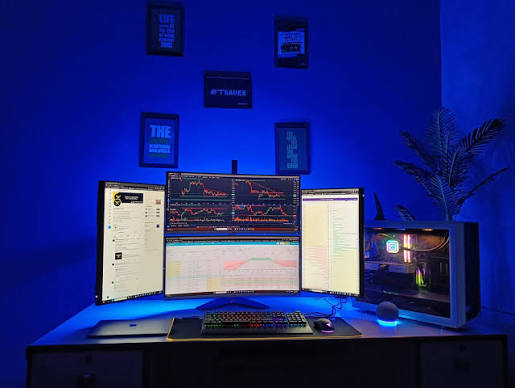
A reliable computer setup can make a significant difference in your crypto trading performance. Whether you’re a beginner learning the markets or an experienced trader executing multiple trades each day, the right combination of hardware, monitors, internet connectivity, and trading software helps improve speed, productivity, and decision-making. In 2026, modern trading setups are more powerful and affordable than ever, making it easier to build an efficient workspace for cryptocurrency trading.
In this guide, we’ll cover the best crypto trader computer setup in 2026, including recommended PCs and laptops, processors, RAM, storage, monitors, internet requirements, essential trading software, and accessories. You’ll also find budget, mid-range, and professional setup recommendations to help you create a fast, secure, and reliable trading workstation for Bitcoin, Ethereum, and other cryptocurrency markets.
Crypto. Trader Computer Setup in 2026: (step by step)
Step 1: Define Your Trading Style First
Before buying anything, define what kind of trader you are. Your setup should match your workflow.
Day Trader / Scalper
Needs: Multiple monitors, ultra-low-latency internet, fast CPU, real-time data feeds, rapid order entry. Priority hardware: Speed and screen real estate above everything else
Swing Trader
Needs: Clean multi-chart setup, reliable alerts, research tools alongside chart.s Priority hardware: Comfort for long research sessions, good display quality
DeFi / On-Chain Trader
Needs: Multiple browser windows with DeFi dashboards, hardware wallet integration, on-chain data tools. Priority hardware: RAM-heavy setup for many browser tabs, multiple monitors
Crypto Investor (Long-Term)
Needs: Portfolio tracking, news aggregation, occasional chart analysis. Priority hardware: Any modern laptop or desktop handles this comfortably
Step 2: Choose Your Core Computer

Desktop Setup (Best for Serious Traders)
A desktop gives you the best performance, upgradability, and value for money as a dedicated trading machine.
Day Trader / Scalper Desktop:
| Component | Recommendation | Approx. Price (India) |
|---|---|---|
| CPU | AMD Ryzen 7 7700X or Intel Core i7-13700K | ₹25,000–₹35,000 |
| RAM | 32GB DDR5 (dual channel) | ₹8,000–₹12,000 |
| Storage | 1TB NVMe SSD (Samsung 980 Pro or WD Black) | ₹7,000–₹10,000 |
| GPU | NVIDIA RTX 3060 or AMD RX 6600 | ₹18,000–₹25,000 |
| Motherboard | ASUS B650 or MSI MAG Z790 | ₹15,000–₹22,000 |
| PSU | Corsair 650W 80+ Gold | ₹7,000–₹9,000 |
| Case | NZXT H510 or Fractal Design Define 7 | ₹6,000–₹10,000 |
| Total | ₹86,000–₹1,23,000 |
Swing Trader / DeFi Desktop (Budget-Optimised):
| Component | Recommendation | Approx. Price (India) |
|---|---|---|
| CPU | AMD Ryzen 5 7600 or Intel Core i5-13400 | ₹15,000–₹20,000 |
| RAM | 32GB DDR5 | ₹8,000–₹12,000 |
| Storage | 512GB NVMe SSD | ₹4,000–₹6,000 |
| GPU | Integrated or budget RX 6500 XT | ₹0–₹10,000 |
| Motherboard | B650 or B760 | ₹10,000–₹15,000 |
| PSU | 550W 80+ Bronze | ₹5,000–₹7,000 |
| Case | Budget ATX case | ₹3,000–₹5,000 |
| Total | ₹45,000–₹75,000 |
Laptop Setup (Mobile Traders)
For traders who move between locations or want a clean single-device setup:
Best laptops for crypto trading in India 2026:
- Apple MacBook Pro M4 Pro — Best overall. Handles 4+ external monitors via Thunderbolt, exceptional battery, fast performance. Price: ₹1,80,000–₹2,50,000
- ASUS ROG Zephyrus G14 — Powerful AMD chip, good display, strong GPU for multi-monitor. Price: ₹1,10,000–₹1,40,000
- Lenovo ThinkPad X1 Carbon Gen 12 — Best keyboard, excellent build, reliable for long sessions. Price: ₹1,40,000–₹1,80,000
- Dell XPS 15 — Large display, solid performance, good port selection. Price: ₹1,10,000–₹1,50,000
Laptop tip: Always buy a laptop dock or USB-C hub if you want to add external monitors. A Thunderbolt dock (₹8,000–₹15,000) turns your laptop into a proper multi-monitor trading station at your desk.
Step 3: Monitor Setup by Trading Style

Day Trader Monitor Setup
Day traders need maximum screen real estate — more charts visible simultaneously means faster pattern recognition and reaction.
Recommended: Triple 24-inch or dual 27-inch setup
- Three 24-inch Full HD monitors (1920×1080) arranged side by side
- Or two 27-inch QHD monitors (2560×1440) for higher resolution
- Dedicated layout: Left monitor (order book + open positions), Centre monitor (primary chart), Right monitor (exchange platform + news)
Recommended monitors:
- LG 24MP60G (24-inch, IPS, 75Hz) — approximately ₹9,000 each
- Samsung F27T350 (27-inch, FHD) — approximately ₹12,000 each
- Dell S2722D (27-inch, QHD) — approximately ₹18,000 each
Day trader triple monitor total: ₹25,000–₹55,000
Swing Trader Monitor Setup
Swing traders need quality over quantity — fewer charts but more data per view.
Recommended: Dual 27-inch QHD or one 34-inch ultrawide
- Dual 27-inch QHD: One for charts, one for research, news, and exchange
- 34-inch ultrawide (3440×1440): Single seamless display replacing two monitors, cleaner cable management
Recommended ultrawide:
- LG 34WP65C-B (34-inch, QHD ultrawide, curved) — approximately ₹35,000
- Samsung S34A650U (34-inch, ultrawide) — approximately ₹40,000
DeFi Trader Monitor Setup
DeFi traders juggle multiple dashboards — DEX interfaces, wallet management, on-chain data, and yield tracking.
Recommended: Dual 27-inch setup with one in portrait mode
- Primary 27-inch landscape: TradingView and primary DEX interface
- Secondary 27-inch portrait (rotated vertical): Long token lists, transaction history, DeFiLlama data
Portrait monitor stand or arm: ₹2,000–₹5,000 for a monitor arm that supports rotation
Monitor Arms
A monitor arm is essential for multi-monitor trading setups:
- Frees up desk space
- Lets you position monitors at exact eye level (critical for neck health)
- Makes it easy to adjust layouts for different market sessions
Recommended: Ergotron LX (single, ₹6,000) or Amazon Basics Dual Monitor Arm (₹3,500)
Step 4: Internet Setup for Crypto Trading
Primary Connection
Best options for Indian crypto traders:
- Jio Fiber — 100–300 Mbps plans at ₹699–₹999/month. Best coverage and reliability in most Indian cities. Low latency to Asian exchange servers.
- Airtel Xstream Fiber — 100–300 Mbps at ₹799–₹1,199/month. Excellent reliability. Strong in metro cities.
- ACT Fibernet — Available in Bangalore, Chennai, Hyderabad, Delhi. Competitive speeds at reasonable prices.
Minimum requirement: 50 Mbps symmetric, below 20ms ping to your exchange’s nearest server.
Wired vs Wi-Fi
Always use wired Ethernet for trading. Connect your trading computer directly to your router with a Cat6 or Cat6A cable.
Wi-Fi introduces:
- Intermittent packet loss (causes delayed order execution)
- Variable latency spikes (miss fast entries)
- Interference from other devices
A ₹200 Cat6 cable eliminates all of these problems instantly.
Mobile Backup Internet
Essential for serious traders:
Keep a dedicated mobile hotspot ready for when your broadband drops mid-trade.
Options:
- Dedicated Jio or Airtel 4G/5G data SIM (₹199–₹299/month for data-only plan)
- Mi-Fi device (₹1,500–₹3,000 one-time) or phone hotspot
Rule: Never be in an open position without a backup internet connection.
Ping Test
Before each trading session, ping your primary exchange:
- Binance: ping binance.com
- Bybit: ping bybit.com
- Target: below 30ms from Indian cities to Singapore/Tokyo servers
Use fast.com or speedtest.net for speed verification.
Step 5: Software Stack for Crypto Traders

Charting and Analysis
TradingView — Industry standard. Free plan supports 3 charts. Pro ($14.95/month, ₹1,250/month) supports 8+ simultaneous charts. Essential for any serious trader.
TradingView setup for crypto traders:
- Create layouts for each trading style (scalping layout, swing layout)
- Build watchlists by category (BTC pairs, altcoin pairs, DeFi tokens)
- Set up price alerts on key support/resistance levels
- Save indicator templates — RSI + MACD + Volume Profile is a strong starting stack
Exchange Platforms
Install and fully configure before live trading:
For Indian traders:
- Binance FZE (binance.com) — Deepest liquidity, most pairs
- Bybit (bybit.com) — Best derivatives and copy trading
- OKX (okx.com) — Full-service with DeFi integration
- WazirX / CoinDCX — Best INR deposit/withdrawal
Set up on every exchange:
- 2FA via authenticator app (not SMS)
- Withdrawal address whitelist
- Anti-phishing code
- Login notification emails
- IP restriction (Binance, OKX)
On-Chain Data Tools
| Tool | What It Shows | Price |
|---|---|---|
| CoinGlass | Futures OI, funding rates, liquidation heatmap | Free / Pro |
| Glassnode | Bitcoin/ETH on-chain metrics | Free tier |
| DeFiLlama | DeFi TVL, protocol yields | Free |
| Arkham Intelligence | Whale wallet tracking | Free |
| Nansen | Smart money flows | Paid |
| IntoTheBlock | Token-level on-chain signals | Freemium |
Portfolio and Tax Tracking
KoinX — Best for Indian traders. Tracks all transactions across exchanges, calculates 30% tax liability, generates Schedule VDA for ITR filing. Connects to 100+ exchanges via API. Price: Free tier + paid plans from ₹1,999/year.
ClearTax Crypto — Alternative Indian crypto tax tool. Good for traders who already use ClearTax for ITR.
Delta — Mobile portfolio tracker (iOS/Android). Shows P&L, positions, and portfolio allocation in real time. Free.
News and Alerts
- Telegram — Follow official exchange announcement channels and curated news channels
- Twitter/X — Real-time market sentiment and breaking news
- CoinDesk / CoinTelegraph — Structured crypto news
- Messari — Deep research and fundamentals
- Economic Times Markets — India-specific regulatory and tax news
Communication and Signals
- Discord — DeFi protocol communities, NFT updates
- Telegram — Signal groups, whale alert bots, exchange updates
- WhatsApp — India-specific trading groups (use with caution — signal quality varies enormously)
Step 6: Security Setup
Hardware Security
Hardware wallet — For any holdings above ₹50,000, store in a hardware wallet:
- Ledger Nano X — approximately ₹12,000 — Bluetooth-enabled, mobile-compatible
- Trezor Model T — approximately ₹15,000 — Open-source firmware, touchscreen
- Ledger Nano S Plus — approximately ₹6,000 — Budget option, USB-only
Never store large amounts on exchange — Exchanges get hacked. Your hardware wallet cannot.
Dedicated trading device — Use a separate computer exclusively for trading. No gaming, no torrenting, no random browsing on your trading machine.
Software Security
Antivirus: Windows Defender (built-in, adequate) + Malwarebytes Premium (₹2,000/year) for real-time ransomware protection.
VPN: Use a VPN when trading on any non-home network. NordVPN (₹282/month) or ExpressVPN (₹693/month) for encrypted connections.
Password Manager: Bitwarden (free, open-source) or 1Password (₹830/month). Generate unique 20+ character passwords for every exchange.
2FA: Google Authenticator or Authy on every exchange and email account. Never use SMS-based 2FA for crypto exchanges.
Anti-Phishing Rules
- Bookmark exchange URLs — never click email links
- Check URL carefully before entering credentials (binance.com not bïnance.com)
- Never enter seed phrases or private keys on any website
- Never share screen while wallet is open
- Verify smart contract addresses on block explorers before approving transactions.
- Never click “connect wallet” on links sent via DM or Telegram
Step 7: Trading Desk and Ergonomics
Desk
Minimum: 140cm wide × 60cm deep for dual monitor + peripherals.s Recommended: 160cm wide × 70cm deep for triple monitor setup.
Standing desk (₹15,000–₹40,000) — Highly recommended for full-time traders. Alternating sitting and standing prevents fatigue that leads to poor trading decisions. Flexispot E7 and Ergoflex are popular Indian options.
Chair
Budget: Green Soul Monster Ultimate (₹8,000–₹12,000) — Good lumbar support, adjustable armrests.sts Mid-range: Featherlite EM-37 (₹15,000–₹20,000) — Reliable, widely available in I. Premium: Herman Miller Aeron (₹80,000+) — Industry standard for long daily sessions
Never trade for hours in a chair without proper lumbar support. Back pain creates distraction that costs more than a good chair.
Keyboard and Mouse
Keyboard: Mechanical keyboard with tactile feedback for precise data entry
- Budget: Redragon K552 (₹2,500) — Solid mechanical keyboard for the price
- Mid-range: Keychron K2 (₹6,000) — Excellent build quality, wireless option
- Premium: Das Keyboard 4 (₹12,000) — Professional grade
Mouse: Any comfortable mouse. A gaming mouse with adjustable DPI helps with precise chart interaction.
- Budget: Logitech G102 (₹1,500)
- Mid-range: Logitech MX Master 3 (₹8,000) — Excellent for multi-monitor workflow
TradingView keyboard shortcuts to learn:
- Alt+1 / Alt+2 — Switch between chart layouts
- Alt+Enter — Add indicator
- Ctrl+Z — Undo drawing
- F11 — Fullscreen chart
Lighting and Eye Care
Bias lighting: LED strip behind monitor (₹800–₹2,000) reduces eye strain during night trading sessions by reducing contrast between screen and wall.
Night Mode: Enable Night Mode (Windows) or Night Shift (Mac) after 6 PM — reduces blue light during evening trading.
20-20-20 rule: Every 20 minutes, look at something 20 feet away for 20 seconds. Prevents eye strain during long sessions.
Step 8: Power Backup
Power cuts during open positions are one of the most avoidable risks for Indian traders.
UPS (Uninterruptible Power Supply)
Essential for every Indian trading setup.
- APC Back-UPS 1500VA — Provides 15–20 minutes runtime during power cuts. Enough to close positions and safely shut down. Price: approximately ₹8,000–₹10,000
- APC Smart-UPS 1500VA — Longer runtime, better surge protection. Price: approximately ₹15,000–₹20,000
Connect: Computer, monitors, router, and networking equipment all to UPS. Never trade from a power setup without UPS protection.
Surge Protector
Even with a UPS, connect all equipment through a good surge protector (₹800–₹2,000) to handle voltage fluctuations common in Indian power supply.
Mobile Power Bank
A 20,000mAh power bank (₹2,000–₹4,000) keeps your phone charged for mobile backup internet during extended outages.
Complete Setup Budgets for Indian Crypto Traders 2026
Beginner Crypto Trader Setup — ₹35,000–₹60,000
- Existing PC or budget desktop (₹20,000–₹35,000)
- Single 24-inch FHD monitor (₹8,000)
- Cat6 ethernet cable (₹200)
- UPS 1500VA (₹8,000)
- Surge protector (₹1,000)
- Jio Fiber 100Mbps (₹699/month)
- Free software stack (TradingView free, KoinX free tier)
Intermediate Crypto Trader Setup — ₹90,000–₹1,50,000
- Mid-range desktop: Ryzen 5 7600 + 32GB RAM (₹45,000–₹60,000)
- Dual 27-inch QHD monitors (₹30,000–₹40,000)
- Monitor arm (₹4,000)
- Mechanical keyboard + gaming mouse (₹5,000–₹8,000)
- UPS 1500VA (₹10,000)
- Hardware wallet: Ledger Nano X (₹12,000)
- TradingView Pro (₹1,250/month)
- Jio Fiber 300Mbps (₹999/month)
- NordVPN (₹282/month)
Professional Crypto Trader Setup — ₹2,50,000–₹4,00,000
- High-end desktop: Ryzen 9 7900X + 64GB RAM + RTX 4070 (₹1,50,000–₹2,00,000)
- Triple 27-inch QHD monitors or 34-inch ultrawide + secondary (₹60,000–₹90,000)
- Standing desk (₹25,000–₹40,000)
- Ergonomic chair (₹15,000–₹25,000)
- Full peripheral setup (₹15,000–₹20,000)
- UPS Smart 1500VA (₹15,000–₹20,000)
- Hardware wallet: Ledger Nano X (₹12,000)
- TradingView Pro+ (₹2,500/month)
- VPN + Password Manager (₹1,000/month)
- KoinX paid plan (₹1,999/year)
FAQs
Q: What is the most important upgrade for a crypto trader’s computer?
Adding a second monitor is the single highest-impact upgrade. It immediately improves your workflow — one screen for charts, one for your exchange platform and data — without requiring a new computer.
Q: Do I need a powerful GPU for crypto trading?
Not necessarily. GPU is important for running multiple monitors smoothly. For triple monitor setups, an entry-level dedicated GPU (₹8,000–₹15,000) is sufficient. You do not need a gaming GPU for trading.
Q: Is a Mac or Windows PC better for crypto trading?
Both work well. Windows has broader software compatibility and better value for money on comparable specs. MacBook Pro M-series offers superior battery life and performance efficiency for laptop traders. Choose based on your preference and budget.
Q: How much RAM do I need for crypto trading?
16GB is the minimum. 32GB is the sweet spot for serious traders running multiple exchanges, TradingView with 8+ charts, on-chain data dashboards, and communication apps simultaneously. 64GB is for professional setups with extremely heavy workloads.
Q: Should I use a laptop or desktop for crypto trading?
Desktop for dedicated trading from a fixed location — better performance, easier to add monitors, more upgradable. Laptop for mobile traders or those with limited space — pair with a dock for a proper multi-monitor setup at your desk.
Q: Is a UPS really necessary for crypto trading in India?
Absolutely. Power cuts during open positions — especially leveraged futures — can result in significant losses if you cannot close positions in time. A ₹8,000–₹10,000 UPS is cheap insurance against this risk.
Q: What internet speed do I need for crypto trading in India?
50 Mbps is sufficient. Stability and low latency matter more than raw speed. A 50 Mbps Jio Fiber connection with low ping is better than 200 Mbps Wi-Fi with packet loss. Always use wired Ethernet.
Conclsion
The perfect crypto trader computer setup in 2026 is not the most expensive one — it is the one built around how you actually trade.
Day traders need speed and screen real estate. Swing traders need quality displays and research tools. DeFi traders need RAM and multiple browser-friendly screens. Investors need reliability above all else.
Start with the essentials: a reliable internet connection on ethernet, 32GB RAM, a second monitor, and a UPS. These four upgrades transform any trading setup without requiring a complete rebuild.
Secure your setup from day one — 2FA, hardware wallet, phishing awareness, and a VPN are non-negotiable for anyone holding significant crypto positions.
Build your setup to match your trading style, secure it properly, and upgrade as your capital and trading volume grow. The market rewards the prepared trader — not the one with the flashiest desk.

