
Google Pixel smartphones have been among the most eSIM-capable Android devices since Pixel 2 — consistently leading Android eSIM implementation with clean software, fast activation, and the deepest eSIM integration of any Android manufacturer. In 2026, Pixel devices from the Pixel 6 through Pixel 9 series all support eSIM, with the latest Pixel 9 series offering the most advanced eSIM management features available on Android.
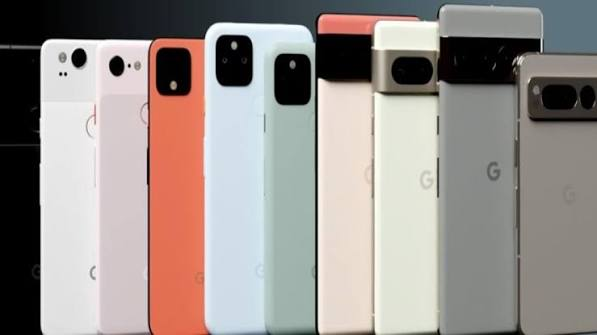
For Indian Pixel users, eSIM activation with Jio, Airtel, and Vi is straightforward — Pixel’s clean Android implementation handles all major Indian carrier eSIM profiles efficiently. Pixel’s eSIM management through Settings is the most intuitive of any Android device — significantly cleaner than Samsung’s One UI or OnePlus’s OxygenOS implementation.
This guide covers everything about using eSIM on Google Pixel in 2026 — from Pixel 6 to Pixel 9 series — with complete Jio, Airtel, and Vi activation steps.
Google Pixel eSIM Compatibility — All Models
| Pixel Model | eSIM Support | Physical SIM | Dual SIM | 5G |
|---|---|---|---|---|
| Pixel 9 Pro XL | ✅ Dual eSIM | ✅ 1 nano-SIM | ✅ 3 total | ✅ |
| Pixel 9 Pro | ✅ Dual eSIM | ✅ 1 nano-SIM | ✅ 3 total | ✅ |
| Pixel 9 | ✅ Dual eSIM | ✅ 1 nano-SIM | ✅ 3 total | ✅ |
| Pixel 9 Pro Fold | ✅ Dual eSIM | ✅ 1 nano-SIM | ✅ 3 total | ✅ |
| Pixel 8 Pro | ✅ Dual eSIM | ✅ 1 nano-SIM | ✅ 3 total | ✅ |
| Pixel 8 | ✅ Dual eSIM | ✅ 1 nano-SIM | ✅ 3 total | ✅ |
| Pixel 8a | ✅ Dual eSIM | ✅ 1 nano-SIM | ✅ 3 total | ✅ |
| Pixel 7 Pro | ✅ Dual eSIM | ✅ 1 nano-SIM | ✅ 3 total | ✅ |
| Pixel 7 | ✅ Dual eSIM | ✅ 1 nano-SIM | ✅ 3 total | ✅ |
| Pixel 7a | ✅ Dual eSIM | ✅ 1 nano-SIM | ✅ 3 total | ✅ |
| Pixel 6 Pro | ✅ Single eSIM | ✅ 1 nano-SIM | ✅ 2 total | ✅ |
| Pixel 6 | ✅ Single eSIM | ✅ 1 nano-SIM | ✅ 2 total | ✅ |
| Pixel 6a | ✅ Single eSIM | ✅ 1 nano-SIM | ✅ 2 total | ✅ |
Key upgrade: Pixel 7 series introduced dual eSIM — maximum 3 active numbers (1 physical + 2 eSIM). Pixel 6 series has a single eSIM — maximum 2 active numbers.
Google Pixel eSIM — Unique Features vs.Other Android
What Makes Pixel eSIM Different
Fastest activation: Pixel processes eSIM profiles faster than any Android — QR scan to active connection in under 60 seconds typically.
Google Fi native: Pixel is Google’s own phone — Google Fi eSIM activates without a QR code at all.
Carrier suggestions: Pixel proactively suggests eSIM carrier options during setup — most helpful onboarding of any Android.
eSIM transfer: Google’s eSIM transfer between Pixel devices is the most seamless Android-to-Android transfer available.
Clean UI: No manufacturer skin on network settings — pure Android eSIM management is the simplest of any Android device.
Android 15+ features:
- eSIM backup to Google account
- Quick SIM switching from notification shade
- Per-app SIM assignment
Finding eSIM Settings on Google Pixel
Primary location:
Settings → Network & internet → SIMs
SIMs screen shows:
- Physical SIM (if inserted)
- Active eSIM profiles
- Stored (inactive) eSIM profiles
- Add SIM option
Alternative access:
Settings → search “eSIM” → direct link to SIM management
Quick Settings:
Pull down notification shade → SIM tile → quick switch between SIMs
Verify Pixel eSIM Capability
Method 1 — EID Check
Dial *#06# → EID number appears alongside IMEI → eSIM supported ✅
Method 2 — Settings Check
Settings → Network & internet → SIMs → if “Add SIM” or “Download SIM” option is visible → eSIM supported ✅
Method 3 — About Phone
Settings → About phone → SIM status → EID present → eSIM capable ✅
Before Activating eSIM on Google Pixel
Pre-Activation Checklist
- ✅ Android updated — Settings → System → System update → install latest
- ✅ Wi-Fi connected — stable connection for eSIM download
- ✅ Battery above 20% — prevents interruption
- ✅ EID noted — dial *#06# → screenshot
- ✅ Pixel unlocked — Settings → Network & internet → SIMs → verify no carrier lock
- ✅ Carrier account active — Jio/Airtel/Vi account in good standing
Checking Carrier Lock on Pixel
Settings → Network & internet → SIMs → look for lock indicator
OR:
Insert a different carrier SIM → if the network works → unlocked ✅
If “SIM not supported” → carrier locked ❌
How to Activate eSIM on Google Pixel in 2026
Method 1: QR Code (Most Common)
- Open Settings
- Tap Network & internet
- Tap SIMs
- Tap Add SIM or + icon
- Select Download a SIM instead of Scan QR code
- Pixel camera opens
- Point at carrier QR code → hold steady 15–20cm away
- QR recognized → plan details appear:
- Carrier name
- Phone number
- Plan type
- Tap Download
- SIM downloading (30–90 seconds on Pixel — fastest Android)
- Name your SIM: “Jio Personal” / “Airtel Work”
- Configure which SIM for calls/data
- Tap Activate → eSIM active
Method 2: Carrier App (Recommended for India)
MyJio:
- Open MyJio → My Account → Get eSIM
- Pixel EID auto-detected OR enter manually
- Verify OTP
- Direct push to Pixel → notification appears
- Tap notification → Settings opens → Download → Activate
Airtel Thanks:
- Airtel Thanks → Account → Switch to eSIM
- Pixel EID detected
- OTP verification
- QR or direct push → activate
Method 3: Manual Activation Code
When the QR code is sent to the same device:
- Settings → Network & internet → SIMs → Add SIM
- Tap Enter code manually or Use code
- Enter:
- SM-DP+ address
- Activation code
- Confirmation code (if required)
- Connect → plan details → Download → Activate
Method 4: eSIM Transfer from Previous Pixel
Upgrading Pixel to Pixel? Easiest eSIM transfer available:
- New Pixel setup → “Copy apps & data” → select old Pixel
- Connected via cable or Wi-Fi → Bluetooth
- Google detects eSIM on old Pixel → offers to transfer
- Confirm on old Pixel → eSIM transfers automatically
- Old Pixel eSIM deactivated → new Pixel active
Carrier support required:
Not all Indian carriers support Pixel-to-Pixel eSIM Quick Transfer — check with Jio/Airtel before relying on this method.
Jio eSIM Activation on Google Pixel

Via MyJio App (Fastest)
- Install/open MyJio on Pixel
- My Account → Get eSIM
- Activate on This Device → Pixel EID auto-read
- Verify OTP → choose activation method
- Direct push: Notification on Pixel → tap → Settings → Download → Activate
- QR code: MyJio shows QR → Settings → SIMs → Add SIM → Scan → activate
Via SMS:
- *#06# → note EID (15 digits)
- SMS: SIMCHG [15-digit EID] to 199
- Reply 1 to confirm
- QR code sent → scan in Settings → SIMs
Jio 5G on Pixel:
After activation → Settings → Network & internet → SIMs → Jio → Preferred network type → 5G
Airtel eSIM Activation on Google Pixel

Via Airtel Thanks App
- Airtel Thanks → Account → My Plan → Switch to eSIM
- Pixel EID auto-detected
- OTP verification
- Choose:
- Direct push: Notification → Settings → Download → Activate (1–3 minutes)
- QR: Scan in Settings → SIMs → Add SIM
- Airtel eSIM active
Airtel 5G on Pixel:
Settings → Network & internet → SIMs → Airtel → Preferred network → 5G (preferred)
Vi eSIM Activation on Google Pixel
Via Vi App
- Vi app → My Account → SIM Services → Get eSIM
- OTP verification → EID detected
- QR code generated → Settings → SIMs → Add SIM → Scan
- Vi eSIM activates (2–6 hours for full registration)
Vi store recommended for Pixel Vi eSIM — more reliable than the app for Pixel specifically.
Google Pixel Dual SIM Configuration (Android 15)

Settings → Network & internet → SIMs
SIM management screen shows:
- SIM 1 (Physical)
- SIM 2 (eSIM 1)
- SIM 3 (eSIM 2) — Pixel 7+ only
Calls:
Select default call SIM → or “Ask every time” → choose per call.
SMS:
Select default SMS SIM.
Mobile data:
Select data SIM → toggle on → only one SIM provides data at a time.
Data switching:
Settings → SIMs → Data → Allow data switch → Pixel automatically switches to the other SIM if the primary data SIM loses signal.
Recommended Indian Pixel dual SIM setup:
| Setting | Recommendation | Reason |
|---|---|---|
| Mobile data | Jio | Best 5G network |
| Calls | Airtel | Better voice quality |
| SMS | Jio | Better delivery rates |
| Data switch | On | Automatic fallback |
Pixel 9 Series eSIM — New Features
Pixel 9 eSIM Improvements over Pixel 8
Faster activation:
Pixel 9 processes eSIM profiles noticeably faster — sub-30-second activation on stable Wi-Fi.
eSIM transfer improvements:
More Indian carriers now support Pixel Quick Transfer — check current Jio/Airtel support.
Android 15 eSIM management:
- Better eSIM backup to Google account
- Improved notification shade SIM switcher
- Per-app SIM assignment (assign WhatsApp to Jio, work apps to Airtel)
Tensor G4 advantage:
Better baseband → stronger network signal → more stable eSIM connection in weak signal areas.
Per-App SIM Assignment on Pixel (Android 15)
Pixel with Android 15 allows assigning specific apps to a specific SIM:
Settings → Network & internet → SIMs → [SIM name] → App assignment
Example Indian setup:
- WhatsApp → Jio SIM (personal)
- Work email and apps → Airtel SIM (work)
- Banking apps → Jio SIM (primary number for OTPs)
Result: Apps automatically use assigned SIM — no manual switching needed.
International Travel with Pixel eSIM
Pixel is the best Android device for international travel eSIM:
Pre-travel setup:
- Purchase Airalo or Nomad eSIM
- Settings → SIMs → Add SIM → Scan Airalo QR
- Label: “Travel — [Country]”
- Profile stored, inactive
When traveling:
Settings → SIMs → activate travel eSIM for data
Indian SIMs remain active for calls and OTPs
Pixel-specific advantage:
Quick notification shade SIM switcher → change data SIM without entering Settings → fastest travel SIM management of any Android.
Return:
Settings → SIMs → deactivate travel SIM → Indian SIM resumes
Converting Physical SIM to eSIM on Pixel
Jio Physical to eSIM (Same Number)
- MyJio → Get eSIM → Convert SIM to eSIM
- OTP verification
- QR code → Settings → SIMs → Add SIM → Scan
- Same Jio number on eSIM
- Physical Jio SIM auto-deactivated
Airtel Physical to eSIM
- Airtel Thanks → Switch to eSIM → same process
- Same Airtel number transferred to Pixel eSIM
- Physical Airtel SIM deactivated
Pixel eSIM APN Settings
If data is not working after activation:
Jio APN on Pixel:
Settings → Network & internet → SIMs → Jio → Access Point Names:
- APN: jionet
- Username/Password: blank
Airtel APN on Pixel:
Settings → Network & internet → SIMs → Airtel → APNs:
- APN: airtelgprs.com
- Username/Password: blank
Vi APN on Pixel:
Settings → Network & internet → SIMs → Vi → APNs:
- APN: www
- Username/Password: blank
Pixel eSIM vs Samsung eSIM vs iPhone eSIM
| Feature | Google Pixel | Samsung (S-series) | iPhone (Indian) |
|---|---|---|---|
| Activation speed | ✅ Fastest | ✅ Fast | ✅ Fast |
| UI simplicity | ✅ Cleanest | ⚠️ One UI complex | ✅ Very clean |
| Dual eSIM | ✅ (Pixel 7+) | ✅ (S-series) | ✅ All models |
| Total active SIMs | 3 (Pixel 7+) | 3 (S-series) | 3 (Indian) |
| Quick Transfer | ✅ Android | ✅ Samsung | ✅ iPhone |
| Per-app SIM | ✅ Android 15 | ✅ One UI | ❌ |
| Google Fi | ✅ Native | ❌ | ❌ |
Troubleshooting Google Pixel eSIM
“Couldn’t Download SIM” Error
Fix sequence:
- Check Wi-Fi → switch to a different network → retry
- Enable Airplane Mode → 30 seconds → disable → retry
- QR code expired (validfor 24–72 hours typically) → request a fresh QR from carrier
- Clear Settings app cache: Settings → Apps → Settings app → Storage → Clear cache
- Restart Pixel → retry download
Pixel eSIM Shows “No Service” After Activation
Fix:
- Settings → Network & internet → SIMs → tap eSIM → toggle off → 10 seconds → toggle on
- Settings → SIMs → Network → Select automatically → let Pixel find network
- Airplane mode cycle → 30 seconds → disable
- Restart Pixel
- Contact carrier with EID and activation timestamp — may need network-side activation push
eSIM Missing After Android Update
Rare but known issue:
- Settings → Network & internet → SIMs → check if eSIM profile present but inactive
- If inactive → tap → enable
- If completely missing → contact carrier → request re-download → carrier pushes profile again
Jio eSIM Activated but No 5G on Pixel
Fix:
Settings → Network & internet → SIMs → Jio → Preferred network type → 5G
If the 5G option is missing → check Jio 5G coverage in your area (not all Indian cities are covered) → try 4G LTE first.
Airtel Thanks App Not Detecting Pixel EID
Fix:
- Manually enter EID: *#06# → copy EID → paste in Airtel app
- Update Airtel Thanks to the latest version
- Clear Airtel Thanks cache → retry
- Visit Airtel store with EID — staff can activate directly
Dual SIM Calls Going to Wrong SIM on Pixel
Fix:
Settings → Network & internet → SIMs → Calls → select specific SIM → OR select “Ask every time” → choose at the time of each call.
Selling Pixel — eSIM Cleanup
Before selling Google Pixel:
Step 1 — Delete all eSIMs:
Settings → Network & internet → SIMs → each eSIM → [eSIM name] → Delete → confirm
Step 2 — Remove Google account:
Settings → [Google account] → Remove account
Step 3 — Factory reset:
Settings → System → Reset → Erase all data (factory reset)
Buyer receives a clean Pixel with no eSIM profiles — ready for their own activation.
Frequently Asked Questions
Does Google Pixel support eSIM in India 2026?
Yes — all Pixel models from Pixel 6 onwards support eSIM in India. Pixel 7, 8, and 9 series support dual eSIM (2 eSIM slots + 1 physical SIM = 3 active numbers). Pixel 6 series supports a single eSIM (1 eSIM + 1 physical = 2 active numbers). Jio, Airtel, and Vi all support eSIM activation on Google Pixel.
How do I activate Jio eSIM on Google Pixel?
Open MyJio → My Account → Get eSIM → Activate on This Device → Pixel EID auto-detected → verify OTP → activate via direct push notification OR scan QR in Settings → Network & internet → SIMs → Add SIM. Activation completes in under 2 minutes on stable Wi-Fi.
Can Pixel 8 use both Jio and Airtel simultaneously?
Yes — Pixel 8 supports physical SIM + 2 eSIMs = 3 active numbers. Insert Jio physical SIM + activate Airtel eSIM + activate Vi eSIM (or travel eSIM) = three active lines simultaneously. Set Jio as the data SIM (best 5G), Airtel as the calls SIM (better voice).
Which is better for eSIM — Pixel or Samsung?
Both are excellent — Pixel has a cleaner, simpler eSIM UI and the fastest activation speed. Samsung One UI has more customization options but a more complex menu structure. For pure eSIM ease of use, Pixel’s clean Android implementation is marginally simpler. Both support dual eSIM on flagship models.
Why is my Pixel eSIM not downloading?
Most common cause: expired QR code (valid 24–72 hours) or unstable Wi-Fi. Request a fresh QR code from the carrier, ensure stable Wi-Fi, try an Airplane Mode cycle, restart the Pixel, and clear the Settings cache. If persistent — visit carrier store with EID for manual activation.
Conclusion
Google Pixel offers the cleanest, most intuitive eSIM experience on Android — fast activation, simple management, and the most advanced dual eSIM features available on any Android device in 2026.
For Indian Pixel users:
Physical SIM (Jio) + eSIM 1 (Airtel) + eSIM 2 (travel/Vi) on Pixel 7+ = maximum connectivity flexibility with India’s best network coverage.
Fastest activation: MyJio app direct push on Pixel — under 2 minutes from start to active Jio eSIM.
Most important Pixel eSIM tip: Update Android to the latest version before activation — Android updates significantly improve carrier compatibility and activation reliability on Pixel devices.
Pixel 9 series is the best Android device for eSIM — fastest activation, dual eSIM standard, cleanest management UI, and per-app SIM assignment for the most sophisticated Indian dual-carrier setup.

