
A free VPN for PC is one of the easiest ways to improve your online privacy, secure your internet connection, and access content safely without paying for a subscription. Whether you’re using Windows 10, Windows 11, or an older version of Windows, a reliable free VPN can encrypt your data, protect you on public Wi-Fi, and help keep your browsing activity private.
In 2026, there are many free VPN services available, but not all of them offer the same level of security, speed, or reliability. Some free VPNs come with data limits, while others provide unlimited bandwidth with fewer server locations. Choosing a trusted provider is essential to ensure your personal information remains protected and your browsing experience stays smooth.

In this guide, we’ll review the best free VPNs for PC in 2026, comparing their features, performance, security, and limitations. Whether you need a VPN for streaming, browsing, gaming, remote work, or everyday privacy, you’ll find the right free option for your needs.
Is there any free VPN for PC?
Short answer: yes, several free VPNs work on PC. The longer answer is that “free” comes with trade-offs you should know about before you install one, especially if you’re using it for anything beyond casual browsing.
If you’ve searched for this, you’re probably trying to access a blocked website, stream something not available in your region, hide your browsing from your ISP, or just add a layer of privacy without spending money. All of that is doable with a free VPN. The question is which one, and what you’re giving up in exchange for not paying.
This guide covers the free VPNs actually worth installing on a Windows PC in 2026, what each one is good and bad at, and a few things people only find out after they’ve already wasted an evening setting one up.
- Check now–Free VPN for PC USA Server 2026
How Free VPNs Actually Make Money

Before picking one, it helps to understand why a VPN would ever be free in the first place. Running VPN servers costs real money, so a free service is paying for that somehow. Usually it’s one of these:
A limited free tier that exists to upsell you to a paid plan — this is the most trustworthy model, since the company’s business is the paid product, not your data. A data cap, so you get full features but only a certain amount of usage per month or day. Slower speeds or fewer server locations on the free tier compared to paid. Or, in the worst cases, the company sells anonymized (or not-so-anonymized) user data to advertisers, which defeats the entire purpose of using a VPN.
Knowing this helps explain why some “free forever” VPNs you’ve never heard of should be avoided entirely, while well-known free tiers from established VPN companies are generally safe.
What to Check Before Installing One
A few basics matter more than flashy marketing. Check whether the VPN has a no-logs policy that’s actually been independently audited, not just claimed on their website. Look at the data limit — some free plans give you 10GB a month, which is fine for browsing but won’t last through much streaming. Check how many server locations are available on the free tier, since some companies lock almost all locations behind the paid plan. And read what permissions the Windows app asks for during install — a VPN app asking for unrelated system access is a red flag.
1. Proton VPN
Proton VPN’s free plan is widely considered the most generous and trustworthy option out there, mainly because it’s run by the same team behind Proton Mail, a company that built its reputation on privacy.
Proton VPN Free is one of the best free VPNs for PC in 2026, offering a strong combination of security, privacy, and reliable performance. Unlike many free VPN services, Proton VPN has no data limits, allowing you to browse, work, and use the internet for as long as you need without worrying about monthly bandwidth caps. It is available for both Windows 10 and Windows 11 and features an easy-to-use interface that is suitable for beginners and experienced users alike.
The free plan uses AES-256 encryption, secure VPN protocols such as WireGuard and OpenVPN, and a strict no-logs policy to help protect your personal information. Proton VPN is developed by the team behind Proton Mail and is known for its strong focus on user privacy and transparency. While the free version provides access to a limited number of server locations, it still delivers stable connections for everyday browsing, online banking, remote work, and public Wi-Fi protection.
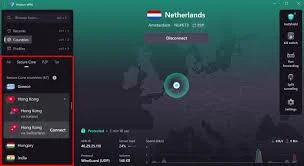
Although the free plan does not officially support streaming-optimized servers or P2P file sharing, it remains an excellent choice for users who want a trustworthy VPN without paying for a subscription.
What it’s good for: Daily browsing, accessing blocked sites, and general privacy without any data cap.
Practical example: Someone working from a coffee shop in Mumbai wants to securely check their email and avoid public Wi-Fi snooping. Proton VPN’s free tier handles this without any usage limit, so it’s safe to leave running all day.
Pros:
- No data cap, unlike almost every other free VPN
- Strong, independently audited no-logs policy
- Owned by a privacy-focused company with a clean track record
Cons:
- Only three free server locations (US, Netherlands, Japan)
- Speeds can drop during peak hours since free users share fewer servers
- No streaming unlock on the free tier — that’s reserved for paid plans
2. Windscribe
Windscribe gives a reasonable monthly data allowance and throws in some useful extras like an ad blocker, which most free VPNs don’t bother with.
Windscribe Free is one of the top free VPNs for PC in 2026, offering an excellent balance of privacy, speed, and flexibility. It is available for Windows 10 and Windows 11 and is easy to install, making it a great choice for beginners and experienced users alike. Unlike many free VPNs that offer very limited usage, Windscribe provides up to 10 GB of free data per month when you verify your email, which is enough for regular browsing, light streaming, and occasional downloads.
The VPN uses strong AES-256 encryption and supports modern protocols such as WireGuard, OpenVPN, and IKEv2 to keep your internet connection secure. Windscribe also follows a no-identifying-logs policy, helping protect your online privacy while browsing on public Wi-Fi or accessing websites securely.
One of Windscribe’s standout features is its access to free servers in multiple countries, giving users more flexibility than many other free VPN services. It also includes useful tools like an ad blocker, tracker blocker, and malware protection through its ROBERT filtering system, providing an extra layer of security while you browse.
Although the free plan has a monthly data limit and some premium server locations are reserved for paid users, Windscribe remains one of the best free VPNs for everyday PC use.

What it’s good for: Light streaming, ad blocking, and users who want a bit more than basic browsing protection.
Practical example: A student wants to block ads while browsing and occasionally watch geo-restricted YouTube videos. Windscribe’s free 10GB monthly limit covers a few weeks of regular use comfortably.
Pros:
- 10GB free monthly data, more generous than most competitors
- Built-in ad and tracker blocker included free
- Access to around 10 server locations on the free plan
Cons:
- 10GB runs out fast if you’re streaming regularly
- Customer support response is slow on the free tier
- Windows app interface feels a bit cluttered for beginners
3. PrivadoVPN
PrivadoVPN’s free plan stands out because it actually unlocks one server location capable of streaming, which most “free” VPNs explicitly block.
What it’s good for: Occasional streaming access without paying, alongside standard browsing protection.
Practical example: Someone wants to check if a show is available on a different region’s streaming catalog before deciding whether to subscribe. PrivadoVPN’s free plan lets them test this without committing to a paid VPN first.
Pros:
- 10GB monthly data, similar to Windscribe
- One of the few free plans that supports streaming on at least one server
- No ads within the app itself
Cons:
- Only one server location usable for streaming
- Slower speeds compared to its own paid tier
- Smaller company, so less of a long-term track record than Proton
4. Hide.me
Hide.me offers a smaller data allowance but makes up for it with a clean, no-nonsense Windows app and a clear stance on not logging user activity.
What it’s good for: Users who want a simple setup with minimal configuration.
Practical example: Someone who just wants to mask their IP address occasionally while doing online banking or filling out forms on public Wi-Fi, without dealing with complicated settings.
Pros:
- Straightforward, beginner-friendly Windows app
- Clear no-logs commitment
- Decent connection speeds on the free plan
Cons:
- Only 10GB monthly data and capped at one device at a time
- Five server locations only
- No 24/7 live chat support on free accounts
5. Atlas VPN
Atlas VPN’s free plan includes unlimited data, which is rare, though it limits you to a handful of server locations to balance that out.
What it’s good for: Heavy daily browsing where you don’t want to watch a data counter.
Practical example: Someone working remotely who wants their VPN running constantly throughout the workday without worrying about hitting a monthly cap.
Pros:
- Unlimited data on the free tier
- Built-in basic malware-blocking feature
- Simple, modern Windows interface
Cons:
- Only a few server locations available for free
- Speeds noticeably slower than the paid version
- Company has changed ownership, which makes some users cautious about its long-term policies
6. TunnelBear
TunnelBear is one of the older, more recognizable names in the free VPN space, known for being approachable rather than feature-heavy.
What it’s good for: First-time VPN users who want something simple to try before committing to anything paid.
Practical example: Someone traveling who wants to quickly check if a website is geo-blocked in a new country, without learning a complicated app first.
Pros:
- Genuinely beginner-friendly design
- Transparent about its limits, no hidden surprises
- Independently audited for security practices
Cons:
- Only 2GB of free data per month, among the lowest on this list
- Limited server selection on the free plan
- Not suitable for any regular streaming use
Free VPN Comparison Table
| VPN | Free Data Limit | Server Locations (Free) | Streaming Support | Best For |
|---|---|---|---|---|
| Proton VPN | Unlimited | 3 | No | Daily browsing |
| Windscribe | 10GB/month | ~10 | Limited | Ad blocking + browsing |
| PrivadoVPN | 10GB/month | 1 (streaming) | Yes (limited) | Testing streaming access |
| Hide.me | 10GB/month | 5 | No | Simple, occasional use |
| Atlas VPN | Unlimited | Few | No | All-day browsing |
| TunnelBear | 2GB/month | Limited | No | First-time users |
What Free VPNs Won’t Do Well
It’s worth being upfront about the limits, since most disappointment comes from expecting paid-level performance for free. Streaming is usually restricted or completely blocked, since unlocking Netflix, Hotstar, or Prime Video libraries takes server infrastructure that free plans don’t offer. Speeds are noticeably slower during busy hours because free users are often deprioritized behind paying customers. Data caps mean you can’t leave a free VPN running constantly for heavy use like downloading large files or watching long videos. And server choice is limited, so if you need a specific country’s IP address, the free tier might not have it.
If you need a VPN for serious daily use — work, frequent streaming, torrenting, or accessing very specific regional content — a paid plan will save you frustration even if it costs a small monthly amount.
How to Set Up a Free VPN on Your PC
Setting one up takes a few minutes. Download the official Windows app directly from the VPN provider’s website, not from a random third-party download site, since that’s a common way people end up with malware disguised as a VPN. Create a free account using an email address, install the app, and sign in. Pick a server location from the available free options, then click Connect. Once connected, check your IP address through a quick search to confirm it shows the VPN server’s location instead of your real one.
That’s the entire process for almost every VPN on this list — none of them require advanced configuration for basic use.
A Quick Note for India-Based Users
If you’re using a free VPN from India, a few things are worth knowing. Server speeds to nearby locations (like Singapore or Japan through Atlas VPN or Proton VPN) tend to be noticeably faster than connecting to US or European servers. Some Indian ISPs throttle VPN traffic during peak hours, so don’t be surprised if speeds vary throughout the day regardless of which VPN you pick. And if you’re using a VPN to access international streaming catalogs, remember that most free tiers explicitly block this, so PrivadoVPN is currently the most realistic free option if streaming access matters to you.
FAQs
Is it actually safe to use a free VPN?
It depends entirely on which one. Established companies like Proton VPN, Windscribe, and TunnelBear are safe because their business model is selling paid upgrades, not your data. Avoid unknown free VPNs with no clear company behind them, since those are far more likely to log and sell your activity.
Can a free VPN unlock Netflix or other streaming services?
Mostly no. Streaming services actively block known VPN server IPs, and free VPN servers get blocked the fastest since they’re shared by thousands of users. PrivadoVPN is currently one of the few exceptions with limited streaming support on its free plan.
Why is my internet so slow after connecting to a free VPN?
Free VPN servers are usually more crowded than paid servers, since everyone on the free tier shares the same limited number of locations. Switching to a less popular server location sometimes helps, but some slowdown is normal with free plans.
Do I need a VPN at all if I’m just browsing normally?
Not strictly, but it adds a layer of protection on public Wi-Fi, prevents your ISP from seeing which sites you visit, and lets you access content restricted in your region. For everyday banking or shopping on home Wi-Fi, it’s optional rather than necessary.
Can I use a free VPN and a paid antivirus together on the same PC?
Yes, they don’t conflict with each other. A VPN protects your internet traffic and location, while antivirus software protects your files and system from malware — they cover different things entirely.
Which free VPN has the best speed for PC?
Proton VPN and Atlas VPN generally perform best for everyday browsing, as both offer unlimited data without aggressive throttling, though actual speeds vary by your location and the server you connect to.
Conclsion
Free VPNs for PC are genuinely useful for everyday browsing, basic privacy, and occasionally getting around a geo-block, as long as you pick one from a known, established company rather than a random app promising unlimited everything for nothing. Proton VPN is the safest all-around starting point if you want no data cap, while Windscribe or PrivadoVPN are worth trying if ad blocking or limited streaming access matters more to you. If your needs grow beyond casual use, most of these companies make it easy to upgrade without starting over from scratch.

