
Yes, there are still several free VPNs for PC available in 2026, but they are not all created equal. While a free VPN can help protect your privacy, secure your connection on public Wi-Fi, or access content from different regions, many free services come with limitations such as data caps, slower speeds, fewer server locations, or restricted features. Choosing a reputable provider is essential to ensure your personal information remains secure and your browsing experience stays reliable.

The best free VPNs for Windows PCs in 2026 focus on user privacy, strong encryption, and transparent data policies rather than displaying excessive ads or collecting unnecessary user data. Some offer unlimited bandwidth with limited server choices, while others provide generous monthly data allowances suitable for everyday browsing, streaming, or occasional remote work.
In this guide, you’ll discover the best free VPNs for PC in 2026, compare their features, understand their limitations, and learn which option is best for your specific needs. Whether you’re looking for better online privacy, safer browsing on public networks, or a cost-free way to access global content, this article will help you choose a trustworthy free VPN without compromising your security.
If you’ve been searching for a free VPN for your PC, you’ve probably noticed something frustrating pretty quickly: most “free” VPNs either barely work, slow your internet to a crawl, or quietly sell your data to make up for the fact that you’re not paying them anything. So the real question isn’t just “are there free VPNs available in 2026” — it’s “are any of them actually worth using?”
The short answer is yes, there are legitimate free VPNs for PC in 2026, but they come with real trade-offs you need to understand before installing one. This guide breaks down what’s actually available, how they compare, and how to avoid the sketchy ones that do more harm than good.
Why People Look for Free VPNs in the First Place
Before getting into specific options, it helps to understand what people actually need a VPN for, since that changes which free option makes sense.
Common reasons people search for a free VPN on PC include:
- Accessing content or websites blocked in their country or workplace
- Protecting their connection on public Wi-Fi, like at a coffee shop or airport
- Hiding their browsing activity from their internet provider
- Testing whether a VPN is useful before committing to a paid plan
- Occasional use, like streaming a show only available in another region
If you fall into the “occasional use” or “just testing it out” category, a free VPN might genuinely be enough. But if you need a VPN for daily work, handling sensitive data, or torrenting, free options usually fall short — and we’ll explain exactly why below.
Do Free VPNs Actually Work in 2026?
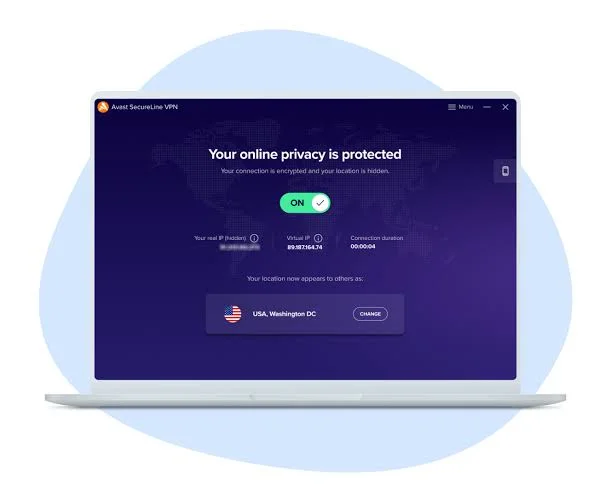
Yes, but with real limits. Free VPNs generally work by restricting one or more of the following: data usage, server locations, connection speed, or the number of devices you can use at once. Some also make money by logging and selling anonymized user data, which defeats the entire purpose of using a VPN for privacy.
Practical example: Imagine you install a free VPN to watch a show that’s only available on a streaming platform in another country. You connect, and it works — for about twenty minutes. Then your connection slows down so much that the video keeps buffering, because the free tier limits your speed to encourage you to upgrade to premium. This is an extremely common pattern.
Types of Free VPNs Available for PC
Not all free VPNs work the same way. Here’s a breakdown of the main categories you’ll come across.
1. Freemium VPNs (Free Tier of a Paid Service)
These are trimmed-down versions of paid VPN services. You get limited data (often 500MB to 10GB per month), fewer server locations, and sometimes slower speeds, but the core security features like encryption are usually solid because it’s the same underlying technology as their paid product.
One of the safest ways to use a free VPN in 2026 is to choose a premium VPN provider that offers a genuine free plan. Unlike many completely free VPN services, these providers operate established paid businesses and use their free tier to introduce users to their platform rather than relying on intrusive advertising or selling user data. As a result, they generally offer stronger security, better privacy policies, and more reliable performance.
Premium VPNs with free plans typically include the same core security features found in their paid versions, such as AES-256 encryption, secure VPN protocols like WireGuard or OpenVPN, DNS leak protection, and a strict no-logs policy. Although the free tier usually limits server locations, connection speeds, or monthly data usage, users still benefit from enterprise-grade security and trustworthy software.
Examples include Proton VPN Free, which offers unlimited data with access to a limited number of server locations, Windscribe Free, which provides a monthly data allowance and servers in several countries, and PrivadoVPN Free, which includes high-speed connections with a generous monthly data limit. These services are suitable for everyday browsing, online banking, public Wi-Fi protection, and occasional streaming, making them excellent choices for users who want reliable security without paying for a subscription.
If your VPN needs grow over time—such as streaming in multiple regions, gaming, downloading large files, or connecting multiple devices—the paid plans unlock faster speeds, larger server networks, dedicated IP options, and advanced privacy features. Starting with a premium provider’s free tier also makes upgrading simple if you later decide you need additional features. For most PC users in 2026, a premium VPN with a free plan offers the best balance between security, performance, and long-term reliability.
Example: A freemium VPN might give you 10GB of free data monthly with access to servers in only three countries, while the paid version unlocks unlimited data and fifty-plus countries.
2. Fully Free VPNs (No Paid Tier)

These VPNs don’t have a premium version, which usually means they make money in other ways — often through ads or data collection. Some are genuinely built on donations or open-source models, but many are not transparent about how they sustain themselves.
Fully free VPNs are services that allow you to use their apps without requiring a paid subscription or offering a premium upgrade. These VPNs can be appealing to users who need basic online privacy or occasional access to a different IP address without spending money. However, because they rely on limited resources, it’s important to choose providers with a strong reputation and transparent privacy practices.
In 2026, fully free VPNs generally offer essential security features such as encrypted connections, IP address masking, and protection when using public Wi-Fi. They are suitable for light web browsing, checking email, accessing online banking securely, and protecting personal information on unsecured networks. Some also provide browser extensions or apps for Windows, macOS, Android, and iOS, making them convenient across multiple devices.
The biggest trade-off is that completely free VPNs often have restrictions. You may experience slower connection speeds during busy periods, fewer server locations, lower bandwidth limits, or limits on the number of devices you can connect at the same time. Streaming support, gaming performance, and torrenting are also commonly restricted or unavailable.
Before installing any free VPN, review its privacy policy carefully. A trustworthy provider should clearly explain what information it collects, use strong encryption, and avoid selling user data to third parties. Reading recent independent reviews and checking how frequently the software is updated can also help you identify reliable services.
For users who only need occasional protection, a reputable fully free VPN can be a practical choice. If you require faster speeds, unlimited data, more server locations, or advanced features such as dedicated IP addresses and priority support, upgrading to a premium VPN is usually the better long-term solution.
3. Browser Extension VPNs
These aren’t full VPNs technically speaking. They only encrypt traffic within your browser, not your entire PC. They’re fine for quick, low-stakes browsing but shouldn’t be relied on for anything involving sensitive information, since apps outside your browser are left completely unprotected.
4. Built-In Browser VPN Features
Some browsers include a built-in VPN-like feature for browsing traffic only. Similar to browser extensions, this only covers browser activity, not your whole system.
Comparison Table: Free VPN Types for PC
| Type | Data Limit | Coverage | Speed | Best For |
|---|---|---|---|---|
| Freemium (paid service’s free tier) | Usually 500MB–10GB/month | Browser + full system | Moderate | Occasional use, testing before upgrading |
| Fully free VPN | Often unlimited but slow | Full system | Often slow, inconsistent | Light browsing, non-sensitive use |
| Browser extension VPN | Usually unlimited | Browser only | Fast | Quick browser-only tasks |
| Built-in browser VPN | Unlimited | Browser only | Fast | Casual browsing privacy |
What to Actually Check Before Using a Free VPN
This is the part most guides skip, but it matters more than which specific VPN you pick.
1. Check the logging policy. A VPN’s entire point is privacy, so if a free VPN logs and sells your browsing data, it’s arguably worse than not using one at all. Look for a clear, published privacy policy — not a vague “we care about your privacy” statement.
2. Look at who owns the company. Some free VPNs are owned by larger data companies whose business model depends on collecting and reselling user data. A quick search of the parent company can reveal a lot.
3. Check for a kill switch. This feature cuts your internet connection if the VPN drops unexpectedly, preventing your real IP address from being exposed. Many free VPNs skip this feature entirely.
4. Read recent reviews, not just the app store rating. App store ratings can be manipulated. Independent reviews from tech sites or forums usually give a more honest picture of real-world performance.
5. Test the speed yourself. Most free VPNs let you try before committing to anything. Run a quick speed test with the VPN on and off to see the real difference.
A Realistic Example: Choosing a Free VPN for Specific Needs
Let’s walk through how someone might actually pick between options based on their situation.
Scenario 1 — Occasional streaming access: Someone wants to watch a show unavailable in their country, just once or twice a month. A freemium VPN with a small monthly data allowance works fine here, since they’re not using it constantly.
Scenario 2 — Public Wi-Fi safety while working from a café: Someone connects to public Wi-Fi weekly and wants basic protection against snooping. A fully free VPN with decent encryption and a no-logs policy is reasonable, as long as they’ve checked reviews confirming it doesn’t sell data.
Scenario 3 — Quick, casual browsing privacy: Someone just wants a bit of extra privacy while browsing news sites and doesn’t handle anything sensitive. A browser extension VPN is enough, and installation takes less than a minute.
Scenario 4 — Handling sensitive work documents remotely: This is where free VPNs generally aren’t recommended at all. The data limits, inconsistent encryption standards, and lack of dedicated support make a paid VPN a much safer choice here.
Pros and Cons of Free VPNs for PC
Pros
- No upfront cost, making it accessible for anyone testing the waters
- Good for occasional, low-stakes browsing needs
- Freemium options often use the same encryption as their paid counterparts
- Easy to install and use, with minimal setup required
- A reasonable way to try a VPN before committing to a paid subscription
Cons
- Data and speed limits make them unreliable for regular or heavy use
- Some free VPNs log and sell user data, defeating the purpose of using one
- Fewer server location options compared to paid services
- Limited or no customer support if something goes wrong
- Missing key features like a kill switch or split tunneling
- Some free VPNs display ads within the app itself
Signs a Free VPN Might Be Unsafe
A few warning signs worth taking seriously before installing any free VPN:
- No published privacy policy, or one that’s vague and hard to find
- Excessive permissions requested during installation that have nothing to do with VPN functionality
- No information available about who owns or operates the company
- Reviews mentioning sudden ads, redirected searches, or unexpected pop-ups
- The app hasn’t been updated in over a year, which can mean outdated security protocols
If a free VPN shows more than one of these signs, it’s safer to look elsewhere, even if it means paying a small amount for a more reputable option.
When It Makes Sense to Upgrade to Paid
Free VPNs work well for light, occasional use, but here’s when upgrading genuinely makes sense:
- You’re streaming regularly and keep hitting data caps
- You need consistent, fast speeds for video calls or work
- You want access to servers in many different countries
- You’re handling sensitive information and need stronger security guarantees
- You want features like a kill switch, split tunneling, or dedicated customer support
Many paid VPNs offer affordable monthly or yearly plans, and some even have money-back guarantees, so it’s worth testing a paid option briefly if free VPNs consistently fall short of your needs.
Frequently Asked Questions
Are free VPNs safe to use on a PC in 2026?
Some are, but not all. Reputable freemium VPNs from established companies are generally safe, while lesser-known fully free VPNs can carry risks like data logging or excessive permissions. Always check the privacy policy and company background first.
Why do free VPNs limit data and speed?
Running VPN servers costs money, so free VPNs either limit usage to encourage upgrades to a paid plan, or they make money through other means like ads or data collection. Limits are usually a sign of a sustainable business model rather than a red flag by itself.
Can I use a free VPN for streaming?
Yes, but with limitations. Free VPNs often have restricted server locations and slower speeds, which can make streaming inconsistent, especially with data caps that get used up quickly with video content.
Do free VPNs actually protect my privacy?
It depends entirely on the provider. A well-reviewed free VPN with a clear no-logs policy can offer genuine privacy protection. Poorly reviewed ones may collect and sell your data, which works against the entire purpose of using a VPN.
Is it better to use a free VPN or no VPN at all?
A reputable free VPN is generally better than no VPN when using public Wi-Fi, since it still encrypts your connection. However, an untrustworthy free VPN with poor privacy practices could be worse than not using one, especially if it logs and sells your data.
Can I use a free VPN and a paid VPN interchangeably depending on my needs?
Yes, some people use a free VPN for casual browsing and switch to a paid VPN for streaming or sensitive tasks. Just make sure both are reputable and that you’re not running two VPNs simultaneously, which can cause connection issues.
Do free VPNs work well for torrenting?
Generally not recommended. Most free VPNs either block torrenting entirely or don’t offer the speed and stability needed for it. Paid VPNs with dedicated torrenting support are a safer, more reliable choice for this specific use.
Conclsion
Yes, there are free VPNs for PC in 2026 that are genuinely safe and useful, but only if you choose carefully. Reputable freemium options tend to be the safest bet since they share security infrastructure with established paid services, while fully free VPNs require more caution and research before installing.
For occasional browsing, public Wi-Fi protection, or testing whether a VPN fits your needs, a well-reviewed free VPN can absolutely do the job. But if you find yourself relying on it daily, hitting data limits constantly, or handling anything sensitive, it’s worth considering a paid plan that offers better speed, security, and support.

