
Does the Samsung Galaxy S21 Ultra Support eSIM — Complete Guide 2026
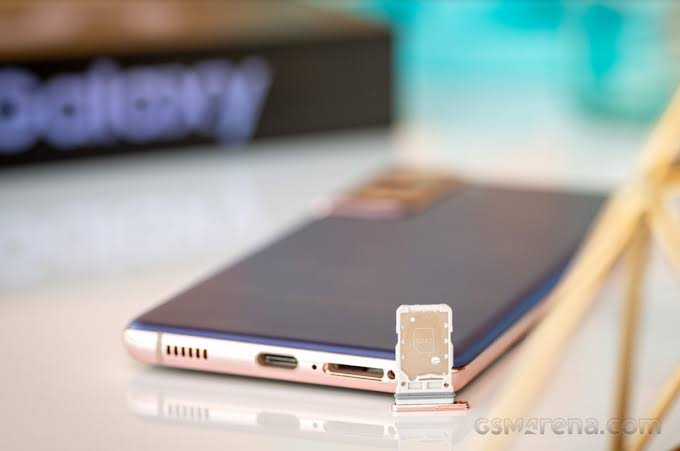
The Samsung Galaxy S21 Ultra is one of Samsung’s most capable flagship devices — and yes, it does support eSIM. But the answer comes with important nuances that many guides skip: eSIM support on the S21 Ultra depends on which regional variant you have, which carrier you’re using, and whether your specific unit was sold with eSIM functionality enabled.
This guide covers everything about eSIM on the Samsung Galaxy S21 Ultra — confirming compatibility, checking if your specific unit supports eSIM, setting it up with Indian carriers (Jio, Airtel, Vi), troubleshooting common issues, and comparing eSIM performance on the S21 Ultra versus newer Samsung models.
- Check now the Problem – Samsung Galaxy S26 eSIM Not Working — Complete Fix 2026
Samsung Galaxy S21 Ultra eSIM — Quick Answer
Does Samsung Galaxy S21 Ultra support eSIM?
✅ Yes — but with regional variants:
| Variant | eSIM Support | Physical SIM |
|---|---|---|
| Global (SM-G998B) | ✅ Yes | 1x Nano SIM |
| USA (SM-G998U) | ✅ Yes | 1x Nano SIM |
| India (SM-G998B/DS) | ✅ Yes (select units) | 2x Nano SIM (Dual SIM) |
| Korean (SM-G998N) | ❌ No | 2x Nano SIM |
| China (SM-G998B/ZH) | ❌ No | 2x Nano SIM |
Critical India-specific note:
The Indian variant of the Galaxy S21 Ultra (SM-G998B/DS) is a Dual Physical SIM model — meaning it has two physical SIM card slots. On Dual SIM variants, eSIM functionality is typically not present because the two physical SIM slots replace the eSIM chip.
If you bought your S21 Ultra in India through official Samsung India, Flipkart, or Amazon India — you almost certainly have the Dual Physical SIM variant without eSIM support.
If you imported your S21 Ultra from the US, UK, or global market — you likely have eSIM support.
How to Confirm If Your S21 Ultra Supports eSIM
Before attempting any eSIM setup, confirm your specific unit supports eSIM:
Method 1 — Check EID Number (Most Reliable)
- Open the Phone app on your S21 Ultra
- Dial *#06#
- Device information screen appears
- Look for EID number — a 32-digit code
Result interpretation:
- EID present (32-digit number shown) → Your S21 Ultra supports eSIM ✅
- No EID shown → Your S21 Ultra does NOT support eSIM ❌
Method 2 — Check SIM Manager
- Open Settings
- Tap Connections
- Tap SIM Card Manager or SIM Manager
- Look for the “Add Mobile Plan” or “Add eSIM” option
Result interpretation:
- “Add Mobile Plan” visible → eSIM supported ✅
- No “Add Mobile Plan” option → eSIM not supported on your variant ❌
Method 3 — Check Model Number

- Settings → About Phone → Software Information
- Note your Model Number
Model number guide:
- SM-G998B (single SIM) → eSIM supported ✅
- SM-G998B/DS (dual SIM) → eSIM NOT supported ❌
- SM-G998U (US carrier) → eSIM supported ✅
- SM-G998N (Korea) → eSIM NOT supported ❌
Method 4 — Physical SIM Tray Check
- Remove SIM tray from S21 Ultra
- Count SIM card slots:
- 1 SIM slot → Likely eSIM supported ✅
- 2 SIM slots → Dual SIM variant, likely no eSIM ❌
Samsung Galaxy S21 Ultra eSIM Specifications
For S21 Ultra units with eSIM support:
eSIM chip: Embedded SIM (eUICC) — permanently soldered inside device
eSIM profiles supported: Up to 10–12 profiles storable simultaneously
Active eSIM: 1 active at a time (alongside physical SIM)
Dual SIM configuration:
- Slot 1: Physical Nano SIM
- Slot 2: eSIM (digital)
Network support via eSIM:
- 4G LTE ✅
- 5G Sub-6GHz ✅ (where available)
- 3G/2G fallback ✅
Indian carrier eSIM support on S21 Ultra:
- Jio eSIM: ✅ Supported
- Airtel eSIM: ✅ Supported
- Vi eSIM: ✅ Supported
- BSNL: Limited — check availability
How to Set Up eSIM on Samsung Galaxy S21 Ultra
If your S21 Ultra supports eSIM (confirmed via EID check), here’s the complete setup process:
Setting Up Jio eSIM on S21 Ultra

Step 1: Get Your EID and IMEI
- Dial *#06# on S21 Ultra
- Note the EID (32-digit) and IMEI numbers
- Screenshot for reference
Step 2: Request Jio eSIM QR Code
Via MyJio App:
- Open MyJio app
- Profile → SIM Services → Get eSIM
- Enter S21 Ultra EID number
- Enter IMEI number
- Complete Aadhaar KYC + OTP verification
- QR code sent to registered email in 2–4 hours
Via Jio Store:
- Visit nearest Jio Store with Aadhaar and S21 Ultra
- Request eSIM installation
- QR code issued immediately
- Staff can assist with scanning
Via Customer Care:
- Call 199 from registered Jio number
- Request eSIM QR code
- Provide EID and IMEI over call
- QR code sent via email in 2–4 hours
Step 3: Install eSIM on S21 Ultra
- Settings → Connections → SIM Card Manager
- Tap Add Mobile Plan
- Tap Scan Carrier QR Code
- Scan Jio QR code from email
- Profile downloads (30–90 seconds)
- Tap Activate ✅
Step 4: Configure Dual SIM Settings
- SIM Card Manager → Set defaults:
- Calls: Physical SIM or Jio eSIM
- SMS: Physical SIM or Jio eSIM
- Data: Physical SIM or Jio eSIM
- Recommended: Use Jio eSIM for data (better 4G/5G in most areas)
Setting Up Airtel eSIM on S21 Ultra
Step 1: Request via Airtel Thanks App

- Open the Airtel Thanks app
- My Account → Manage SIM → Switch to eSIM
- Enter S21 Ultra EID number
- Complete video KYC (3–5 minutes with Aadhaar)
- QR code sent to email within 15–30 minutes
Step 2: Install on S21 Ultra
- Settings → Connections → SIM Card Manager → Add Mobile Plan
- Scan Airtel QR code
- Download and activate ✅
Alternative — Airtel Store:
Visit Airtel Store with Aadhaar for in-person eSIM setup — QR code issued and scanned on the spot.
Setting Up Vi eSIM on S21 Ultra
Step 1: Request via Vi App or Store
Vi App:
- Open Vi app → My Account → Manage SIM → Convert to eSIM
- Enter EID → Complete KYC
- QR code via email in 4–6 hours
Vi Store (Recommended for Vi):
- Visit the nearest Vi Store with Aadhaar
- Request eSIM installation
- In-store KYC and immediate QR code
Step 2: Install on S21 Ultra
- SIM Card Manager → Add Mobile Plan → Scan QR Code
- Install Vi eSIM profile ✅
eSIM on S21 Ultra vs Physical SIM — Which is Better?
For Indian S21 Ultra users, here’s the honest comparison:
| Feature | Physical SIM | eSIM |
|---|---|---|
| Setup | Insert card | Digital QR scan |
| Carrier switching | Buy new SIM | Download new profile |
| Travel convenience | Buy local SIM abroad | Download travel eSIM instantly |
| Dual SIM | Both slots used | 1 slot free for another physical SIM |
| India carrier support | All carriers | Jio, Airtel, Vi |
| Risk of loss | Card can be lost | No physical card |
| Emergency replacement | Store visit | Remote reactivation |
Recommended dual SIM setup for Indian S21 Ultra users:
- Slot 1 (Physical): Primary number for calls and SMS (Airtel/Jio)
- Slot 2 (eSIM): Secondary data SIM or travel eSIM when abroad
Common eSIM Problems on Samsung S21 Ultra and Fixes
Problem 1: “Add Mobile Plan” Option Not Visible
Cause: Dual SIM (DS) variant without eSIM support
Fix:
- Confirm model number — SM-G998B/DS has no eSIM
- If SM-G998B (single SIM) — check software version
- Update One UI: Settings → Software Update → Download and Install
- If still missing after update — contact Samsung Support
Problem 2: QR Code Not Scanning on S21 Ultra
Fix:
- Clean rear camera lens
- Increase brightness on QR code source device
- Ensure good lighting
- Hold QR source 15–20cm from S21 Ultra camera
- Print QR code on paper for more reliable scanning
- Request manual activation code from carrier as alternative
Problem 3: eSIM Profile Download Failed on S21 Ultra
Fix:
- Switch to a stronger Wi-Fi connection
- Disable any active VPN
- Clear SIM Card Manager cache:
- Settings → Apps → Show System Apps
- Find SIM Card Manager → Storage → Clear Cache
- Retry download
- Reset network settings if still failing:
- Settings → General Management → Reset → Reset Network Settings
Problem 4: eSIM Installed But No Signal on S21 Ultra
Fix:
- Toggle Airplane Mode on/off
- Manual network search:
- Settings → Connections → Mobile Networks → Network Operators → Search Now
- Select your carrier manually
- Call carrier for manual network provisioning
- Check network mode:
- Mobile Networks → Network Mode → 5G/LTE/3G/2G Auto
Problem 5: S21 Ultra eSIM Keeps Disconnecting
Fix:
- Check for SIM conflict — dual SIM settings may cause interference:
- SIM Card Manager → Set one SIM as primary for data
- Update APN settings:
- Mobile Networks → Access Point Names → Reset to Default
- Disable and re-enable eSIM in SIM Card Manager
- Restart S21 Ultra
Problem 6: One UI Update Caused eSIM to Disappear
Fix:
- Restart S21 Ultra after update completion
- Toggle Airplane Mode on/off
- Check SIM Card Manager for profile
- If profile missing — contact carrier for new QR code
- Carriers issue replacement QR codes for update-related profile loss free of charge
S21 Ultra eSIM — International Travel Setup
The S21 Ultra’s eSIM is particularly valuable for international travel — keep your Indian physical SIM active while using an international eSIM for local data rates:
Best International eSIM Providers for S21 Ultra
| Provider | Coverage | India Price | Activation |
|---|---|---|---|
| Airalo | 200+ countries | ₹500–₹3,000 | QR code/App |
| Holafly | 160+ countries | ₹800–₹4,000 | QR code |
| Maya Mobile | Asia focus | ₹400–₹2,000 | QR code |
| Nomad eSIM | 100+ countries | ₹600–₹3,500 | QR code/App |
International eSIM Setup on S21 Ultra
Before traveling:
- Purchase international eSIM plan from Airalo or Holafly
- Receive QR code via email
- SIM Card Manager → Add Mobile Plan → Scan QR Code
- Download profile — do NOT activate yet
- Keep installed but inactive until you land
At destination:
- SIM Card Manager → Select international eSIM → Activate
- Set mobile data to international eSIM
- Keep Indian physical SIM active for calls/SMS on Indian number
- Indian number stays reachable while using local data rates ✅
Samsung Galaxy S21 Ultra vs Newer Samsung Models for eSIM
If you’re considering upgrading from S21 Ultra, here’s how eSIM support compares:
| Model | eSIM Support | India Variant eSIM |
|---|---|---|
| Galaxy S21 Ultra | ✅ (non-DS variant) | ❌ (DS variant no eSIM) |
| Galaxy S22 Ultra | ✅ | ❌ (DS variant no eSIM) |
| Galaxy S23 Ultra | ✅ | ❌ (DS variant no eSIM) |
| Galaxy S24 Ultra | ✅ | ✅ (India variant now supports eSIM) |
| Galaxy S25 Ultra | ✅ | ✅ |
| Galaxy S26 Ultra | ✅ | ✅ |
Important trend: Samsung India started enabling eSIM on Indian variants from the S24 series — meaning S24 Ultra, S25 Ultra, and S26 Ultra sold in India through official channels now support eSIM even on the Dual SIM variant.
The S21 Ultra remains in active use for many Indian users — and imported S21 Ultra units (SM-G998B single SIM) work perfectly with Jio, Airtel, and Vi eSIM in India.
S21 Ultra eSIM — Frequently Asked Questions
Q: Does Samsung Galaxy S21 Ultra support eSIM in India?
It depends on the variant. The global single SIM variant (SM-G998B) supports eSIM. The Indian Dual SIM variant (SM-G998B/DS) sold through Indian retailers typically does NOT support eSIM — it has two physical SIM slots instead.
Q: How do I check if my S21 Ultra has eSIM?
Dial *#06# on your S21 Ultra. If an EID (32-digit number) appears — your device supports eSIM. If no EID shows — your variant doesn’t support eSIM.
Q: Can I use Jio eSIM on Samsung S21 Ultra?
Yes — if your S21 Ultra is the single SIM global variant with eSIM support (EID present). Request a Jio eSIM QR code via the MyJio app, enter your EID number, and install via SIM Card Manager → Add Mobile Plan.
Q: Why doesn’t my S21 Ultra show “Add Mobile Plan” in settings?
Most likely you have the Indian Dual SIM variant (SM-G998B/DS), which doesn’t support eSIM. Confirm by checking your model number in Settings → About Phone. DS suffix indicates Dual SIM without eSIM.
Q: Can I add eSIM support to my Indian S21 Ultra Dual SIM variant?
No — eSIM support is determined by hardware. The Dual SIM variant has two physical SIM slots and no embedded eSIM chip. Software updates cannot add eSIM hardware that isn’t present.
Q: How many eSIM profiles can Samsung S21 Ultra store?
The S21 Ultra can store up to 10–12 eSIM profiles simultaneously. Only one eSIM can be active at a time alongside the physical SIM.
Q: Does S21 Ultra support 5G via eSIM?
Yes — the S21 Ultra supports 5G through both physical SIM and eSIM (on supported variants). Compatible with Jio 5G and Airtel 5G where available.
Q: What is the difference between SM-G998B and SM-G998B/DS?
SM-G998B is the single SIM global variant — supports eSIM + 1 physical SIM. SM-G998B/DS is the Dual SIM variant — supports 2 physical SIMs but NO eSIM. The /DS suffix indicates Dual SIM.
Q: Can I use an international eSIM on S21 Ultra while keeping my Indian SIM?
Yes — if your S21 Ultra has eSIM support (SM-G998B single SIM variant). Keep your Indian physical SIM in the tray for calls/SMS. Add and activate an international eSIM for local data rates when traveling.
Q: Is Samsung S21 Ultra worth buying in 2026 for eSIM use?
The S21 Ultra remains a capable device — but for Indian buyers wanting eSIM support out of the box, the Galaxy S24 Ultra, S25 Ultra, or S26 Ultra are better choices since Indian variants of these newer models support eSIM on the Dual SIM configuration.
Conclsion
The Samsung Galaxy S21 Ultra does support eSIM — but whether your specific unit has eSIM capability depends entirely on which variant you have. The single SIM global variant (SM-G998B) fully supports eSIM with Jio, Airtel, and Vi in India. The Indian Dual SIM variant (SM-G998B/DS) sold through Indian retailers does not.
The fastest way to confirm: dial *#06# and look for an EID number. EID present = eSIM supported. No EID = no eSIM on your unit.
For Indian buyers considering an S21 Ultra purchase in 2026 — if eSIM is important to you, source a global single SIM variant (SM-G998B without /DS suffix) or upgrade to a newer Samsung flagship (S24 Ultra or later) where Indian variants now include eSIM support.
For S21 Ultra owners with confirmed eSIM support — setup with Jio, Airtel, and Vi is straightforward via their respective apps, and international travel eSIM via Airalo makes the S21 Ultra an excellent travel companion even in 2026.

