
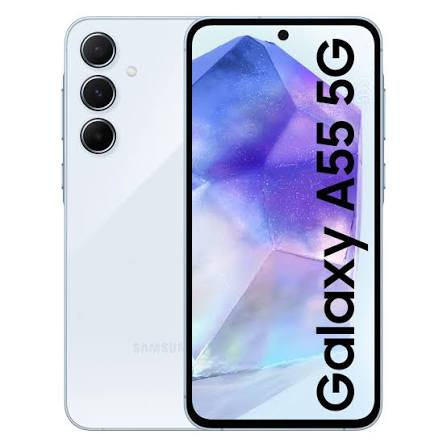
The Samsung Galaxy A55 5G represents Samsung’s most popular mid-range smartphone in India — combining capable hardware with an affordable price point that makes it one of the best-selling Android phones in the Indian market. Unlike Samsung’s premium Ultra series, the A55 offers eSIM support alongside its physical SIM capabilities, bringing digital SIM management to budget-conscious Indian consumers for the first time in this price segment.
For Indian eSIM on the Samsung Galaxy A55, eSIM activation on a Samsung Galaxy A55 with Jio, Airtel, or Vi provides the flexibility of dual connectivity — a physical SIM for a primary carrier plus an eSIM for a secondary carrier, travel SIM, or work number — all without carrying multiple phones or swapping SIM cards.
This guide covers everything about using eSIM on Samsung Galaxy A55 in 2026 — from verifying eSIM capability to complete Jio, Airtel, and Vi activation steps to troubleshooting common issues.
How to check eSIM support on the eSIM on a Samsung Galaxy A55, how to add an eSIM, how to activate it using a QR code, how to select your preferred SIM for calls and mobile data, and what to do if the eSIM does not activate.
- Check now: How to Delete eSIM on Samsung Galaxy S26
Samsung Galaxy A55 eSIM Specifications
| Feature | Samsung Galaxy A55 5G |
|---|---|
| Physical SIM | ✅ nano-SIM (Slot 1) |
| eSIM support | ✅ Yes |
| Dual SIM | ✅ Physical SIM + eSIM |
| Total active numbers | 2 (1 physical + 1 eSIM) |
| 5G support | ✅ Yes |
| Chip | Exynos 1480 |
| OS | Android 14 / One UI 6.1 (upgradeable) |
| Indian model | SM-A556E |
Important note: Samsung Galaxy A55 supports ONE eSIM — not dual eSIM like Samsung’s S-series Ultra phones. Maximum 2 active numbers simultaneously (1 physical SIM + 1 eSIM).
Verify Samsung Galaxy A55 eSIM Capability
Method 1 — Settings Check
Settings → Connections → SIM card manager → look for eSIM or Add mobile plan option
If eSIM option visible → A55 supports eSIM ✅
If no eSIM option → check One UI version (may need an update)
Method 2 — IMEI Check
Dial *#06# on Galaxy A55:
- EID number appears → eSIM supported ✅
- Only IMEI, no EID → eSIM not supported ❌
Method 3 — One UI Version Check
Settings → About Phone → Software Information → One UI version
Ensure One UI 6.1 or later for best eSIM support on A55.
Samsung Galaxy A55 vs Samsung Ultra — eSIM Differences
| Feature | Galaxy A55 | Galaxy S25 Ultra |
|---|---|---|
| Physical SIM slots | 1 | 1 |
| eSIM slots | 1 | 2 |
| Total active numbers | 2 | 3 |
| Dual eSIM | ❌ No | ✅ Yes |
| eSIM + physical SIM | ✅ Yes | ✅ Yes |
| Price range | ₹40,000 | ₹1,30,000+ |
Key difference: A55 has a single eSIM (1 physical + 1 eSIM = 2 numbers). Ultra models have dual eSIMs (1 physical + 2 eSIMs = 3 numbers).
Indian Carrier eSIM Support on Samsung Galaxy A55
| Carrier | eSIM Support on A55 | 5G on eSIM | Activation Method |
|---|---|---|---|
| Jio | ✅ Full | ✅ Yes | MyJio app or SMS |
| Airtel | ✅ Full | ✅ Yes | Airtel Thanks app |
| Vi | ✅ Full | ⚠️ Limited | Vi app or store |
| BSNL | ⚠️ Limited | ❌ No | Store visit |
Before Activating eSIM on Samsung Galaxy A55
Pre-Activation Checklist
- ✅ One UI updated — Settings → Software Update → install latest
- ✅ Wi-Fi connected — stable connection for eSIM download
- ✅ EID noted — dial *#06# → screenshot EID number
- ✅ Phone unlocked — not carrier-locked toa specific carrier
- ✅ Battery above 20% — prevents interruption
- ✅ Carrier account active — Jio/Airtel/Vi account in good standing
- ✅ Physical SIM inserted — for OTP during activation
Finding EID on Samsung Galaxy A55
Method 1 — Dial code:
Dial *#06# → EID displayed on screen → note or screenshot
Method 2 — Settings:
Settings → About Phone → Status Information → EID
Method 3 — SIM manager:
Settings → Connections → SIM card manager → eSIM → EID shown
Where to Find eSIM Settings on Samsung Galaxy A55
Primary location:
Settings → Connections → SIM card manager
From SIM manager:
- View active SIMs (physical + eSIM)
- Add eSIM → activate new profile
- Manage eSIM profiles
- Switch active eSIM
- Delete eSIM profile
Alternative path:
Settings → search “eSIM” → direct link appears
How to Activate eSIM on Samsung Galaxy A55 /eSIM on a Samsung Galaxy A55 in 2026
Method 1: QR Code Activation (Recommended)
- Open Settings
- Tap Connections
- Tap SIM card manager
- Tap Add mobile plan or Add eSIM
- Tap Scan carrier QR code
- Galaxy A55 camera opens
- Point at carrier-provided QR code
- QR recognized → plan details appear
- Tap Confirm
- eSIM downloading → progress shown
- Name your eSIM: Enter label (“Airtel Work” / “Jio eSIM”)
- Tap Done
- eSIM active — signal bars appear for new carrier
Time: 2–5 minutes on stable Wi-Fi
Method 2: Manual Activation Code
When the QR code sent to the same device:
- Settings → Connections → SIM card manager
- Add mobile plan → Enter activation code
- Type the SM-DP+ address and activation code
- Tap Connect → plan details appear
- Confirm → eSIM activates
Method 3: Carrier App Direct Push
Some carriers push eSIM profile directly to A55:
Jio direct push via MyJio:
MyJio generates profile → pushes notification to A55 → notification appears: “Mobile Plan Ready to Install” → tap → Settings opens → confirm → eSIM installs automatically.
Airtel direct push:
Similar process via Airtel Thanks app → notification → confirm → installed.
Jio eSIM Activation on Samsung Galaxy A55

Via MyJio App (Fastest Method)
- Download/open the MyJio app on the Galaxy A55
- Tap My Account → Get eSIM
- Select Activate on This Device (A55 detected automatically)
- MyJio reads the EID automatically from the A55
- Verify identity via OTP
- Choose: Direct push or QR code
- If QR code:
- QR displayed in MyJio
- Settings → Connections → SIM card manager → Add mobile plan → Scan QR
- Scan MyJio QR → confirm → Jio eSIM active
- If direct push:
- Notification appears on A55
- Tap notification → Settings opens → confirm → Jio installs
Jio eSIM activation via SMS:
- *#06# → note EID (last 15 digits)
- Send SMS: SIMCHG [15-digit EID] to 199
- Reply 1 to confirm porting
- QR code sent → scan in SIM card manager
Jio 5G on A55 eSIM:
After activation → SIM card manager → Jio eSIM → Network mode → 5G/LTE/3G/2G (Auto)
Airtel eSIM Activation on Samsung Galaxy A55

Via Airtel Thanks App
- Open Airtel Thanks on Galaxy A55
- Navigate to Account → My Plan → Manage SIM
- Tap Switch to eSIM
- A55 EID auto-detected
- Verify OTP
- Select delivery method:
- Direct to device: Push notification → tap → confirm → Airtel eSIM installs
- QR code: Scan via SIM card manager → Scan QR
- Airtel eSIM activates in 1–3 minutes
Airtel 5G on A55 eSIM:
SIM card manager → Airtel eSIM → tap → Mobile data → enable → Network mode → 5G/LTE Auto
Vi eSIM Activation on Samsung Galaxy A55
Via Vi App
- Open Vi app on A55
- My Account → SIM Services → Get eSIM
- Verify OTP → EID detected
- QR code generated → scan via SIM card manager
- Vi eSIM activates (2–6 hours for full network registration)
Vi store recommended for Galaxy A55 Vi eSIM — more reliable than app-based activation.
SIM Card Manager — Samsung A55 eSIM Configuration

After activation, configure dual SIM settings:
Settings → Connections → SIM card manager
Active SIMs display:
Shows both physical SIM and eSIM with:
- Carrier name
- Signal strength
- Active/inactive status
Calls:
Select which SIM handles outgoing calls:
- Physical SIM (SIM 1)
- eSIM (SIM 2)
- Ask every time
Texts:
Select default SMS SIM:
- Physical SIM
- eSIM
Mobile data:
Select data SIM:
- Physical SIM
- eSIM
Only one SIM can provide data at a time
Recommended Indian A55 dual SIM setup:
| Setting | Recommendation | Reason |
|---|---|---|
| Calls | Airtel (eSIM) | Better voice quality |
| Texts | Jio (physical) | Better delivery |
| Mobile data | Jio (physical) | Best 5G network |
| Ask before switch | On | Awareness of SIM used |
Samsung Galaxy A55 eSIM — One UI Specific Features
One UI 6.1 eSIM Features
eSIM quick switch:
Pull-down notification panel → SIM selector → quick switch between physical and eSIM for data.
SIM-specific contacts:
Contacts can be assigned to a specific SIM — calls from that contact automatically use the assigned SIM.
Data switch notification:
When switching mobile data between SIMs → One UI shows notification confirming switch.
eSIM backup:
One UI backs up eSIM labels and preferences to Samsung account — preserves setup during factory reset (not eSIM profile itself — carrier must re-issue).
Samsung Account eSIM Protection
Link Galaxy A55 to Samsung account:
Settings → Samsung Account → sign in
Benefits for eSIM:
- Remote device management if A55 is lost
- eSIM preferences backed up
- Find My Mobile works with Samsung account
International Travel with Samsung Galaxy A55 eSIM
Galaxy A55 is an excellent travel companion with eSIM:
Pre-travel setup:
- Purchase Airalo or Nomad eSIM for destination
- Settings → Connections → SIM card manager → Add mobile plan → Scan QR
- Label: “Travel — [Country Name]”
- Profile stored, inactive
When abroad:
SIM card manager → activate travel eSIM as mobile data
Indian physical SIM remains active for calls and banking OTPs
Return to India:
SIM card manager → deactivate travel eSIM → Indian physical SIM resumes
Storage:
Galaxy A55 stores multiple inactive eSIM profiles — keep travel eSIMs for return trips.
Converting Physical Jio/Airtel SIM to eSIM on Galaxy A55
Existing Jio or Airtel physical SIM user converting to eSIM on same number:
Physical to eSIM Conversion — Jio
- Open MyJio → My Account → Get eSIM
- Select Convert SIM to eSIM
- Verify identity → OTP
- QR code generated
- Scan in A55 SIM card manager
- Jio eSIM activates with the SAME number
- Physical Jio SIM deactivated automatically
Keep physical SIM safe — may need to re-activate if eSIM issues arise.
Physical to eSIM Conversion — Airtel
- Airtel Thanks → Switch to eSIM
- Same process as new activation
- Same Airtel number transfers to eSIM
- Physical Airtel SIM deactivated
Troubleshooting Samsung Galaxy A55 eSIM
“Unable to Add Mobile Plan” Error
Fix 1: Check One UI version — Settings → Software Update → ensure the latest version
Fix 2: Clear SIM card manager cache:
Settings → Apps → Show system apps → SIM card manager → Storage → Clear cache → retry
Fix 3: Check EID — *#06# → confirm EID present → A55 supports eSIM
Fix 4: Contact carrier — verify account eligibility for eSIM
A55 eSIM Activated But No Signal
Fix sequence:
- SIM card manager → eSIM line → toggle off → 10 seconds → toggle on
- Settings → Connections → Mobile networks → Network operators → Search manually → select carrier
- Airplane mode on → 30 seconds → off
- Restart Galaxy A55
- Contact carrier with activation confirmation number
Mobile Data Not Working on A55 eSIM
Fix:
- SIM card manager → Mobile data → select eSIM line
- Check APN settings:
Settings → Connections → Mobile networks → Access Point Names → verify APN
Jio APN for A55:
- APN: jionet
- Username/Password: blank
Airtel APN for A55:
- APN: airtelgprs.com
- Username/Password: blank
QR Code Not Scanning on Galaxy A55
Fix:
- Increase brightness on the QR source device
- Try in better lighting
- Clean A55 rear camera
- Use manual activation code alternative
eSIM Disappeared After One UI Update
Cause: Rare One UI update issue — eSIM profile may deactivate.
Fix:
- SIM card manager → check if eSIM profile is present but inactive
- If present → tap → activate
- If missing → contact carrier for a new QR code → re-scan
Battery Drain with Physical SIM + eSIM on A55
A55 battery with dual SIM active:
Both SIMs scanning for signal = approximately 5–8% additional battery drain.
Optimization:
When only one line needed → SIM card manager → deactivate unused line → save battery.
Samsung Galaxy A55 eSIM — Comparison with Other Mid-Range Phones
| Phone | Physical SIM | eSIM | Total Numbers | Price Range |
|---|---|---|---|---|
| Samsung A55 | ✅ 1 | ✅ 1 | 2 | ₹38,000–₹45,000 |
| iPhone 14 (India) | ✅ 1 | ✅ 2 | 3 | ₹65,000–₹75,000 |
| Google Pixel 8a | ✅ 1 | ✅ 1 | 2 | ₹52,999 |
| OnePlus 13 | ✅ 1 | ✅ 1 | 2 | ₹69,999 |
| Samsung A35 | ✅ 2 | ❌ No | 2 (physical) | ₹27,000–₹32,000 |
Key insight: Samsung A55 is one of the most affordable smartphones with eSIM support in India — A35 (cheaper) has no eSIM.
Frequently Asked Questions
Does Samsung Galaxy A55 support eSIM in India?
Yes — Samsung Galaxy A55 5G (SM-A556E) supports eSIM in India alongside a physical nano-SIM. Maximum of 2 active numbers simultaneously (1 physical SIM + 1 eSIM). All major Indian carriers — Jio, Airtel, and Vi — support eSIM activation on Galaxy A55.
How do I activate Jio eSIM on Samsung Galaxy A55?
Open the MyJio app → My Account → Get eSIM → A55 EID auto-detected → verify OTP → scan QR code in Settings → Connections → SIM card manager → Add mobile plan → Scan QR. Alternatively send SMS “SIMCHG [EID]” to 199. Activation completes in 2–5 minutes.
Can Samsung A55 have both Jio and Airtel active simultaneously?
Yes — insert Jio physical SIM in SIM slot + activate Airtel eSIM = both active simultaneously. Set Jio as data line (better 5G), Airtel as call line (better voice quality). Both receive calls and SMS simultaneously.
Does Samsung A55 support dual eSIM like S-series?
No — Galaxy A55 supports only ONE eSIM (not dual eSIM). Maximum configuration: 1 physical SIM + 1 eSIM = 2 active numbers. Samsung’s S-series Ultra models support dual eSIMs = 3 active numbers.
How do I find the EID on a Samsung Galaxy A55?
Dial *#06# → EID is displayed on the screen. Or Settings → About Phone → Status Information → EID. Or Settings → Connections → SIM card manager → eSIM section shows EID number.
What to do if A55 eSIM disappears after restart?
Settings → Connections → SIM card manager → check if eSIM profile shows as inactive. If inactive → tap → activate. If missing entirely → contact carrier (Jio/Airtel/Vi) for a new QR code → re-scan in SIM card manager.
Conclusion
Samsung Galaxy A55 brings eSIM capability to India’s mid-range smartphone segment — making digital SIM management accessible at ₹38,000–₹45,000 price point previously requiring premium flagship pricing.
Activation is straightforward:
Settings → Connections → SIM card manager → Add mobile plan → Scan QR from MyJio or Airtel Thanks → complete in under 5 minutes.
Best A55 dual SIM configuration:
Physical SIM (Jio — best 5G data) + eSIM (Airtel — better voice quality) = optimal Indian connectivity combining both major carrier strengths.
Remember A55 eSIM limitation:
Single eSIM only — maximum 2 active numbers vs 3 on premium Samsung S-series. For users needing 3 simultaneous numbers, consider Samsung S-series or iPhone 14/15/16 Indian variants.
Update One UI to the latest version before activation, keep the EID noted for carrier visits, and use the MyJio or Airtel Thanks apps for the fastest app-based eSIM activation on the Galaxy A55.

