
If you’ve ever looked at an Apple Watch and wondered why some models work without your phone nearby, that’s the eSIM doing its job. The term comes up a lot in Apple’s marketing, but most people aren’t sure what it actually means or why it matters.
This guide breaks it down in plain English. Whether you’re thinking about buying an Apple Watch or already have one and want to understand it better, you’ll find everything you need right here.
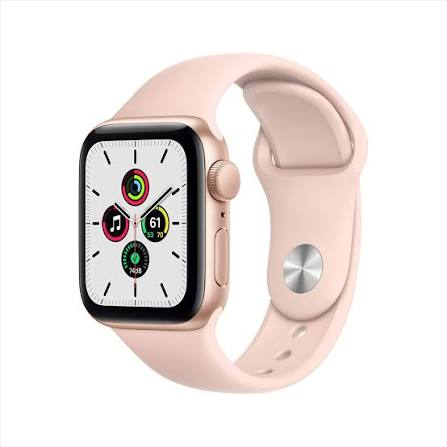
An eSIM (embedded SIM) on an Apple Watch is a built-in digital SIM that allows the watch to connect to a mobile network without needing a physical SIM card. With an active cellular plan from a supported carrier, you can make calls, send messages, stream music, and use mobile data directly from your Apple Watch—even when your iPhone is not nearby.
Unlike traditional SIM cards, an eSIM is permanently embedded inside the device and can be activated electronically through your mobile carrier. Apple Watch Cellular models use eSIM technology to provide seamless connectivity while maintaining a compact and lightweight design.
eSIM Apple Watch To use eSIM on an Apple Watch, you need a compatible Apple Watch Cellular model, a supported carrier plan, and an iPhone paired with the watch. Once activated, the Apple Watch can share the same phone number as your iPhone, making it easy to stay connected on the go.
The eSIM feature is especially useful for fitness enthusiasts, travelers, and professionals who want to leave their phone behind while still staying connected through calls, texts, notifications, and internet access.
What is an eSIM?
Before we get into the Apple Watch specifically, let’s cover the basics.

An eSIM (embedded SIM) is a tiny chip built directly into a device. It works just like a regular SIM card — it connects your device to a mobile network — but you don’t need to physically insert or swap anything. Instead, you activate a mobile plan digitally, usually through your carrier’s app or a simple QR code scan.
On a smartphone, eSIM means you can switch carriers without needing a new SIM. On an Apple Watch, it means something even more useful — your watch can connect to cellular networks entirely on its own.
What is the eSIM Apple Watch?

Apple Watch models that come with cellular connectivity have an eSIM built into them. This eSIM lets your Apple Watch connect to your mobile carrier’s network independently — without needing your iPhone to be nearby or connected to Wi-Fi.
These are commonly referred to as Apple Watch GPS + Cellular models. The “Cellular” part is what contains the eSIM.
So if you’re out for a run and leave your phone at home, your Apple Watch with eSIM can still:
- Receive and make phone calls
- Send and receive messages
- Stream music from Apple Music
- Track your location via GPS
- Use Siri
- Receive notifications in real-time
The GPS-only Apple Watch models, on the other hand, don’t have an eSIM. They rely on your iPhone’s connection whenever they need mobile data.
How Does the eSIM Work on Apple Watch?

The eSIM in your Apple Watch is paired to your existing mobile number — the same one you use on your iPhone. This is called a companion plan or paired number plan, and most major carriers support it.
Here’s how the setup works in practice:
- You buy an Apple Watch GPS + Cellular model.
- You go to your carrier’s app or website (like Airtel, Jio, Vi, T-Mobile, EE, etc.) and add a cellular plan for your watch.
- The carrier activates the eSIM on your watch using the same phone number as your iPhone.
- Your watch is now its own cellular device — no separate number needed.
So when someone calls your number, both your iPhone and Apple Watch ring. If your phone is off or out of range, only the watch rings. Replies and calls go through the same number, seamlessly.
Real-world example: Imagine you’re at the gym with your Apple Watch Series 9. You left your iPhone in your locker. Your friend calls you — the watch picks it up. You check Spotify to switch your workout playlist. You get a message from your family. None of this requires your phone to be anywhere near you.
Which Apple Watch Models Have an eSIM?
Not every Apple Watch has cellular capability. Here’s a quick breakdown:
Models with eSIM (GPS + Cellular):
- Apple Watch Series 4 and later (Cellular versions)
- Apple Watch SE (2nd generation, Cellular version)
- Apple Watch Ultra and Ultra 2
- Apple Watch Series 9, Series 10
Models without eSIM (GPS only):
- Apple Watch SE (1st gen, GPS only version)
- Apple Watch Series 3 GPS
- Any GPS-only variant of newer models
When buying, always check whether you’re getting the GPS-only or GPS + Cellular model. The cellular versions are typically slightly more expensive, and you’ll also need to pay your carrier a monthly add-on fee (usually around ₹199–₹299/month in India, or $10–$15/month in the US).
How to Activate the eSIM on Apple Watch
Activation is easier than most people expect. Here’s a general step-by-step:
What you need:
- An Apple Watch GPS + Cellular
- iPhone with iOS 14 or later
- An active carrier plan that supports Apple Watch cellular
Steps:
- Open the Watch app on your iPhone.
- Tap your watch at the top, then go to Cellular.
- Tap Set Up Cellular.
- Follow the on-screen instructions — this will either take you to your carrier’s app or show a QR code.
- Complete the carrier’s activation process (usually takes 5–10 minutes).
- Once done, you’ll see a green dot or signal bars on your watch’s cellular status.
In India, carriers like Airtel and Jio support Apple Watch eSIM activation through their official apps. Airtel, for example, has a dedicated eSIM section in the Airtel Thanks app where you can add your watch as a paired device.
Pros of eSIM on Apple Watch
1. True Independence from Your iPhone
This is the biggest benefit. You can go swimming, running, hiking, or to a meeting without your phone and still stay connected. Emergency calls, messages, navigation — it all works.
2. Same Number, No Confusion
Your watch uses the same phone number as your iPhone. No one needs a separate number to reach you on your watch. Everything syncs automatically.
3. No Physical SIM to Manage
Since the eSIM is built in, there’s nothing to lose, break, or swap. If you change carriers, you update digitally — no trip to a store needed in most cases.
4. Always-On Connectivity
For people who rely on their watch for health monitoring (like those with heart conditions), having a constant cellular connection means faster alerts and real-time data sharing with emergency contacts.
5. Compact Design
Because there’s no physical SIM tray, Apple can keep the Apple Watch slim and water-resistant. The eSIM is part of why the watch can handle serious activities like swimming without any concerns.
Cons of eSIM on Apple Watch
1. Extra Monthly Cost
Adding your Apple Watch to your carrier plan isn’t free. In India, it typically costs around ₹199–₹299 per month, depending on your carrier. In the US, expect $10–$15/month extra on your bill.
2. Battery Drains Faster on Cellular
When your Apple Watch is using LTE (cellular), the battery runs down more quickly than on Wi-Fi or Bluetooth. On a full day of active cellular use, you might get 4–6 hours instead of 18+ hours.
3. Not All Carriers Support It
While support has grown significantly, not every carrier in every country supports Apple Watch cellular. In India, Airtel and Jio are supported, but smaller regional carriers may not be.
4. Still requires an iPhone for Setup
You need an iPhone to activate and configure the eSIM. You can’t set up an Apple Watch eSIM plan on an Android phone or through a computer alone.
5. Higher Upfront Price
GPS + Cellular Apple Watch models cost more than GPS-only versions. In India, the difference can be ₹5,000–₹10,000 depending on the model and variant.
Is the eSIM Apple Watch Worth It?
It depends on your lifestyle. Here’s a simple way to think about it:
eSIM cellular makes sense if you:
- Exercise regularly and don’t want to carry your phone
- Have a job where you’re often away from your phone
- Use health features seriously and want emergency SOS to work at all times
- Travel frequently and want connectivity even when your phone is off or in your bag
GPS-only might be enough if you:
- Almost always have your iPhone nearby
- Use the watch mainly for fitness tracking and notifications
- Want to keep costs down (both upfront and monthly)
A practical example: if you go for early morning runs in a park and want to be reachable or stream music without carrying your phone, the eSIM Apple Watch is genuinely useful. If you mostly wear your watch at the office, where your iPhone is always on your desk, the GPS version works just fine.
eSIM Apple Watch vs Regular Apple Watch: Quick Comparison
| Feature | GPS + Cellular (eSIM) | GPS Only |
|---|---|---|
| Works without iPhone | Yes | No |
| Calls & messages solo | Yes | No |
| Battery life | Shorter on cellular | Longer |
| Price | Higher | Lower |
| Monthly carrier fee | Yes | No |
| Setup required | Yes (carrier activation) | No |
Frequently Asked Questions
Q: Does the Apple Watch eSIM work with any carrier?
No, your carrier needs to support Apple Watch cellular plans. In India, Airtel and Jio support it. Check your carrier’s website or call their support line to confirm before buying.
Q: Can I use the Apple Watch cellular without an iPhone at all?
You need an iPhone to set up and activate the watch initially. But once it’s activated, you can leave your iPhone behind,d and the watch works independently. The watch is not sold as a standalone device in the same way a phone is — it’s designed to work in the Apple ecosystem.
Q: Does this eSIM Apple Watch have a different phone number?
No. The eSIM on Apple Watch mirrors your iPhone’s phone number. It’s the same number — calls and messages to that number reach both devices.
Q: Can I switch carriers if I use eSIM on Apple Watch?
Yes, but you’ll need to deactivate the current plan and set up a new one with the new carrier. Since it’s digital, there’s no physical SIM to swap. The process takes a few minutes through your carrier’s app.
Q: What happens to my watch’s connectivity if I get a new iPhone?
When you pair a new iPhone, the watch will re-link to it. You may need to re-activate the cellular plan through the carrier app, but your number stays the same.
Q: Does the Apple Watch eSIM work internationally?
It depends on your carrier’s roaming policy. Some carriers allow cellular roaming for Apple Watch on international plans, but many don’t include it by default. Check with your carrier before traveling.
Q: Can I turn off cellular on my Apple Watch to save battery?
Yes. You can switch your watch to Wi-Fi + Bluetooth only mode in the Control Center on the watch itself. Just swipe up and tap the cellular signal icon to turn it off.
Conclsion
The eSIM in an Apple Watch is what transforms it from a fancy fitness tracker into a genuinely independent device. For people who want the freedom to step away from their phone — whether at the gym, on a hike, in a meeting, or even just at home — the cellular Apple Watch delivers that.
It’s not a must-have for everyone, especially given the extra cost. But if staying connected matters to you during activities where carrying a phone isn’t ideal, the eSIM Apple Watch is one of those features you’ll use far more than you expect.
If you’re still unsure, think about the last week — how many times did you wish you had your watch working but not your phone? That answer usually settles it.

