
Does Airtel support eSIM on Apple Watch? Everything You Need to Know in 2026
If you’ve recently got an Apple Watch with cellular and you’re on Airtel, this is probably one of the first things you’ve searched for. The short answer is yes — Airtel does support eSIM on Apple Watch in India. But the longer answer involves a few important details about which watch models work, which Airtel plans support, and how the actual setup process goes.
This guide covers everything in one place, so you don’t have to piece it together from five different sources.
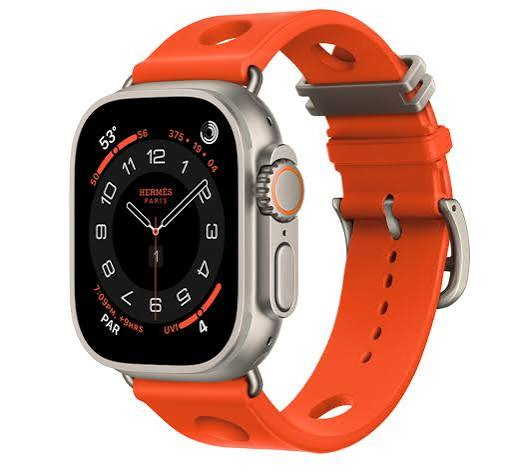
If you’re planning to use an Apple Watch with cellular connectivity in India, you may be wondering whether Airtel supports eSIM on Apple Watch. The good news is that Airtel offers eSIM and cellular services for compatible Apple Watch models, allowing users to stay connected even when their iPhone is not nearby.
With Apple Watch cellular support, you can make and receive calls, send messages, stream music, use maps, and access mobile data directly from your watch. This is especially useful for workouts, travel, or situations where carrying your iPhone is inconvenient. Airtel’s One Number service enables your Apple Watch to share the same mobile number as your iPhone, providing a seamless communication experience.
In this guide, we’ll explain whether Airtel supports eSIM on Apple Watch, which devices are compatible, how the setup process works, and what you need to activate cellular connectivity on your watch. Whether you’re a new Apple Watch owner or considering an upgrade, this article will help you get started quickly and easily.
What Is eSIM on Apple Watch and Why Does It Matter?

Apple Watch cellular models have a built-in eSIM — a small chip inside the watch that connects to a mobile network without needing a physical SIM card. When it’s set up correctly with your carrier, your Apple Watch gets its own cellular connection.
What this means practically: you can leave your iPhone at home, and your Apple Watch still works. You can take calls, reply to messages, stream music, use maps, and get notifications — all from your wrist.
Practical example: You go for a morning run without your phone. Someone calls you — the call rings on your Apple Watch, and you answer it directly. Your Apple Watch uses Airtel’s network through its eSIM, completely independently of your iPhone being nearby.
This is the whole point of the cellular Apple Watch, and Airtel’s eSIM support makes it possible for Indian users.
Does Airtel support eSIM on Apple Watch in India?

Yes, Airtel officially supports eSIM on Apple Watch in India.
Airtel was one of the first Indian carriers to roll out Apple Watch cellular support, and in 2026, it remains one of the most reliable options for this. The service works through what Apple calls Apple Watch Cellular with NumberShare — your Apple Watch shares your existing Airtel mobile number, so calls and messages come to both your iPhone and Watch using the same number.
You don’t get a separate number for your Apple Watch. It mirrors your iPhone’s number, which is the standard way Apple Watch cellular works globally.
Which Apple Watch Models Work with Airtel eSIM?

Not every Apple Watch supports cellular. Only the GPS + Cellular variants have the eSIM chip inside. The Wi-Fi-only models (sometimes called GPS-only) cannot connect to mobile networks.
Apple Watch models that support Airtel eSIM in India:
- Apple Watch Series 4 (GPS + Cellular) and newer
- Apple Watch SE (2nd generation, GPS + Cellular)
- Apple Watch Series 7, 8, 9 (GPS + Cellular)
- Apple Watch Ultra and Ultra 2
- Apple Watch Series 10 (GPS + Cellular)
If you’re unsure which model you have, go to Settings → General → About on your Apple Watch — the model name will be listed there. Or check the back of the watch — cellular models have a red ring around the Digital Crown.
Important: The Apple Watch must be a model sold for the Indian market or an internationally sold unlocked model. Carrier-locked models from other countries may not work with Airtel.
Which Airtel Plans Support Apple Watch eSIM?
This is where many users get confused. Not every Airtel postpaid plan automatically includes Apple Watch eSIM support. Here’s how it works:
Airtel’s Apple Watch cellular service is available on postpaid plans only. Prepaid customers cannot use Apple Watch eSIM as of 2026.
Airtel offers the Apple Watch pairing as an add-on to existing postpaid plans, typically called a Mobile Broadband or Wearable Add-on. The pricing has varied over time, so checking the current rate on the Airtel website or app is the most reliable way to confirm exact costs.
General structure in 2026:
- You need an active Airtel postpaid SIM plan on your iPhone
- You add a wearable/Apple Watch plan on top of that
- Your Apple Watch shares your iPhone’s number
- Data is drawn from your iPhone’s data pool
To check current plans: Open the Airtel Thanks app → go to postpaid section → look for “Wearable” or “Apple Watch” add-ons. Alternatively, call Airtel customer care at 121 and ask specifically about Apple Watch eSIM add-on pricing.
How to Set Up Airtel eSIM on Apple Watch: Step-by-Step
The setup process is straightforward once your Airtel plan is active. Here’s exactly how it works:
Before You Start — What You Need:
- An Apple Watch GPS + Cellular model
- iPhone running iOS 16 or later (paired to the Watch)
- Active Airtel postpaid plan with Apple Watch add-on activated
- Stable Wi-Fi connection during setup
Step 1: Make Sure Your iPhone and Apple Watch Are Paired
Your Apple Watch must already be set up and paired to your iPhone through the Watch app. If you haven’t done this yet, start there.
Step 2: Open the Watch App on Your iPhone
Go to Watch app → My Watch tab → Cellular. You’ll see an option to set up cellular.
Step 3: Tap “Set Up Cellular”
The app will guide you through the process. It will detect Airtel as your carrier (since your iPhone’s SIM is Airtel).
Step 4: Agree to Airtel’s Terms
You’ll be redirected to Airtel’s activation page within the Watch app. Review and accept the terms. This is where the wearable add-on gets linked.
Step 5: Wait for Activation
The eSIM provisioning takes a few minutes — sometimes up to 15–20 minutes. Keep your iPhone and Apple Watch close together during this process, and stay connected to Wi-Fi.
Step 6: Confirm It’s Working
Once activated, you’ll see the Airtel signal bars on your Apple Watch when cellular is on. To test it: turn off Wi-Fi and Bluetooth on your iPhone (or move away from it), and check if your Apple Watch still shows a signal and can make a call.
What Can You Do with Airtel eSIM on Apple Watch?
Once your Apple Watch is connected to Airtel’s network, here’s what works independently — without your iPhone nearby:
- Phone calls — incoming and outgoing using your Airtel number
- iMessage and SMS — send and receive messages
- WhatsApp — works on Apple Watch with cellular (you need the Watch app installed)
- Apple Maps navigation — turn-by-turn directions on your wrist
- Music streaming — Apple Music, Spotify (with downloaded playlists)
- Siri — full Siri functionality over cellular
- Emergency SOS — works even without iPhone
- Health notifications — irregular heart rhythm alerts and fall detection with automatic calling
Practical example: You’re at the gym, iPhone locked in your locker. A call comes in from your office on your Airtel number — it rings on your Apple Watch. You answer, take the call, and go back to your workout. No interruption, no need to fetch the phone.
Common Issues and How to Fix Them
Issue 1: “Carrier Not Supported” Error During Setup
This usually means either your Airtel plan doesn’t have the wearable add-on active, or your Apple Watch model isn’t supported.
Fix: Call Airtel on 121, confirm the Apple Watch add-on is active on your account, then retry setup.
Issue 2: eSIM Setup Starts But Doesn’t Complete
Sometimes the activation stalls partway through.
Fix: Restart both your iPhone and Apple Watch. Make sure you’re on stable Wi-Fi, not mobile data, during setup. Try again.
Issue 3: Apple Watch Shows No Signal After Setup
The eSIM may have been provisioned, but the network hasn’t registered yet.
Fix: On your Apple Watch, go to Settings → Cellular and toggle cellular off and back on. Wait 2–3 minutes. If it still doesn’t work, remove the cellular plan from the Watch app and re-add it.
Issue 4: Calls Not Coming Through on Apple Watch When Away from iPhone
This is usually a settings issue, not a network issue.
Fix: On iPhone, go to Settings → Phone → Calls on Other Devices and make sure your Apple Watch is toggled on.
Issue 5: Battery Draining Much Faster Than Usual
Using cellular on the Apple Watch consumes significantly more battery than Wi-Fi or Bluetooth.
Fix: This is normal. When you don’t need independent connectivity, keep your iPhone nearby — the Watch will use Bluetooth instead of cellular, saving battery. You can also manually turn off cellular in Apple Watch Settings → Cellular.
Pros and Cons of Using Airtel eSIM on Apple Watch
Pros
- True independence from iPhone — leave your phone behind and stay connected
- Same number, no confusion — calls and messages come to both devices on one Airtel number
- Emergency safety net — Apple Watch can call emergency services even without an iPhone
- Great for fitness — run, swim, or gym without carrying a phone
- Works across Airtel’s 4G/5G network — reliable coverage in most Indian cities
- Easy setup — done entirely through the Apple Watch app, no store visit needed in most cases
Cons
- Postpaid only — prepaid Airtel users can’t use this feature
- Extra monthly cost — the wearable add-on adds to your bill
- Battery drain — cellular use reduces Apple Watch battery life noticeably
- Initial activation can be finicky — some users need a call to Airtel support to get it activated
- Data from shared pool — your Watch uses the same data as your iPhone plan; heavy Watch usage eats into your main allowance
- Not all Watch models supported — older or GPS-only models won’t work
Airtel vs Jio vs Vi: Apple Watch eSIM Support in India
For context, here’s where other major Indian carriers stand in 2026:
| Carrier | Apple Watch eSIM Support | Plan Type Required |
|---|---|---|
| Airtel | Yes — well established | Postpaid only |
| Jio | Yes — available on select postpaid plans | Postpaid only |
| Vi (Vodafone Idea) | Limited — patchy availability | Postpaid only |
| BSNL | No | — |
Airtel and Jio are the two most reliable options for Apple Watch eSIM in India. If you’re already on Airtel postpaid, there’s no reason to switch carriers just for this feature.
Tips for Getting the Most Out of Airtel eSIM on Apple Watch
1. Use cellular selectively. You don’t need cellular on all the time. Keep your iPhone nearby at home or work — your Watch will use Bluetooth and save battery. Turn cellular on only when you actually need independence from your phone.
2. Download music before your workout.t If you listen to music while running without your phone, download playlists to your Apple Watch beforehand over Wi-Fi. This avoids streaming over cellular and saves battery.
3. Check your data usage.ge Your Apple Watch cellular usage comes out of your Airtel data pool. If you’re on a limited plan, check usage in the Airtel Thanks app periodically.
4. Keep software up to date. Tedd Apple Watch cellular connectivity can improve with watchOS and iOS updates. Keep both devices updated for the best experience.
5. Test it before you rely on it. Before going on a run or leaving your phone behind, do a quick test — step away from your iPhone and make sure your Watch has signal and can make a call. Better to know it works before you need it.
FAQs
Q: Does Airtel support eSIM on Apple Watch in India?
Yes. Airtel officially supports Apple Watch cellular via eSIM in India. It works as a wearable add-on to your existing Airtel postpaid plan, sharing your iPhone’s number.
Q: Can I use Airtel prepaid for Apple Watch eSIM?
No. As of 2026, Apple Watch eSIM on Airtel is only available on postpaid plans. Prepaid customers are not eligible for the wearable add-on.
Q: How much does Airtel charge for an Apple Watch eSIM?
Pricing changes periodically. Check the Airtel Thanks app under postpaid add-ons, or call 121 for current rates. It’s typically a monthly add-on charge on top of your regular plan.
Q: Do I need to visit an Airtel store to activate Apple Watch eSIM?
Usually not. The activation is done through the Apple Watch app on your iPhone. However, if you face issues during setup, calling Airtel customer care at 121 or visiting a store can help resolve them faster.
Q: Will my Apple Watch have a separate phone number on Airtel?
No. Your Apple Watch shares the same Airtel number as your iPhone through NumberShare. Calls and messages to your number ring on both devices.
Q: Does Apple Watch eSIM work with Airtel 5G?
Yes, on supported Apple Watch models and in areas with Airtel 5G coverage. Older Watch models may connect on 4G LTE even in 5G areas, depending on the hardware.
Q: What happens to my Apple Watch if I switch from Airtel to another carrier?
You’ll need to remove the existing cellular plan from your Apple Watch and set up a new one with your new carrier. Go to Watch app → Cellular → your plan → Remove Plan, then set up again with the new carrier.
Q: Can I use WhatsApp on Apple Watch with Airtel eSIM?
Yes. WhatsApp has an Apple Watch app that works over cellular. You can send and receive messages and make audio calls directly from your Watch when away from your iPhone.
Q: My Apple Watch shows “No SIM” even after Airtel eSIM activation. What do I do?
Restart both your iPhone and Apple Watch. Toggle cellular off and on in Watch settings. If it persists, remove the plan and re-add it through the Watch app. If the issue continues, contact Airtel support at 121.
Q: Does Apple Watch eSIM drain Airtel data quickly?
Light use — calls, messages, notifications — uses minimal data. Streaming music or using maps over cellular uses more data. For most users, the Watch’s data usage is a small fraction of their overall plan usage.
Conclsion
Airtel’s Apple Watch eSIM support is solid, well-established, and works reliably for postpaid customers across India. If you’re on an Airtel postpaid plan and have a cellular Apple Watch, adding the wearable plan is genuinely worth it — especially if you exercise regularly or just want to be reachable without carrying your phone everywhere.
The setup is mostly straightforward. The occasional activation hiccup is usually sorted with a quick call to Airtel support. And once it’s running, it works the way it should — your Apple Watch connected, independent, and useful on its own.
If you’re still on Airtel prepaid and want this feature, upgrading to a postpaid plan is the only path forward. Given how the postpaid plans are priced in 2026, the switch is worth considering anyway.

