
If you’ve been thinking about leaving your phone at home and heading out with just your Apple Watch Series 9, you’re not alone. The cellular model of the Series 9 makes that possible — and eSIM is the technology that powers it. But a lot of people still have questions: What exactly is an eSIM? How do you set it up? Will it work with your carrier? Is it actually worth paying for?
This guide answers all of that, in plain language, so you can decide whether the cellular Apple Watch Series 9 fits your lifestyle.

eSIM on Apple Watch Series 9 is one of the most advanced smartwatches created by Apple. It combines health tracking, fitness features, communication tools, and powerful performance in a compact wearable device. The watch is designed for users who want a premium smartwatch experience with deep integration into the Apple ecosystem.
One of the biggest upgrades in Apple Watch Series 9 is the new S9 chip, which makes the watch faster and more responsive than previous models. Apps open quickly, Siri works directly on the device, and overall performance feels smoother. Apple also introduced the “Double Tap” gesture feature, allowing users to control the watch by tapping their thumb and index finger together. This helps users answer calls, pause music, or stop timers without touching the screen.
The display on Apple Watch Series 9 is brighter than older models, reaching up to 2000 nits. This makes it easier to read notifications and fitness data even under strong sunlight. The Always-On Retina display also keeps important information visible without needing to raise the wrist constantly.
Health tracking is one of the strongest features of the watch. It includes heart rate monitoring, ECG support, blood oxygen tracking, sleep analysis, cycle tracking, and temperature sensing. The watch can also detect falls and crashes, helping users contact emergency services when needed. Fitness lovers can track workouts like running, cycling, swimming, yoga, and strength training with detailed performance metrics.
Battery life typically lasts around 18 hours with regular use, and Low Power Mode can extend usage time. The watch also supports fast charging, helping users quickly recharge before workouts or travel.
For connectivity, Apple Watch Series 9 supports GPS, Bluetooth, Wi-Fi, and optional cellular connectivity. Users can make calls, send messages, stream music, and use maps directly from the watch. It works best when paired with an iPhone.
The smartwatch also focuses on sustainability. Apple uses recycled materials in many parts of the device and offers carbon-neutral options with selected bands.
Overall, Apple Watch Series 9 is a powerful smartwatch for fitness tracking, health monitoring, productivity, and everyday convenience. It is ideal for users who already use Apple products and want a premium wearable with advanced smart features.
What Is an eSIM, and Why Does the Apple Watch Series 9 Use It?

An eSIM (embedded SIM) is a digital SIM card built directly into your device. There’s no physical card to insert or swap — your carrier activates your line electronically.
The Apple Watch Series 9 uses eSIM because it simply doesn’t have room for a traditional SIM card tray. The watch needs to be slim, waterproof, and packed with sensors. An eSIM solves the space problem while still giving the watch its own phone number and cellular connection.
This means when you go for a run without your iPhone, your Apple Watch can still receive calls, reply to messages, and stream music — all on its own.
Apple Watch Series 9: GPS vs. Cellular — What’s the Difference?

Before diving into setup, it helps to know what you’re working with.
The Apple Watch Series 9 comes in two versions:
GPS only — This connects to your iPhone for everything. No iPhone nearby? No calls, no data, no Siri (unless you’re on Wi-Fi).
GPS + Cellular — This has a built-in eSIM. It can connect to your carrier’s network independently. You can leave your phone at home and still stay connected.
If you already own the GPS-only version, you cannot add eSIM functionality later. The cellular chip must be present in the hardware from the start.
How eSIM Works on Apple Watch Series 9
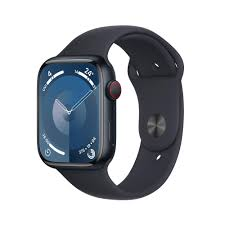
Here’s a simple way to think about it: your Apple Watch Series 9 shares your iPhone’s phone number through your carrier’s plan. When someone calls your number, both your iPhone and Apple Watch ring. You can answer whichever is more convenient.
The watch doesn’t need a separate phone number in most cases. Your carrier links the watch to your existing number through a feature called “one number, multiple devices” — though the exact name varies by carrier (Verizon calls it NumberShare, T-Mobile calls it DIGITS, and so on).
Data used by your Apple Watch goes toward your existing plan’s data pool. Streaming a playlist on a run or checking Maps uses your plan’s data, just from the watch instead of the phone.
Setting Up eSIM on Apple Watch Series 9: Step-by-Step
Setting up cellular on your Apple Watch is done entirely through the Apple Watch app on your iPhone. Here’s how it works:
Step 1: Make sure your carrier supports Apple Watch
Not every carrier in every country supports Apple Watch cellular plans. Before you start, visit your carrier’s website or call them to confirm. In the US, all major carriers — AT&T, T-Mobile, and Verizon — support it. In India, Airtel and Jio support it as well.
Step 2: Open the Apple Watch app on your iPhone
Tap the “My Watch” tab at the bottom. Then tap “Cellular.” If you haven’t set it up yet, you’ll see a button that says “Set Up Cellular.”
Step 3: Follow the carrier setup
Tapping “Set Up Cellular” opens your carrier’s activation page inside the app. You’ll go through the carrier’s specific steps — this usually involves agreeing to an added monthly fee (typically $10–$15/month in the US) and confirming your account details.
Step 4: Wait for activation
Activation takes a few minutes. Once complete, you’ll see a green indicator in the Cellular section of the Apple Watch app. Your watch now has its own connection.
Step 5: Test it
Put your iPhone in another room (or turn off its Wi-Fi and Bluetooth temporarily), then try making a call from your Apple Watch. If it connects, you’re good to go.
Real-World Examples: When eSIM on Apple Watch Series 9 Actually Helps
Morning runs — You head out at 6 AM, phone stays on the nightstand. Your watch streams Spotify, your sister calls to ask about Sunday dinner, and you answer from your wrist. That’s the eSIM doing its job.
Kids and safety — Some parents set up an Apple Watch with cellular for their child. The kid doesn’t need a smartphone, but can still call mom or dad. The eSIM makes this possible without a separate phone number or device.
Travel — In countries where your carrier has roaming agreements, your Apple Watch cellular plan travels with you. You can leave your phone at the hotel while exploring a new city and still navigate or take emergency calls.
Gym sessions — Nobody wants to run on a treadmill with a phone strapped to their arm. Leave it in the locker, and your watch handles music and calls independently.
Cycling — When you’re on a long bike ride and need turn-by-turn directions, your watch can pull navigation data over cellular even if your phone is miles away.
Carrier Plans and Costs: What to Expect
Here’s a quick overview of what major US carriers charge for Apple Watch cellular:
| Carrier | Plan Name | Monthly Fee |
|---|---|---|
| AT&T | NumberSync | ~$10/month |
| T-Mobile | DIGITS | ~$10/month |
| Verizon | NumberShare | ~$10/month |
Most carriers require that you already have a smartphone line with them. You can’t activate an Apple Watch cellular plan as a standalone account.
Outside the US, fees and availability vary. In the UK, carriers like EE, O2, and Vodafone support Apple Watch plans. In Australia, Telstra and Optus do. Always check your carrier’s website for the latest pricing.
One thing worth knowing: some carriers run promotions where the watch line is free for the first few months. If you’re timing a purchase, it’s worth asking.
Pros and Cons of Using eSIM on Apple Watch Series 9
Pros
True independence from your iPhone. This is the biggest benefit. Once cellular is active, your watch can function on its own. You’re not tethered to your phone.
Convenience for fitness and outdoor activities.s Runners, cyclists, hikers — anyone who exercises benefits outdoors massively. You carry less, stay connected more.
Emergency access. If you’re ever in a situation where your phone is lost, dead, or out of reach, your watch can still call emergency services or a trusted contact.
Same phone number.ber No one needs to call a different number to reach you on your watch. Calls come in just like normal.
Seamless switch.hing When your iPhone is nearby, calls and data route through it automatically. The watch switches to cellular only when it needs to.
No SIM card to lose or damage. The eSIM is built in and can’t fall out of your pocket or get wet and corrupted.
Cons
Monthly carrier fee: You’re paying an extra $10–$15 a month (in the US) for the cellular feature. If you rarely leave your phone at home, you might not get your money’s worth.
Battery drain:n Using cellular burns through the battery faster than GPS-only mode. On an active day with calls and music streaming, you might find yourself charging mid-day.
Carrier compatibility required: Your carrier has to support Apple Watch. If they don’t, you’re stuck with GPS-only functionality even on a cellular model.
Limited standalone functionality.y Even with cellular, your watch can’t do everything your iPhone can. App support is limited, web browsing isn’t really a thing on watchOS, and some features still need the iPhone nearby.
No physical SIM flexibility.ty Unlike a phone, where you can pop in a local SIM when traveling, the eSIM on Apple Watch is tied to supported carriers. International travelers on unsupported networks won’t get cellular on the watch.
Common Problems and How to Fix Them
Cellular won’t activate.e First, make sure your carrier supports Apple Watch. If they do, try restarting both your iPhone and Apple Watch, then go back to the Apple Watch app and try again. Sometimes the carrier’s server takes time to process the activation.
Watch shows no signal even with cellulaenabledbl .ed Check if your iPhone is nearby and connected — if it is, the watch uses your phone’s connection, not cellular. Turn off Bluetooth on your iPhone to force the watch to switch to cellular and test it properly. Calls are
Callsar dropping on the watch. This usually comes down to cell signal strength in your area. Apple Watch cellular antennas are smaller than those in a phone, so in weak signal areas, call quality may suffer.The monthly
Monthly fee appeared even though you didn’t use cellular Carriers charge the monthly fee regardless of how often you use it. If you decide you don’t need cellular for a few months, you can pause or cancel the plan through your carrier.
eSIM vs. Traditional SIM: A Quick Comparison
| Feature | eSIM (Apple Watch Series 9) | Traditional SIM |
|---|---|---|
| Physical card | No | Yes |
| Carrier switching | Done digitally | Swap card |
| Space required | Minimal | Needs a tray |
| Risk of damage | Very low | Card can get damaged |
| Flexibility for travel | Limited | More flexible |
For a wearable device like the Apple Watch, eSIM is clearly the right call. A physical SIM slot would compromise the watch’s waterproofing, size, and durability.
Is the Cellular Apple Watch Series 9 Worth It?
That depends on how you use your watch.
If you exercise regularly without your phone, work in environments where carrying a phone is inconvenient, or simply want the peace of mind of being reachable without your iPhone — yes, it’s worth the extra cost (both the hardware premium and the monthly carrier fee).
If you’re almost always within arm’s reach of your iPhone, the GPS-only model will serve you just as well at a lower price.
A good test: think about your last 10 days. How many times did you wish you had a way to take a call or use your watch without your phone? If the answer is more than a handful, the cellular model pays for itself in convenience.
Frequently Asked Questions
Can I use eSIM on Apple Watch Series 9 with any carrier?
No. Your carrier must officially support Apple Watch cellular plans. In the US, AT&T, T-Mobile, and Verizon all support it. Check your carrier’s website to confirm before purchasing the cellular model.
Does the Apple Watch Series 9 eSIM work internationally?
It depends on your carrier’s roaming agreements and whether the carrier in your destination country supports Apple Watch. Some US plans include international roaming for the watch; many don’t. Check with your carrier before traveling.
Can I have two numbers on my Apple Watch Series 9?
Generally, no. The Apple Watch is linked to your primary iPhone number. It doesn’t natively support two separate numbers the way some phones do.
What happens to my Apple Watch if I cancel the cellular plan?
Your watch continues to work as a GPS-only device. It connects to your iPhone and Wi-Fi as before. You just lose the ability to use it independently without your phone.
Does using eSIM drain the Apple Watch Series 9 battery faster?
Yes. Active cellular usage — calls, streaming, or data transfer over cellular — uses more battery than operating on Wi-Fi or connected to your iPhone. Expect a shorter battery life on days you use it heavily without your phone.
Can I switch carriers on my Apple Watch Series 9?
Yes, but you’ll need to cancel your current watch plan with your existing carrier and set up a new plan with the new carrier through the Apple Watch app. The process is digital and doesn’t require any physical changes.
Do I need an iPhone to set up eSIM on Apple Watch Series 9?
Yes. Apple Watch Series 9 requires an iPhone for initial setup, including activating the eSIM. Once set up, the watch can operate independently, but the iPhone is needed for configuration.
Is there a data limit for what the Apple Watch can use on cellular?
Your watch shares your iPhone plan’s data. Most carriers don’t impose a separate cap on the watch, but the data it uses counts toward your overall plan limit. Streaming music over cellular for a long workout can add up.
Conclsion
The eSIM on Apple Watch Series 9 is one of those features that sounds like a small thing until you actually use it. The first time you go on a run, take a call on your watch, and realize your phone was on the kitchen counter the whole time — it clicks.
Setup is straightforward, carrier support is solid across major networks, and the day-to-day experience is seamless. The only real questions are whether your carrier supports it and whether the monthly fee makes sense for how you live.
If you’re active, often on the go, or just like having fewer things to carry, the cellular Apple Watch Series 9 with eSIM is worth serious consideration.

