
Activating an eSIM on your iPhone 17 Pro is easier than you might think. Whether you just bought a new phone, switched carriers, or want to use dual SIM, this guide will walk you through everything simply and practically.

By the end of this article, you’ll know exactly how to activate your eSIM, fix common issues, and use it like a pro.
How to Activate eSIM on iPhone 17 Pro. The iPhone 17 Pro is Apple’s latest premium smartphone, introduced in 2025 as part of the iPhone 17 lineup. It is designed for users who want top-level performance, advanced cameras, and long battery life in a compact flagship device.
- How to Activate eSIM on iPhone 17
- How to Activate eSIM on iPhone 12
- How to Activate eSIM on iPhone 15
- How to Activate eSIM on iPhone 13
- How to Activate eSIM on iPhone 11
- How to activate eSIM on iPhone?
Design and Build
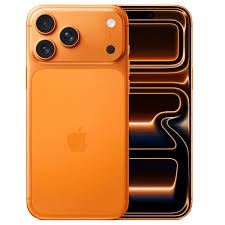
The iPhone 17 Pro comes with a modern aluminum unibody design and durable Ceramic Shield glass on both front and back. It has a refined “camera plateau” design that stretches across the rear, housing its powerful triple-camera system. The phone is available in elegant finishes such as Silver, Deep Blue, and Cosmic Orange. It also offers strong durability with IP68 water and dust resistance.
Display
It features a 6.3-inch Super Retina XDR OLED display with ProMotion technology supporting up to 120Hz refresh rate. The screen is brighter and more efficient than previous models, reaching up to 3,000 nits peak outdoor brightness, making it easy to use even in direct sunlight. It also includes Always-On Display and an anti-reflective coating for better visibility.
Performance
At its core, the device runs on the powerful A19 Pro chip, built on advanced 3nm architecture. It includes a 6-core CPU and a 6-core GPU, along with a 16-core Neural Engine for AI tasks and machine learning. This makes the iPhone 17 Pro extremely fast for gaming, video editing, and multitasking, while also improving battery efficiency.
Camera System

One of the biggest upgrades is the triple 48MP rear camera system, which includes Wide, Ultra Wide, and Telephoto lenses. The telephoto camera supports up to 8× optical zoom, allowing highly detailed long-distance shots. It also supports advanced video features like ProRes RAW, 4K recording, and Dual Capture (recording front and back cameras at the same time). The front camera is an 18MP Center Stage camera designed for high-quality selfies and video calls.
Battery and Charging
The iPhone 17 Pro offers excellent battery life, lasting up to 31–33 hours of video playback depending on usage. It supports fast charging, reaching 50% in around 20–20 minutes with a compatible adapter. Wireless charging is also improved with MagSafe and newer Qi standards.
Connectivity and Features
It includes 5G connectivity, Wi-Fi 7 support, Bluetooth upgrades, and Apple’s improved networking chip for faster and more stable connections. It also supports advanced safety features like crash detection and satellite connectivity for emergencies.
Final Impression
Overall, the iPhone 17 Pro is a powerful flagship device that focuses on performance, camera innovation, and battery efficiency. It is ideal for users who want a professional-grade smartphone for photography, gaming, and everyday productivity.
How to Activate eSIM on iPhone 17 Pro: What is eSIM on iPhone 17 Pro?
eSIM stands for embedded SIM. Unlike a physical SIM card, it is built directly into your phone.
Instead of inserting a SIM card, you can activate a mobile plan digitally using:
- QR code
- Carrier app
- Manual details
This makes switching networks faster and more convenient.
Why Use eSIM on iPhone 17 Pro?
Here are some real-life benefits:
✅ Convenience
No need to visit a store or handle tiny SIM cards.
✅ Dual SIM Support
You can use:
- One physical SIM + one eSIM
or - Multiple eSIM profiles
✅ Travel Friendly
Easily switch to a local carrier when traveling abroad.
✅ Better Security
If your phone is lost, the eSIM cannot be removed like a physical SIM.
Requirements Before Activating eSIM
Before you start, make sure:
- Your iPhone 17 Pro is unlocked
- Your carrier supports eSIM
- You have:
- QR code or
- Activation details from your provider
- Stable internet connection (Wi-Fi recommended)
Method 1: Activate eSIM Using QR Code (Most Common)

This is the easiest and most popular method.
Step-by-Step Guide
- Open Settings
- Tap Mobile Data (or Cellular)
- Tap Add eSIM
- Select Use QR Code
- Scan the QR code provided by your carrier
- Follow on-screen instructions
- Tap Continue
- Wait for activation to complete
Example
If you bought a new plan from a carrier, they usually email you a QR code. Just scan it and your eSIM will be activated within minutes.
Method 2: Activate eSIM Using Carrier App
Some providers allow activation through their mobile app.
Steps:
- Download your carrier’s app
- Log in to your account
- Choose Activate eSIM
- Follow the instructions
- Confirm activation
Example
If you’re using a modern telecom provider, they may allow one-click activation inside their app.
Method 3: Manual eSIM Activation
If the QR code doesn’t work, you can enter details manually.
Steps:
- Go to Settings
- Tap Mobile Data
- Tap Add eSIM
- Select Enter Details Manually
- Enter:
- SM-DP+ address
- Activation code
- Tap Next
- Complete setup
Setting Up Your eSIM After Activation
Once activated, you need to configure it properly.
Label Your Plans
You can name your SIMs like:
- Personal
- Work
- Travel
This helps you easily manage them.
Choose Default Line
Go to:
Settings → Mobile Data → Default Line
Select which SIM to use for:
- Calls
- Messages
- Data
Enable Dual SIM Usage
You can:
- Use one SIM for calls
- Another for data
Perfect for business + personal use.
Practical Use Cases
1. Traveling Abroad
Instead of buying a physical SIM:
- Buy an eSIM plan online
- Activate instantly
- Save roaming charges
2. Separate Work and Personal Life
Use:
- One number for work
- One for personal use
No need to carry two phones.
3. Backup Network
If your primary network is slow:
- Switch to another eSIM instantly
Common Problems and Fixes
❌ eSIM Not Activating
Fix:
- Restart your phone
- Check the internet connection
- Re-scan QR code
❌ “No Signal” Issue
Fix:
- Go to Settings → Mobile Data
- Turn the line OFF and ON
- Check carrier coverage
❌ QR Code Not Working
Fix:
- Make sure it hasn’t expired
- Request a new QR code
❌ Unable to Add eSIM
Fix:
- Check if your phone is locked
- Contact your carrier
Pros and Cons of eSIM on iPhone 17 Pro
👍 Pros
- No physical SIM needed
- Faster activation
- Supports multiple profiles
- Great for travel
- More secure
👎 Cons
- Not supported by all carriers
- Switching devices can be tricky
- Requires internet for setup
- Some users prefer a physical SIM
Tips for Smooth eSIM Activation
- Always keep a screenshot of your QR code
- Activate using a stable Wi-Fi connection
- Update your iPhone to the latest version
- Contact carrier support if stuck
eSIM vs Physical SIM: Which is Better?
| Feature | eSIM | Physical SIM |
|---|---|---|
| Setup | Digital | Manual |
| Convenience | High | Medium |
| Security | More secure | Less secure |
| Flexibility | Multiple profiles | Limited |
👉 Conclusion: eSIM is the future, especially for modern users.
Is eSIM Safe?
Yes, eSIM is safe.
- Harder to remove
- Encrypted activation
- Managed by carriers securely
Just make sure:
- You don’t share your QR code
- You use trusted providers
Frequently Asked Questions (FAQs)
1. Can I use both eSIM and a physical SIM on the iPhone 17 Pro?
Yes, you can use dual SIM functionality:
- One eSIM + one physical SIM
or multiple eSIM profiles.
2. Do I need the internet to activate eSIM?
Yes, you need Wi-Fi or mobile data for activation.
3. How long does eSIM activation take?
Usually:
- 1–5 minutes
But sometimes up to a few hours, depending on the carrier.
4. Can I transfer eSIM to another phone?
Yes, but:
- You may need a new QR code
- Or use carrier transfer options
5. What happens if I reset my iPhone?
Your eSIM may be removed.
Make sure:
- You back up details
- Contact your carrier if needed
6. Is eSIM better than a physical SIM?
For most users, yes:
- More flexible
- Easier to manage
- Ideal for travel
7. What is an eSIM on iPhone 17 Pro?
An eSIM is a built-in digital SIM that lets you activate a mobile plan without inserting a physical SIM card.
8. How do I activate eSIM on iPhone 17 Pro?
You can activate it using:
- QR code from your carrier
- Carrier mobile app
- Manual activation details
Go to Settings → Mobile Data → Add eSIM to start.
9. Can I use eSIM and a physical SIM together?
Yes. The iPhone 17 Pro supports dual SIM, so you can use one physical SIM and one eSIM at the same time.
10. How long does eSIM activation take?
Usually it takes 1–5 minutes, but in some cases it may take a few hours depending on your carrier.
11. What should I do if my eSIM is not working?
Try these steps:
- Restart your iPhone
- Check the internet connection
- Re-scan the QR code
- Contact your mobile carrier
12. Can I transfer my eSIM to a new iPhone?
Yes, but you may need a new QR code or use your carrier’s eSIM transfer feature.
13. Is eSIM safe to use?
Yes, it is secure because it is built into your phone and cannot be physically removed or stolen like a SIM card.
14. What happens if I reset my iPhone 17 Pro?
Your eSIM may be deleted, and you might need to re-activate it using your carrier details.
15. Do all carriers support eSIM?
No, not all carriers support it. You should check with your mobile provider before activation.
16. Is eSIM better than a physical SIM?
For most users, yes. It is more convenient, faster to set up, and ideal for travel and dual-number use.
Conclusion
Activating eSIM on the iPhone 17 Pro is a quick and modern way to get your mobile connection running without using a physical SIM card. Whether you choose a QR code, carrier app, or manual setup, the process is simple if you follow the correct steps.
Once activated, eSIM gives you more flexibility, better security, and the freedom to use multiple numbers on one device. It is especially useful for travelers, business users, and anyone who wants a cleaner and more convenient mobile setup.
If you face any issues, most problems can be fixed by restarting your phone, checking your internet connection, or contacting your carrier for a new activation code.
Overall, eSIM is not just a feature—it’s the future of mobile connectivity, and the iPhone 17 Pro makes it easier than ever to use it.

