
Setting up for crypto trading is more than buying a laptop and opening an exchange account. A proper trading setup covers your hardware, your exchange accounts, your charting tools, your risk rules, your tax tracking, and your daily routine. Miss any of these, and you are trading blind — or worse, trading smart but losing money to avoidable mistakes.
This guide builds your complete crypto trading setup from scratch in 2026 — every component, every tool, and every decision you need to make before placing your first trade.
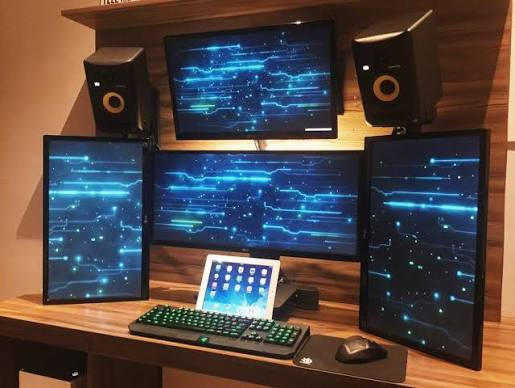
A well-planned crypto trading setup can make trading more organized, efficient, and easier to monitor, but no setup can guarantee profits. In 2026, traders have access to powerful trading platforms, real-time market data, AI-assisted analytics, multiple monitors, and advanced security tools that help them analyze markets and manage risk more effectively. Whether you’re a beginner learning the basics or an experienced trader refining your workflow, having the right setup can improve productivity and decision-making.
The ideal crypto trading setup in 2026 goes beyond simply owning a fast computer. It includes reliable hardware, high-speed internet, secure cryptocurrency wallets, trusted exchanges, charting software, portfolio trackers, and strong cybersecurity practices such as two-factor authentication and hardware wallet protection. Choosing the right combination of tools depends on your trading style, budget, and experience level.
In this comprehensive guide, we’ll explore the best crypto trading setup for 2026, including recommended computers, monitors, internet requirements, trading software, security essentials, and workspace optimization tips. We’ll also compare beginner-friendly and professional setups, discuss common mistakes to avoid, and share practical recommendations to help you build an efficient, secure, and scalable trading environment for today’s fast-moving cryptocurrency markets.
- Check now –Crypto. Trader Computer Setup in 2026
Why Setup Matters Before You Trade
Most new traders skip setup and go straight to trading. This is why most new traders lose money in the first few months — not because the market is against them, but because they are making decisions without the right tools, information, or rules in place.
A proper setup gives you:
- Speed — fast, reliable hardware and internet mean you execute when you decide to, not 3 seconds later
- Information — the right charts, data tools, and news sources so your decisions are based on complete information
- Discipline — risk rules and a trading journal that keep emotions out of execution
- Compliance — tax tracking from day one so you are not scrambling during ITR season
- Security — proper account security so profits cannot be stolen
Set up once. Trade better forever.
Crypto Trading Setup in 2026 (step by step)
Part 1: Hardware Setup

Computer
You do not need an expensive gaming PC to trade crypto. You need a reliable, fast machine that does not crash or lag during active trading.
Minimum specs for crypto trading in 2026:
- CPU: Intel Core i5 (12th gen+) or AMD Ryzen 5 (5000 series+)
- RAM: 16GB (32GB recommended for multi-monitor, multi-exchange setups)
- Storage: 512GB SSD (NVMe preferred)
- OS: Windows 11 or macOS Ventura/Sequoia
Desktop vs Laptop:
- Desktop gives better performance per rupee and supports more monitors
- Laptop gives flexibility — trade from anywhere
- Many serious traders use a desktop as primary and a laptop as backup
Best budget options in India:
- Desktop: AMD Ryzen 5 7600 + 16GB DDR5 + 512GB NVMe — approximately ₹35,000–₹45,000
- Laptop: ASUS VivoBook 15 with i5/Ryzen 5, 16GB RAM — approximately ₹55,000–₹70,000
Monitors
A second monitor is the single most impactful upgrade for trading quality of life.
Recommended monitor setup:
- Beginner: 1 monitor, 24–27 inch, 1920×1080 — ₹8,000–₹15,000
- Intermediate: 2 monitors, 24–27 inch — ₹16,000–₹35,000
- Advanced: 3 monitors or 1 ultrawide — ₹30,000–₹60,000
Monitor arm: Buy a dual monitor arm (₹2,500–₹5,000) — frees desk space and lets you position screens perfectly.
Internet
Wired Ethernet is non-negotiable for serious trading. Wi-Fi introduces latency spikes and packet loss that delay order execution.
Recommended:
- Jio Fiber or Airtel Xstream, 100 Mbps or higher — ₹499–₹999/month
- Cat6 Ethernet cable from router to PC
- 4G/5G mobile hotspot as backup (keep it charged and ready)
Part 2: Exchange Account Setup

Choose Your Exchanges
You need at least two types of exchanges:
Indian exchanges (for INR deposits/withdrawals):
- WazirX — FIU-IND registered, popular, supports INR via UPI and bank transfer
- CoinDCX — Clean interface, good for beginners, INR support
- Mudrex — Good for systematic investing and index-style crypto products
Global exchanges (for trading with better liquidity):
- Binance — Largest global exchange, deepest liquidity, most trading pairs
- Bybit — Best for derivatives and perpetual futures
- OKX — Full-service with DeFi integration
Workflow: Deposit INR on an Indian exchange → convert to USDT → transfer USDT to a global exchange for trading. Withdraw profits back via the same route.
Account Setup Checklist
For EVERY exchange account:
Step 1: Create an account. Use a dedicated email address for crypto — separate from your personal email. Creates a clear boundary and makes security management easier.
Step 2: Complete KYC immediately. Indian exchanges require Aadhaar and PAN verification. Complete this before depositing — unverified accounts have withdrawal limits.
Step 3: Enable 2FA (Authenticator App). Download Google Authenticator or Authy on your phone. Enable 2FA using an authenticator app — NOT SMS. SMS 2FA can be SIM-swapped. Authenticator app 2FA cannot.
Step 4: Set up withdrawal whitelist. Add only your own wallet addresses to the whitelist. Enable the whitelist lock — this means withdrawals can only go to pre-approved addresses. Even if your account is compromised, funds cannot be withdrawn to unknown addresses.
Step 5: Enable anti-phishing code. Binance and OKX support custom anti-phishing codes that appear in all legitimate emails from the exchange. Set this up immediately — any email without your code is a phishing attempt.
Step 6: Note your recovery code.s When you set up 2FA, the app gives you backup recovery codes. Write these down and store them offline — in a notebook in a safe location. Never store digitally.
Fund Your Accounts
For Indian traders:
- Start small — ₹10,000–₹25,000 is enough to learn without painful losses
- Deposit via UPI or NEFT/RTGS on WazirX or CoinDCX
- Never deposit money you cannot afford to lose completely
- Keep emergency fund, rent, and savings completely separate from trading capital
Part 3: Charting and Analysis Setup

TradingView
TradingView is the industry standard for crypto charting. Set it up properly from day one.
Account: Create at tradingview.com. The free plan allows 3 simultaneous charts — sufficient for beginners.
Essential TradingView setup steps:
1. Build your watchlist:
- Add your primary trading pairs (BTC/USDT, ETH/USDT, and any altcoins you follow)
- Organise into groups — “Majors,” “DeFi,” “Layer 2,” etc.
2. Create chart layouts:
- Save a “Swing Trading” layout with 4H and daily charts
- Save a “Scalping” layout with 1M, 5M, 15M charts
- Switch between layouts with Alt+1, Alt+2 keyboard shortcuts
3. Add your indicators: Core indicators to add to every chart:
- RSI (14) — Overbought/oversold signals
- MACD (12,26,9) — Momentum and trend direction
- Volume — Always visible
- 200 EMA — Major trend direction
- Bollinger Bands (20,2) — Volatility and potential reversals
4. Set price alerts:
- Add alerts for key support and resistance levels on all pairs you follow
- Set alerts to notify via browser, email, and TradingView app
- Never watch charts constantly — let alerts bring you to the screen when price reaches key levels
5. Save chart templates: Save your indicator setup as a template so it applies to new charts automatically.
On-Chain and Market Data Tools
These tools give you information that charts alone cannot:
- CoinGlass (coinglass.com) — Futures open interest, liquidation heatmap, funding rates, long/short ratios. Check this before every major trade.
- CoinMarketCap / CoinGecko — Market cap, volume, price data across all coins
- Glassnode (free tier) — Bitcoin and Ethereum on-chain metrics
- DeFiLlama — DeFi protocol TVL and yield data
- Arkham Intelligence — Whale wallet tracking
- Fear and Greed Index (alternative.me/crypto/fear-and-greed-index) — Market sentiment, check daily
News and Information Sources
Fast access to relevant news is part of your setup — not an afterthought.
Follow these for real-time crypto news:
- CoinDesk and CoinTelegraph — Major news outlets
- Twitter/X — Most crypto news breaks here first. Follow: @DocumentingBTC, @WuBlockchain, @TheBlock__
- Telegram — Join channels for projects you follow and general crypto news
What to avoid: Random Telegram “signal groups” that promise guaranteed profits. These almost always end in losses.
Part 4: Risk Management Setup
This is the most important part of your trading setup — and the part most beginners skip.
Define Your Risk Rules Before You Trade
Write these down. Print them. Put them next to your monitor.
Rule 1: Maximum risk per trade. Never risk more than 2% of your total trading capital on a single trade.
- If you have ₹1,00,000 trading capital, maximum loss per trade = ₹2,000
- This means even 10 consecutive losses only cost you 20% of capital — recoverable
Rule 2: Stop-loss on every trade. Decide your stop-loss before you enter. Place it immediately after entry. Never move a stop-loss further away from your entry “just to give it more room” — this is how small losses become large ones.
Rule 3: Risk-reward ratio.o Only take trades where potential reward is at least 2× the risk.
- If you risk ₹2,000 on a trade, the target profit should be at least ₹4,000
- This means you can be right only 40% of the time and still be profitable
Rule 4: Maximum daily loss. Set a maximum daily loss limit — typically 5–6% of total capital. If you hit this limit, stop trading for the day. No exceptions.
- Reason: Bad days cause emotional decisions. Emotional decisions cause bigger losses.
Rule 5: No trading on news you do not understand. If a coin is suddenly moving and you do not know why, stay out. FOMO trades made without understanding the catalyst are gambling, not trading.
Position Sizing Calculator
Before every trade, calculate your position size:
Formula: Position Size = (Capital × Risk %) ÷ (Entry Price – Stop Loss Price)
Example:
- Capital: ₹1,00,000
- Risk per trade: 2% = ₹2,000
- Entry: ₹40,000 (BTC price)
- Stop-loss: ₹38,000
Position Size = ₹2,000 ÷ ₹2,000 = 1 unit Maximum position = ₹40,000 worth of BTC
Bookmark this formula or build it into a spreadsheet.
Part 5: Trading Journal Setup
A trading journal is not optional. It is the difference between traders who improve and traders who repeat the same mistakes for years.
What to Record for Every Trade
Create a simple spreadsheet (Google Sheets or Excel) with these columns:
| Column | What to Record |
|---|---|
| Date | Trade date and time |
| Pair | e.g., BTC/USDT |
| Direction | Long or Short |
| Entry Price | Exact price you entered |
| Stop Loss | Your stop-loss price |
| Target | Your profit target |
| Position Size | How much you bought |
| Exit Price | Price you exited |
| P&L (₹) | Profit or loss in rupees |
| P&L (%) | Profit or loss as percentage |
| Strategy | Which strategy/setup you used |
| Notes | Why you took the trade, what happened |
| Emotion | How you felt during the trade (calm, anxious, FOMO) |
Weekly Journal Review
Every Sunday, review your journal:
- What was your win rate this week?
- What was your average risk-reward ratio?
- Were there trades you should not have taken? Why did you take them?
- Which setups worked best?
- What one thing will you do differently next week?
After 30 trades, patterns become clear. After 100 trades, you know your actual edge — or whether you have one.
Part 6: Tax and Compliance Setup
India’s crypto tax rules make compliance setup essential from day one. Organising tax tracking after the fact is extremely painful.
Indian Crypto Tax Rules (2026)
- 30% flat tax on all crypto gains — no deductions, no offset against losses
- 1% TDS deducted at source on every sale above ₹10,000
- Schedule VDA — declare all crypto income in your ITR
- No capital gains distinction — long-term and short-term gains both taxed at 30%
Tax Setup Steps
Step 1: Connect KoinX to your exchanges. KoinX (koinx.com) is the best crypto tax tool for Indian traders. Connect it via API to all your exchanges. It automatically imports all transactions and calculates your tax liability.
Step 2: Set aside 30% of every profit immediately.y Create a separate “Tax Reserve” in your bank account. Every time you realise a profit, transfer 30% to this account. Do not reinvest it. This money belongs to the government.
Step 3: Track 1% TDS. Your exchange automatically deducts 1% TDS on sales. This appears as Form 26AS in your income tax account. Claim it against your final tax liability when filing.
Step 4: Record every transaction. Even small trades matter. A ₹500 profit is still taxable at 30% (₹150 tax). KoinX tracks all of this automatically if your exchanges are connected.
Step 5: Consult a C.A. If your trading volume exceeds ₹10 lakh per year, consult a Chartered Accountant familiar with crypto taxation. The rules are specific, ic and the penalties for non-compliance are significant.
Part 7: Security Setup
Your trading setup is only as strong as its weakest security link. One phishing click can cost you everything.
Account Security
- Unique passwords for every exchange — use Bitwarden (free) to generate and store them.
- Authenticator 2FA on every exchange, every email account
- Hardware wallet for any holdings above ₹50,000 not actively trading — Ledger Nano X (₹13,000) or Trezor Model T (₹15,000)
- Dedicated trading email — separate from personal email, never used for social media or subscriptions
- VPN on public networks — NordVPN or ExpressVPN when trading outside your home
Phishing Protection
The #1 way traders lose funds is phishing — fake websites and emails that steal login credentials.
Rules:
- Bookmark all exchange URLs — never click links in emails
- Verify URL character by character before logging in (binance.com not binancе.com — check for lookalike characters)
- No legitimate exchange will ask for your 2FA codes via email or Telegram
- No customer support agent needs your password
- Never share your seed phrase with anyone, anywhere, for any reason
Device Security
- Enable full-disk encryption on your trading computer (BitLocker on Windows, FileVault on Mac)
- Keep OS and all apps updated — security patches matter
- Install Malwarebytes Premium (approximately ₹2,000/year) on Windows
- Never install software from unknown sources on your trading computer
Part 8: Daily Trading Routine Setup
A successful trader has a routine, not a schedule based on when they feel like trading.
Pre-Market Routine (Before Trading)
1. Check overnight market moves (10 minutes)
- What happened to BTC and ETH while you slept?
- Any major news (regulatory, macro, project-specific)?
- Check Fear and Greed Index
2. Review your watchlist (15 minutes)
- Are any pairs approaching your key levels?
- Update price alerts if levels have shifted
- Identify potential setups for the day
3. Check macro calendar (5 minutes)
- Any US Fed decisions, CPI data, or major economic events today?
- These move crypto markets significantly.y
4. Review open positions (5 minutes)
- Are stop-losses still valid?
- Any reason to adjust targets?
During Trading
- Never trade when tired, stressed, or emotionally upset
- Take breaks every 90 minutes — trading requires sustained focus
- Do not watch open positions constantly — check at predetermined intervals
- If you hit your daily loss limit, close everything and stop
Post-Market Routine
Record every trade in your journal — do this the same day, while memory is fresh.
30-minute chart review — what setups appeared today? What did you miss? What did you trade well?
Weekly review every Sunday — assess performance, adjust strategy if needed.
Complete Setup Budget (India 2026)
Starter Setup — ₹30,000–₹50,000 (+ trading capital)
- Existing laptop or budget desktop (₹0 if you already have one)
- Single 24-inch monitor (₹8,000–₹12,000)
- Cat6 ethernet cable (₹500)
- Jio Fiber basic plan (₹499/month)
- TradingView free plan
- KoinX free tier
- Bitwarden free
- Total hardware: ₹8,500–₹12,500
Intermediate Setup — ₹60,000–₹90,000 (+ trading capital)
- Mid-range desktop or laptop with 16–32GB RAM (₹40,000–₹60,000)
- Dual 24-inch monitors + arm (₹18,000–₹28,000)
- Jio Fiber 100Mbps (₹699/month)
- TradingView Pro (₹1,250/month)
- Hardware wallet Ledger Nano X (₹13,000)
- KoinX paid plan (₹2,000–₹5,000/year)
Professional Setup — ₹1,50,000+ (+ trading capital)
- High-end desktop: Ryzen 9, 64GB RAM, RTX GPU (₹1,00,000+)
- Triple monitors or ultrawide (₹50,000–₹80,000)
- TradingView Pro+ (₹2,500/month)
- NordVPN (₹282/month)
- UPS 1500VA (₹10,000)
- Ergonomic chair and standing desk (₹30,000+)
FAQs
Q: How much money do I need to start crypto trading in India?
You can start with ₹5,000–₹10,000 on Indian exchanges. However, ₹25,000–₹50,000 gives you enough capital to practice proper position sizing and risk management without each trade being too small to be meaningful.
Q: Do I need all of this setup before my first trade?
The minimum viable setup is: a reliable computer, one exchange account with KYC complete and 2FA enabled, TradingView free, KoinX connected, and your risk rules written down. Everything else can be added as you grow.
Q: How long does it take to set everything up?
Hardware and internet: already done if you have a computer and broadband. Exchange accounts: 2–4 hours including KYC verification. TradingView setup: 1–2 hours. Full security setup: 1–2 hours. Journal: 30 minutes. Total: one weekend, done properly.
Q: Which Indian exchange is best to start with?
WazirX or CoinDCX for your first INR deposit andUSDT conversionT. Both are FIU-IND registered, have clean interfaces, and support UPI deposits for quick funding.
Q: Do I need a hardware wallet if I am just starting?
Not immediately. For the first ₹25,000–₹50,000 of trading capital, strong exchange security (2FA, withdrawal whitelist) is sufficient. Once your holdings exceed ₹50,000 that you are not actively trading, a hardware wallet becomes important.
Q: Can I trade crypto on my phone instead of a computer?
You can — most exchanges have good mobile apps. However, mobile trading has significant limitations: a smaller screen makes chart reading harder, switching between apps is slow, and typing order sizes on a phone keyboard introduces errors. A computer setup is strongly recommended for serious trading.
Q: How do I know when my setup is “ready” to start trading?
When you have: a functioning exchange account with 2FA enabled, TradingView set up with your key pairs and indicators, your risk rules written down (maximum per-trade risk, daily loss limit, risk-reward minimum), KoinX connected, and a trading journal ready. Start with small position sizes and treat the first 30 trades as paid education.
Conclsion
A proper crypto trading setup in 2026 takes one dedicated weekend to complete. The hardware, the accounts, the tools, the rules — all of it can be in place before your first real trade.
The traders who succeed in the long term are almost always the ones who set up carefully before trading aggressively. They know their risk per trade. They have stop-losses ready before they enter. They record every trade. They track their taxes. They secure their accounts.
The market rewards preparation. Build your setup right, start small, and treat every trade as a lesson in the first few months. The returns will come from the process — not from any single “moonshot” bet.
Set up once. Trade better forever.

